Key takeaways
- Schema markup is code that labels the facts on your web pages, like your business name, address, hours and prices, so machines can read them without guessing.
- Google’s own guide says structured data isn’t required for its AI features, and there’s no special schema you need to add for AI.
- Bing says structured data may support clearer grounding in Bing and Copilot, but doesn’t guarantee visibility. It must match what’s visible on the page.
- Schema is worth doing properly for what it does do, like eligibility for rich results. It won’t make thin content worth citing.
“Someone told me I need schema markup to show up in ChatGPT. Is that true?”
I hear a version of this every week. Schema has become one of the most sold ideas in AI search, often with bold promises attached.
The honest answer is more interesting. The search engines that power AI answers have now said, in writing, what schema does and doesn’t do for them. This guide sets out what they said, what schema is actually good for, which types a small business should use, and what to spend your time on instead if AI visibility is the goal.
1. What is schema markup?
Schema markup, also called structured data, is a small block of code on a web page that labels its key facts in a standard format. It tells search engines and other machines “this is a plumber, this is the phone number, these are the opening hours” rather than leaving them to work it out from the text.
The labels come from a shared vocabulary at schema.org, which the major search engines support. Google recommends a format called JSON-LD, which sits in the page’s code and doesn’t change what visitors see.
Here’s a simplified example for an invented business:
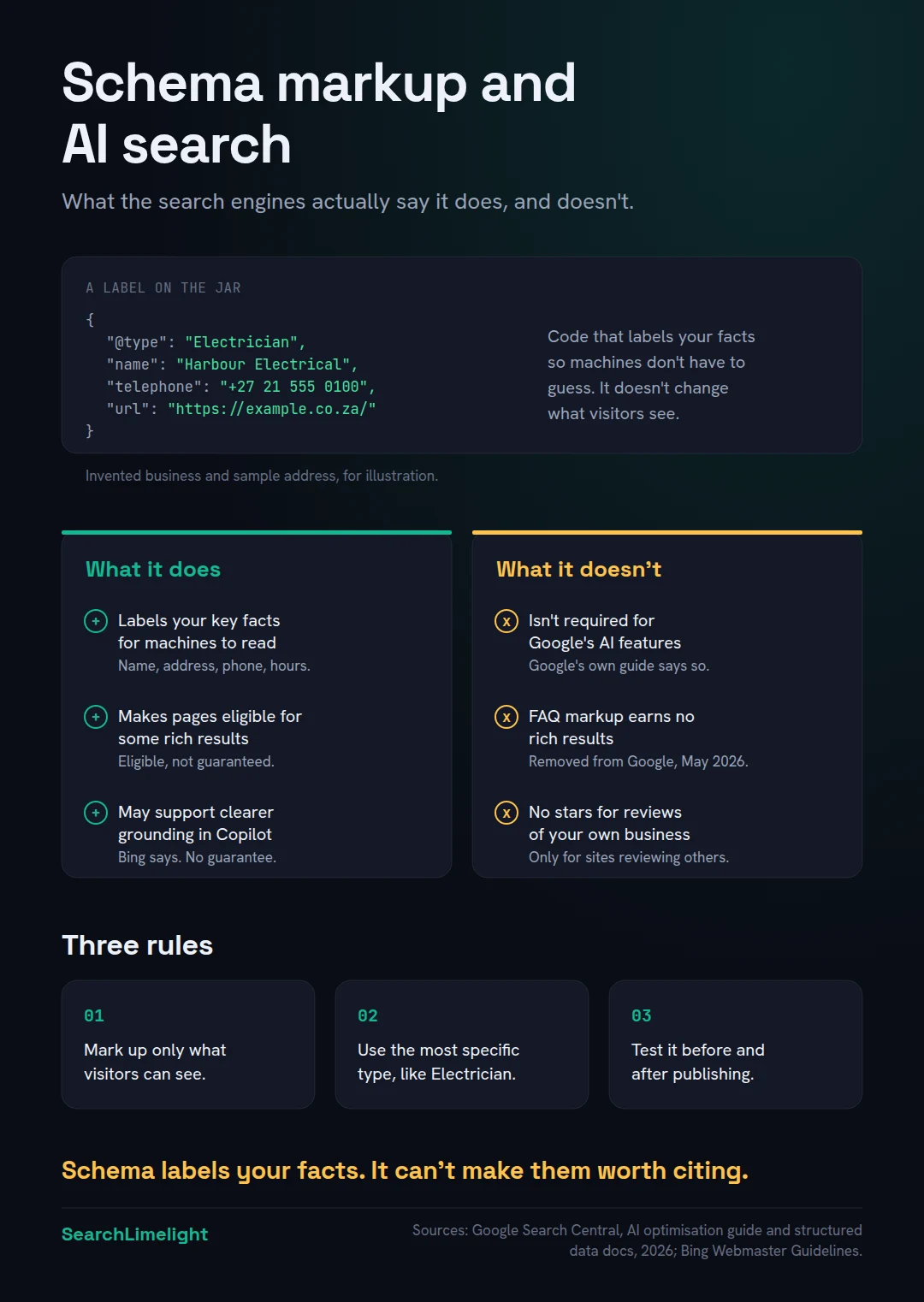
“`json { “@context”: “https://schema.org”, “@type”: “Electrician”, “name”: “Harbour Electrical”, “telephone”: “+27 21 555 0100”, “url”: “https://example.co.za/”, “address”: { “@type”: “PostalAddress”, “addressLocality”: “Durbanville”, “addressCountry”: “ZA” } } “`
A person reading your contact page already knows all of this. Schema just removes the guesswork for machines. Think of it as a label on a jar: it doesn’t change what’s inside, but nobody has to open it to know.
2. Does schema markup help you show up in AI search?
Not directly, according to the companies that run it. Google says structured data isn’t required for its AI features and there’s no special schema for AI. Bing says it may support clearer grounding but guarantees nothing. Schema can help machines read your facts. It can’t make an AI choose you.
Here’s what each platform has said, in its own words where it matters.
Google. Google’s guide to optimising for generative AI features, last updated in July 2026, covers AI Overviews and AI Mode. Under “what you don’t need to do”, it lists overfocusing on structured data. It says structured data isn’t required for generative AI search, and there’s no special schema.org markup to add. It then adds that you should keep using it as part of your overall SEO, because it helps with eligibility for rich results.
Bing and Copilot. Bing’s Webmaster Guidelines say structured data may support clearer grounding, which is how Copilot links its answers to web sources, but doesn’t guarantee visibility or grounding traffic. Markup must accurately reflect visible content. Bing also lists ignored structured data among the consequences for sites that break its rules. Separately, a Bing representative said at a conference in March 2025 that schema helps Microsoft’s AI models understand content, as reported by Search Engine Land.
ChatGPT. OpenAI’s help article on shopping in ChatGPT says it uses structured metadata from merchants and third parties to show products. That’s product data, which matters for online shops. OpenAI hasn’t said that schema on an ordinary business website affects whether ChatGPT recommends you.
Put together: schema is one way to make your facts clear. It’s a helpful label, not a ranking lever. Anyone promising AI citations from schema alone is promising something none of these companies will.
3. What does schema actually do for a business today?
It makes your pages eligible for some rich results in Google, like product details and breadcrumbs, and it gives search engines an unambiguous version of your key facts. That clarity supports everything else you do. It’s a foundation job, not a growth hack.
Rich results. Rich results are search listings with extras, such as prices, availability or a breadcrumb trail. Schema is what makes a page eligible for many of them. Google’s local business guidance explains that LocalBusiness markup lets you tell Google about business hours, departments and more. Eligibility isn’t a promise, though. Google says in its general guidelines that it doesn’t guarantee your structured data will show up, even when it’s correct.
Clear facts. When your website, your Google Business Profile and your listings all say the same thing, and your schema says it too, there’s less room for confusion. That consistency is part of being clear, the second of the three jobs in GEO.
Shopping data. For online shops, product markup and product feeds carry prices, stock and shipping details in a form that Google and ChatGPT’s shopping features can use.
What schema doesn’t do is decide whether your business is the best answer. That comes from your content, your reputation and what others say about you.
4. Which schema types should a small business use?
For most local businesses, three types cover it: LocalBusiness (using the most specific type, like Electrician or Dentist) on your homepage or contact page, BreadcrumbList for your site structure, and Article on blog posts. Online shops add Product. Add others only when the page genuinely contains that content.
LocalBusiness, as specifically as possible. Google’s guidance says to use the most specific subtype available, such as Restaurant, Dentist or HealthClub. You can list more than one if you genuinely offer them, for example Electrician and Locksmith. Include your name and address at minimum, then phone number, hours, website and location coordinates. If you have several branches, mark up each branch on its own page with its own details.
Organization. Google recommends following the Organization fields as well, because LocalBusiness is a type of Organization. This is where your logo and official social profiles go.
BreadcrumbList. This describes where a page sits in your site, like Home, then Services, then Rewiring. It helps search engines understand your structure.
Article or BlogPosting. For blog posts: headline, author, date published and date updated.
Product. For online shops: name, price, availability, reviews from real customers, and shipping and returns details. This is where schema does the most visible work.
Event. If you run workshops, classes or public events with dates, mark them up.
If you use WordPress, plugins like RankMath or Yoast add most of these automatically once you fill in your business details. Check what they output rather than assuming.
5. What doesn’t schema do, whatever you’ve been told?
It doesn’t guarantee AI citations, it isn’t needed for Google’s AI features, FAQ markup no longer produces rich results in Google, it won’t show stars for reviews of your own business, and llms.txt files aren’t a substitute. Several popular tactics rest on one of these myths.
“Schema gets you cited by AI.” Neither Google nor Bing says this. Google says it isn’t required. Bing says it may help grounding but doesn’t guarantee visibility.
“Add FAQ schema for AI.” For years, FAQ markup was sold as a quick win. Google limited FAQ rich results to well-known, authoritative government and health websites in August 2023. In May 2026, according to Google’s documentation updates, FAQ rich results stopped appearing in Google Search altogether. The markup is still valid schema.org vocabulary and you don’t need to remove it. But writing FAQs just to add markup no longer earns anything visible in Google. Write FAQs because customers ask those questions.
“Add review stars to your homepage.” Google’s LocalBusiness guidance recommends review and rating markup only for sites that capture reviews about other local businesses, like a directory. Marking up reviews of your own business won’t get you stars. Earn reviews on Google and the platforms customers use instead.
“You need a special AI file.” Google’s guide says you don’t need llms.txt or other special files, AI text files or markup to appear in Google Search, including its AI features, because Google Search doesn’t use them. Creating one won’t harm or help your Google visibility. Other services may use such files, but none of the major search engines has said it relies on them.
“More schema is always better.” Marking up content that isn’t on the page breaks Google’s rules. Its guidelines say not to mark up content that isn’t visible to readers, and not to mark up misleading content such as fake reviews. Breaking these can cost you rich results, and in Google’s words, may cause your markup to be marked as spam.
6. How do you add schema without breaking the rules?
Use JSON-LD, generated by your website platform or plugin where possible. Mark up only what visitors can see. Test every page type with Google’s Rich Results Test and the Schema Markup Validator. Then keep it updated when your details change, just like your listings.
Step 1: Start with your platform. Most website builders and SEO plugins generate schema for you. Fill in your business details completely in the plugin settings. That covers the basics on every page.
Step 2: Check the output. Run your homepage, a service page and a blog post through Google’s Rich Results Test. It shows which markup Google found and flags errors. The free Schema Markup Validator at validator.schema.org checks schema.org markup more broadly, including types Google doesn’t use for rich results.
Step 3: Match the page. Every fact in your schema should appear on the page itself. If your markup says you open at 7am but your page says 8am, fix one of them. Google’s guidelines use the example of a performer: if the markup describes one, the page must describe that same one.
Step 4: Don’t block it. Google’s guidelines say not to block pages with structured data from its crawler using robots.txt, noindex or other access controls.
Step 5: Watch Search Console. Once Google has crawled your pages, Search Console shows reports for the rich result types it found, and flags structured data it couldn’t read.
Step 6: Keep it current. When you change your phone number, hours or address, update your schema along with your website, Google Business Profile and Bing Places listing. Outdated schema is another conflicting source.
If you’re not technical, this is a reasonable job to hand to your web developer with this section as the brief.
7. What matters more than schema for AI visibility?
Content worth citing, a website search engines can crawl, accurate business profiles, and a genuine reputation across the web. Google’s own guide says unique, valuable content will likely influence your presence in AI search more than anything else it recommends. Schema supports those things. It doesn’t replace them.
Google’s guide is unusually direct here. It says creating unique, compelling and useful content will likely influence your presence in its AI search more than any of the other suggestions in the guide. It contrasts “commodity” content, based on common knowledge that anyone could write, with “non-commodity” content that brings real experience and expertise.
For a local business, that means specifics no one else can write: the jobs you’ve done, what things actually cost in your area, what goes wrong and how you fix it. We cover the writing side in how to write content AI actually quotes.
The same guide says a page must be indexed and eligible to show with a snippet to appear in Google’s AI features, and it points local businesses to Google Business Profile and online shops to Merchant Center. Those are the channels Google names for getting business details into AI responses. Schema isn’t on that list.
And AI tools lean heavily on what other sites say about you. Reviews, directories, local press and mentions all shape the answer. We explain how that works in Where does ChatGPT get its information?
So, in order of impact for most small businesses: a crawlable website with clear, specific content; complete and consistent business profiles; a steady flow of genuine reviews; then correct schema that ties it together.
What to do this week
- Run your homepage through the Rich Results Test and note which schema types it finds.
- Check your LocalBusiness type is the most specific one that fits, not just “LocalBusiness”.
- Compare your schema to your page: name, phone number, address and hours must match exactly.
- Remove review markup for your own business if a plugin or developer added it.
- Fill in your SEO plugin’s business details completely, including logo and social profiles.
- Add schema updates to your checklist for any change to hours, phone or address.
- Spend the time you save improving one key service page with specific, first-hand detail.
Frequently asked questions
Does schema markup help SEO?
Yes, in a specific way. It makes pages eligible for some rich results in Google and gives search engines a clear version of your facts. Google doesn’t guarantee rich results even with correct markup, and schema alone won’t lift a weak page.
Is FAQ schema still worth adding?
Not for Google rich results. Google limited them in 2023 and stopped showing them entirely in May 2026. The markup is still valid, and Google says unused structured data doesn’t cause problems. If you have genuine FAQs on a page, keeping the markup does no harm. Don’t add FAQs just for the markup.
Does ChatGPT use schema markup?
OpenAI says ChatGPT’s shopping features use structured product data from merchants and third parties. It hasn’t said that schema on an ordinary business website affects recommendations. Clear, consistent facts help everywhere, but no AI company has confirmed schema as a factor for non-shopping answers.
What is the best schema type for a local business?
LocalBusiness, using the most specific subtype that fits, such as Plumber, Dentist or Restaurant. Include your name, address, phone number, hours and website. If you have several branches, give each branch its own page with its own markup.
Can schema markup hurt my site?
Incorrect or misleading markup can. Google may ignore it or apply a manual action that removes rich result eligibility, and Bing may ignore structured data from sites that break its guidelines. Markup that accurately describes visible content is safe.
Should I create an llms.txt file?
It won’t help or harm your visibility in Google Search, which says it ignores these files. Some other services may read them. For most small businesses, the time is better spent on your website content and business profiles.
Do I need a developer to add schema?
Not usually. Most website builders and SEO plugins generate the basics once you fill in your business details. A developer is useful for custom types, several locations or fixing errors the Rich Results Test flags.
Want to know what AI says about you?
Most owners are told to add schema, llms.txt files or some other trick. Our free audit tests real customer questions across every major AI engine and shows you what’s actually holding you back.
Book a free discovery call and choose the audit that fits: AI Visibility & GEO, SEO, or Local Business SEO. No pitch until you’ve seen the gap.
Related reading
- What is GEO? A plain-English guide for business owners
- Where does ChatGPT get its information? A guide for business owners
- Bing Places for Business: how to claim, verify and fill in your listing
About the author
Bantu Nonyukela is the founder of SearchLimelight. He has spent ten years in SEO, after starting out as a front-end developer, and is a Toptal-verified SEO expert. From Cape Town, he helps small and medium businesses in the United States, Australia, the United Kingdom and South Africa get found in search and named by AI. Connect on LinkedIn
Sources
- Google Search Central, “Optimizing your website for generative AI features on Google Search,” updated July 2026: developers.google.com
- Google Search Central, General structured data guidelines: developers.google.com
- Google Search Central, Local business (LocalBusiness) structured data: developers.google.com
- Google Search Central Blog, “Changes to HowTo and FAQ rich results,” August 2023: developers.google.com
- Google Search Central, Latest documentation updates (FAQ rich result removal, May and June 2026): developers.google.com
- Bing Webmaster Guidelines: bing.com
- Search Engine Land, “Microsoft Bing/Copilot use schema for its LLMs,” March 2025: searchengineland.com
- OpenAI Help, Shopping with ChatGPT search: help.openai.com
- Schema.org: schema.org