Key takeaways
- Bing Places for Business is Microsoft’s free version of a Google Business Profile. It controls how your business appears in Bing search and Bing Maps, and it now lives at bing.com/forbusiness.
- It matters more than Bing’s size suggests. Microsoft’s Copilot Search is grounded on Bing’s results, so your Bing listing is part of what an AI assistant can find about you.
- Setup takes an afternoon. You can import your Google Business Profile, then verify with a PIN by phone, text, email or post.
- After verification, Bing says a listing usually takes 7 to 12 calendar days to go live. Don’t keep editing while you wait.
“Is Bing even worth my time? Nobody I know uses it.”
That’s the usual reaction when I suggest a Bing listing to a business owner. It’s a fair question. Google is where most local searches happen, and your time is limited.
But your Bing listing isn’t only about people typing into Bing any more. It feeds Microsoft’s AI tools too, and it costs nothing but an afternoon. This guide explains what Bing Places for Business is, whether it’s worth doing, and how to set it up, verify it and fill it in, reflecting Microsoft’s relaunch of the tool in October 2025.
1. What is Bing Places for Business?
Bing Places for Business is a free tool from Microsoft where you create and manage your business listing on Bing. It controls the name, address, phone number, hours, photos and other details people see in Bing search results and on Bing Maps. Think of it as Bing’s version of a Google Business Profile.
When someone searches Bing for “plumber near me”, Bing shows local businesses and their details from its local database. Bing Places for Business is how you take control of your entry in it.
In October 2025, Microsoft relaunched the tool with a simpler design. The address changed from bingplaces.com to bing.com/forbusiness, and existing accounts moved across automatically. If you set up a listing years ago, your login still works and redirects you to the new version.
Bing may already have a listing for you, built from other sources across the web. Until you claim it, it can carry an old phone number or wrong hours that you can’t fix.
2. Is Bing Places worth it if everyone uses Google?
Yes, for most local businesses. Bing gets far fewer searches than Google, but the listing is free, takes an afternoon, and now feeds Microsoft’s AI tools. Copilot Search is grounded on Bing’s results, and customers are spreading their searches across more tools than before.
Bing feeds Microsoft’s AI. Microsoft says Copilot Search is grounded on Bing search results. It uses Bing’s results for the customer’s question, plus extra searches it runs on their behalf, to write its answer and choose its sources. Microsoft’s workplace Copilot works in a similar way: its support page explains that it turns a prompt into a short query and sends it to Bing. So Bing’s picture of your business is part of what Copilot draws on.
Customers are spreading out. In BrightLocal’s 2026 survey of US consumers, 45% had used ChatGPT or another AI tool to find local business recommendations, up from 6% a year earlier. the share using Apple Maps rose from 14% to 27%, while Google’s share as a review source fell from 83% to 71%. Google is still the biggest by far, but customers now use more than one tool.
It costs you nothing. There’s no fee, and if you already have a Google Business Profile, most of the work is done. You can import it.
One caution. Some guides say ChatGPT runs on Bing. OpenAI’s help pages only confirm that ChatGPT Enterprise and Edu searches are shared with Bing, not that everyday ChatGPT does. We explain what OpenAI does say in Where does ChatGPT get its information? A Bing listing is worth having on its own merits, but don’t expect it to fix ChatGPT by itself.
3. How do you add or claim your business on Bing?
Go to bing.com/forbusiness, sign in, and search for your business first. If Bing finds it, claim it. If not, import your Google Business Profile or add your details by hand. Then verify ownership and complete the listing. Most owners finish setup in one sitting.
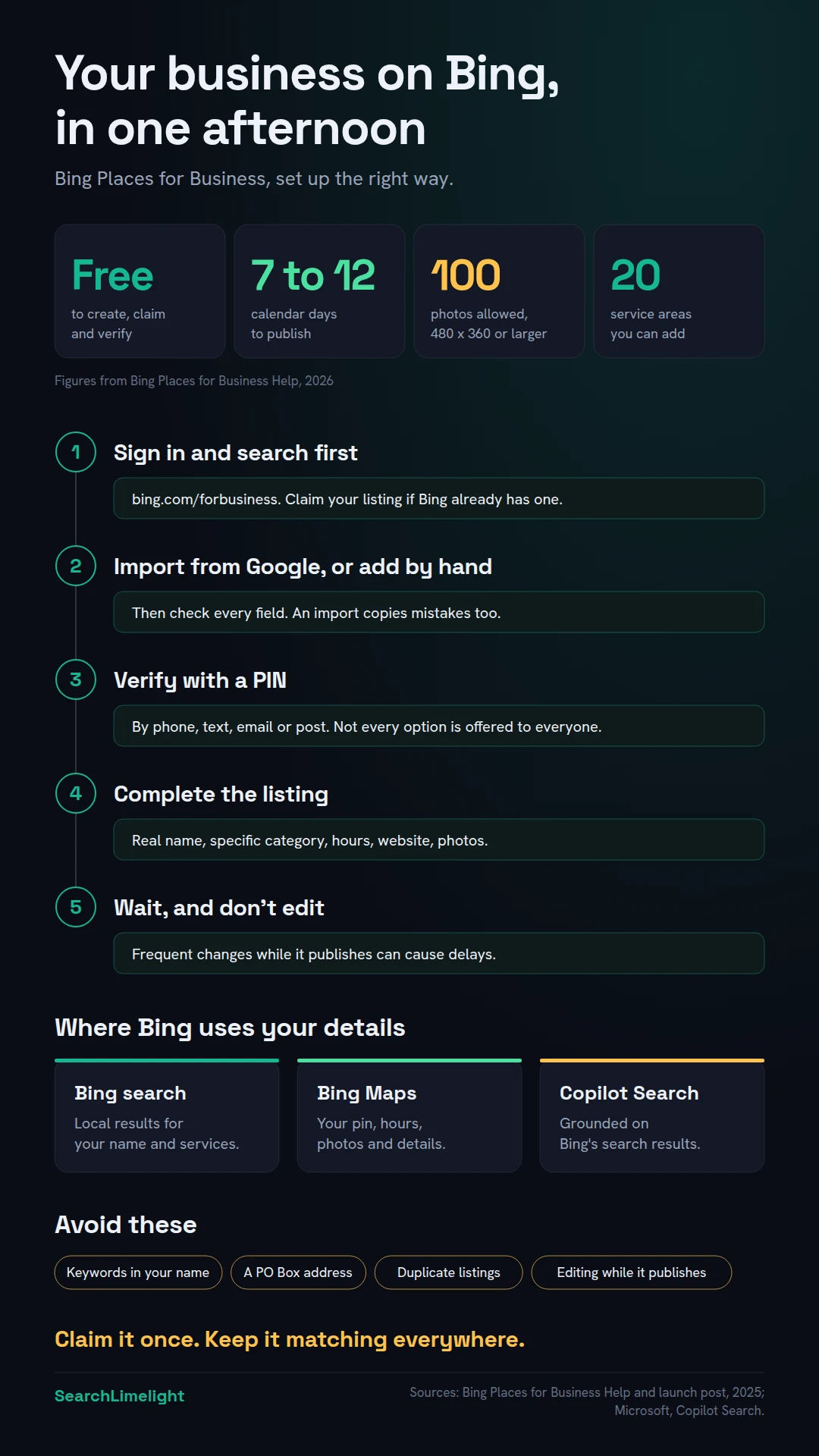
Step 1: Sign in at bing.com/forbusiness. Use an account that belongs to the business, not one person’s private email, so the listing doesn’t leave when a staff member does.
Step 2: Search for your business before adding anything. If Bing already has a listing and you create another, you have a duplicate that splits your information and confuses customers and Bing. Search by name and phone number, and claim the listing if you find it.
Step 3: Import from Google or add manually. If you have a Google Business Profile, importing is the quickest route. Microsoft says the rebuilt import flow is faster and better at keeping key details like your business name, hours and contact details. Check every field afterwards, because an import copies mistakes too. Without a Google profile, add your name, address, phone number, website, category and hours by hand.
Step 4: Verify, complete and wait. Bing needs proof you own the business, then you fill in the rest and let it publish. The next two sections cover both.
If you manage several locations, the new version includes bulk editing tools and real-time status updates, alongside the faster import from Google.
4. How does Bing verify your business, and how long does it take?
Bing sends you a PIN by phone, text, email or post, and you enter it to prove you own the business. Not every option is offered to every business. Once verified, Bing says a listing usually takes 7 to 12 calendar days to go live, and editing it during that time can slow things down.
According to Bing Places help, you can receive a verification PIN by phone, post, email or text message, but some options won’t be available to everyone. A few rules decide which ones you see:
- Phone verification is only offered if the existing listing already contains the business phone number, and that number hasn’t been edited. If you’ve just changed the number, expect a different option.
- Postcards usually take 5 to 6 business days to arrive within the United States. Bing says international locations may take longer, which matters if you’re in South Africa, the UK or Australia. Bing recommends waiting at least 12 days from your request before contacting support.
- Email is quick when it’s available. Check your spam folder if the PIN doesn’t arrive.
Verification also protects your listing from unauthorised changes, Bing notes.
Then comes the wait. Bing’s frequently asked questions say that after verification, a listing usually takes 7 to 12 calendar days to be published, with extra time for every detail to show across search results. Later updates, like new photos or hours, go through the same 7 to 12 day cycle.
So don’t keep editing while it processes. Bing warns that frequent changes may cause delays. Make your changes in one go, then leave it alone. And plan ahead for holidays: update special hours at least two weeks before.
If your listing still isn’t live after 12 calendar days, Bing says it may need further review, and you should contact support through the Bing Places dashboard.
5. What should you fill in to make your listing work?
Use your real business name with no extra keywords, pick the most specific category, add accurate hours, a website link and at least a handful of good photos. If customers don’t visit you, hide your address and add service areas. Then work through Bing’s recommendation tool.
Business name. Use the name on your signage and your paperwork. Nothing more. Bing’s help pages say it may discard updates that could harm the user experience, and it gives keyword insertion in a business name as an example. “Smith Plumbing” is right. “Smith Plumbing Best Emergency Plumber Cape Town” will likely be thrown out.
Category. Choose the most specific category that fits your main service. “Plumber” beats “Home services” because it matches what people actually search for.
Address and service areas. If customers come to you, show your address. If you go to them, like a mobile mechanic or a cleaning company, you can hide it. Bing’s FAQ explains that a hidden address is still needed for verification, but the public won’t see it. You can add up to 20 service areas to show where you work. You can’t use a PO Box as your address.
Hours. Add regular hours and special hours for public holidays.
Website link. One location? Link your homepage. Several branches? Link each listing to that branch’s page.
Photos. Bing allows up to 100 photos. Each must be at least 480 by 360 pixels, with a 10MB limit per upload. Avoid private photos and images with text people can’t read. Start with your storefront or vehicle, your team at work and finished jobs.
The recommendation tool. The relaunched Bing Places includes a recommendation tool that checks your listing and suggests what’s missing, such as photos, your website link, opening hours and social media links. Restaurants get specific suggestions like a menu link or an online ordering link. Work through every suggestion.
Keep everything matching. Bing’s own tip is to keep your details current across review sites, other map platforms and social media. If your name, address and phone number differ between them, Bing has to guess which is right. We cover how to find and fix mismatches in our guide to local SEO citations.
6. How does Bing decide which businesses to show?
Bing says its local results are primarily based on relevance, distance and popularity. Relevance is how well your listing and website match the search. Distance is how close you are. Popularity comes from signals across the web, including reviews on other sites. A complete listing and a website Bing can read help with two of the three.
Bing Places help describes three factors.
Relevance. Does your business match what the customer searched for? Your category, description and services all feed this. Bing says your website plays a part too.
Distance. How far you are from the searcher, or the place they typed. You can’t change this.
Popularity. How well known and well regarded your business is, judged from signals across the web. Bing’s help mentions positive reviews and ratings on popular review sites. So reviews you’ve earned elsewhere can count.
Google’s guidance on improving local ranking names relevance, distance and prominence, so the same work helps on both. We explain the Google side in how “near me” search works.
Don’t forget your website. Your listing links to your site, and Copilot grounds its answers in Bing’s results. If Bing can’t reach your pages, neither can the AI answers built on top of them. Set up Bing Webmaster Tools (it’s free), add your site, and submit your sitemap. Since February 2026, Bing Webmaster Tools has included an AI Performance report in public preview. It shows how often your website is cited as a source in Microsoft Copilot, AI summaries in Bing and some partner services. Microsoft calls it an early step toward tools for generative engine optimisation, or GEO. It’s one of the few free ways to see whether an AI tool uses your content.
7. What are the most common Bing Places mistakes?
The big ones are keywords in the business name, creating a duplicate instead of claiming the existing listing, using a PO Box, editing during the publishing cycle, and setting it up once then never checking it again. Each one can stop your listing appearing or make it wrong.
Adding keywords to your name. Bing says it can discard these edits.
Creating a duplicate listing. If you find two listings for your business, claim the right one and contact Bing support about the other.
Using a PO Box. Use your real address and hide it if customers don’t visit.
Editing while it’s processing. Make all your edits together, then wait.
Changing your phone number just before verifying. Phone verification only works when the listing’s number hasn’t been edited. If you need a new number on the listing, expect to verify another way.
Letting it drift out of date. Owners update Google when they move or change their hours and forget Bing. Put Bing on the same checklist as Google. Most of the Google Business Profile mistakes that quietly cost you calls apply to Bing too.
Never checking the result. Once your listing is live, search for your business on Bing and Bing Maps, and ask Copilot about it by name. That’s the version your customers see.
What to do this week
- Search for your business on Bing and Bing Maps and note what Bing already shows about you.
- Sign in at bing.com/forbusiness with an account that belongs to the business.
- Claim your existing listing, or import your Google Business Profile if Bing has nothing.
- Request your verification PIN and write the date down, so you know when to chase it.
- Fix your name, category, hours and service areas in one sitting, then leave the listing alone while it publishes.
- Upload at least ten real photos of your premises, team and work.
- Set up Bing Webmaster Tools and submit your sitemap.
Frequently asked questions
Is Bing Places for Business free?
Yes. Microsoft describes Bing Places for Business as a free platform. There’s no charge to create, claim, verify or update your listing, so be wary of anyone charging just to “get you on Bing”.
What’s the difference between Bing Places and Bing Maps?
Bing Places for Business is the tool where you manage your listing. Bing Maps is one of the places your listing appears, alongside Bing search results.
Can I list a business that works from home or goes to customers?
Yes. You’ll still need to give Bing your address for verification, but you can hide it from the public. Then add up to 20 service areas to show where you work. You can’t use a PO Box.
How long does it take for my Bing listing to appear?
Bing says a listing usually takes 7 to 12 calendar days to publish after verification, with extra time for every detail to show. If you verify by post, add the postcard’s delivery time.
Will a Bing listing get me recommended by ChatGPT?
Not on its own. OpenAI confirms that ChatGPT Enterprise and Edu searches are shared with Bing, but it doesn’t say the same in that detail for everyday ChatGPT. It matters most for Microsoft’s own AI tools, like Copilot.
Does Bing Places work outside the US?
Microsoft notes that some features may not be available in every country or region, and that postcards to international addresses may take longer. The simplest check is to sign in at bing.com/forbusiness and search for your business.
Can I manage several locations in one account?
Yes. The relaunched Bing Places includes bulk editing tools and a faster import from Google for multiple locations. Give each location its own listing, phone number and page link.
Want to know where your business shows up?
Most owners have never checked Bing, let alone what Copilot or ChatGPT say about them. Our free audit checks your listings, website and AI visibility, and shows you what’s missing or wrong.
Book a free discovery call and choose the audit that fits: AI Visibility & GEO, SEO, or Local Business SEO. No pitch until you’ve seen the gap.
Related reading
- Google Business Profile mistakes that quietly cost you calls
- Where does ChatGPT get its information? A guide for business owners
- What is GEO? A plain-English guide for business owners
About the author
Bantu Nonyukela is the founder of SearchLimelight. He has spent ten years in SEO, after starting out as a front-end developer, and is a Toptal-verified SEO expert. From Cape Town, he helps small and medium businesses in the United States, Australia, the United Kingdom and South Africa get found in search and named by AI. Connect on LinkedIn
Sources
- Microsoft Bing, “Introducing the New Bing Places for Business,” October 2025: blogs.bing.com
- Bing Places for Business Help, Manage your listings: bing.com
- Bing Places for Business Help, Frequently asked questions: bing.com
- Bing Places for Business Help, Bing ranking: bing.com
- Microsoft, Copilot Search: explore.microsoft.com
- Microsoft Support, “How web search works in Microsoft Copilot Chat and agents”: support.microsoft.com
- Microsoft Bing, “Introducing AI Performance in Bing Webmaster Tools,” February 2026: blogs.bing.com
- OpenAI Help, ChatGPT search for Enterprise and Edu: help.openai.com
- BrightLocal, Local Consumer Review Survey 2026: brightlocal.com
- Google Business Profile Help, Improve your local ranking on Google: support.google.com