Key takeaways
- ChatGPT answers from two places: what it learned during training, which is fixed at a cutoff date, and what it looks up live when it searches the web.
- OpenAI says its training data comes from public web pages, data it licenses from partners, and information from users, trainers and researchers.
- When ChatGPT searches, it rewrites the question into search queries, sends them to search partners such as Microsoft’s Bing, reads the pages it finds and cites them.
- For your business, that means your website is only one input. Search listings, reviews, directories and what other sites say about you all feed the answer.
“When someone asks ChatGPT about businesses like mine, where is it actually getting its answer from?”
It’s a fair question. The top result on Google for it is OpenAI’s own help article about how its models are trained. Useful, but it doesn’t answer what a business owner needs to know: when a customer asks for a recommendation today, where does the answer come from, and can you influence it?
This guide answers that. It covers the two routes ChatGPT uses to get information, what happens behind the scenes when it searches, why it sometimes gets your details wrong, and what you can do this week to make sure it finds the right information about you.
1. Where does ChatGPT get its information?
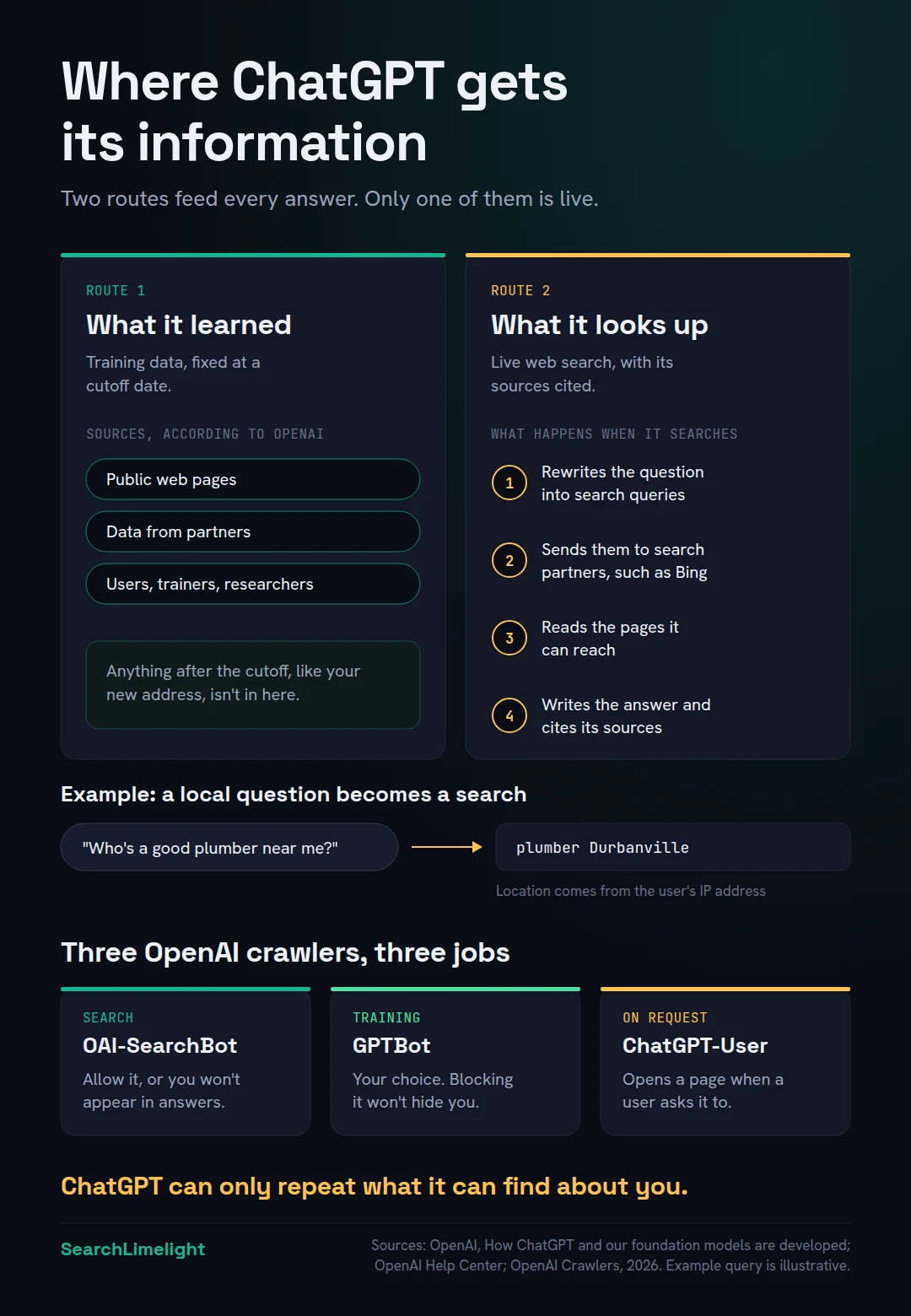
ChatGPT gets its information from two places. The first is what it learned during training, from a huge amount of text that stops at a cutoff date. The second is live web search, where it looks up current pages, reads them and cites them. For questions about local businesses, the live route usually matters most.
Think of it like a well read new employee. On day one, they already know a lot from years of reading. That’s the training. But if you ask them which plumber is open on Saturday, they’ll look it up. That’s the search.
Route 1: What it learned in training. OpenAI says its models are built from three main sources: information that’s publicly available on the internet, information OpenAI accesses through partnerships with other companies, and information from users, human trainers and researchers. OpenAI also says it filters out certain material, like spam and sites that collect personal information, and doesn’t intentionally collect content from behind paywalls.
Training has a cutoff. Anything that happened after it, like your new address or the service you added last month, isn’t in that knowledge.
Route 2: What it looks up live. ChatGPT can search the web when a question would benefit from current information. It does this automatically, or when the user chooses Search. Answers that use search usually include citations that link to the sources.
There’s also a smaller third route: anything the user pastes or uploads into the chat. You can’t control that, so this guide focuses on the first two.
2. What happens when ChatGPT searches the web?
ChatGPT rewrites the customer’s question into one or more search queries, sends them to its search partners, reviews the results, and often runs follow-up searches. It uses the customer’s approximate location for local questions. Then it writes an answer from the pages it found and links to its sources.
OpenAI’s help article on search gives a clear picture of the process. Here it is in plain steps.
Step 1: The question becomes a search. ChatGPT typically rewrites what the customer typed into one or more targeted search queries. OpenAI’s own example is someone asking for good restaurants near them. If ChatGPT can tell from their IP address that they’re in San Francisco, it might search for “top restaurants San Francisco”.
Step 2: The queries go to search partners. OpenAI says ChatGPT search works with third-party search providers. Its help pages point to Microsoft’s privacy statement, and its article for business customers says queries are shared with the Bing search engine. OpenAI’s launch announcement for ChatGPT search also mentions content provided directly by its partners.
Step 3: It searches again if needed. After reviewing the first results, ChatGPT may send more specific follow-up searches. Google’s AI features do something similar, which Google calls “query fan-out”.
Step 4: It reads pages and writes the answer. ChatGPT reads the pages it found, pulls out the parts that answer the question, and writes a reply with citations.
Two details matter for local businesses.
Location shapes the answer. ChatGPT uses an approximate location based on the user’s IP address, and users can choose to share a more precise device location. OpenAI says it may share location with third-party providers that supply local information, such as nearby business listings.
Memory can shape it too. If a user has memory turned on, ChatGPT may use what it remembers about them, such as a dietary preference, when writing the search query.
3. Does ChatGPT get its information from Google?
OpenAI doesn’t list Google as one of its search providers. Its help pages name Microsoft’s Bing, along with Shopify for shopping results, and it runs its own crawler called OAI-SearchBot. So a page that ranks well on Google isn’t automatically what ChatGPT reads. Being findable beyond Google matters.
Here’s what OpenAI has published:
- Its search help article links to Microsoft’s and Shopify’s privacy policies when explaining how search providers handle queries.
- Its help article for business and education accounts says ChatGPT may share search queries, with account details removed, with the Bing search engine.
- Its crawler documentation describes OAI-SearchBot, which it uses to surface websites in ChatGPT’s search features.
The practical point is that Google rankings and ChatGPT answers are related but different. When Ahrefs compared the pages cited by AI tools, including ChatGPT, with Google’s top 10 results for the same questions, they overlapped only about 12% of the time on average.
If you’ve only ever checked how you look on Google, you’ve only checked one of the places ChatGPT’s information comes from. We cover the differences in SEO vs GEO: do you need both?
4. What decides whether ChatGPT can see your website?
OpenAI uses three separate crawlers. OAI-SearchBot finds pages for ChatGPT search. GPTBot collects content that may be used for training. ChatGPT-User visits a page when a user’s request needs it. Blocking OAI-SearchBot keeps your website out of ChatGPT’s search answers entirely.
A crawler is a program that visits websites and reads them. Your website’s robots.txt file tells crawlers which pages they’re allowed to visit. Each of OpenAI’s crawlers can be allowed or blocked separately.
OAI-SearchBot (search). This is the one that matters most for being recommended. OpenAI’s documentation says sites that block it won’t be shown in ChatGPT search answers, though they can still appear as plain navigation links. OpenAI recommends allowing it in robots.txt and allowing requests from its published IP addresses.
GPTBot (training). This crawler collects content that may be used to train future models. Blocking it tells OpenAI not to use your content for training. It doesn’t stop you appearing in search answers. Whether to allow it is a business decision, and plenty of sites allow search but block training.
ChatGPT-User (on request). This visits a page when a user’s request calls for it. It isn’t used for automatic crawling.
Two more details from OpenAI’s documentation. After you change robots.txt, ChatGPT’s search systems take around 24 hours to adjust. And your web host or content delivery network must also allow traffic from OpenAI’s published search bot IP addresses. Some firewalls block unfamiliar bots by default.
The 10-minute self-check walks you through checking your robots.txt.
5. Why does ChatGPT get information about your business wrong?
Usually because it’s working from old training data, from an outdated listing somewhere on the web, or from sources that disagree with each other. OpenAI itself warns that search results and citations can be incomplete, outdated or incorrect. The fix is to correct the sources, not to argue with the chatbot.
There are four common reasons.
The training data is old. If ChatGPT answers without searching, it relies on what it learned before its cutoff. Your old phone number or a service you stopped offering can linger there.
An outdated listing is being read. If a directory, an old press article or a supplier’s website still shows your previous address, a search can pick it up. ChatGPT has no way to know which source is right if they disagree.
Your own website is unclear. If your homepage says “quality solutions for all your needs” and never says what you do or where, ChatGPT has to guess from other sources.
It’s confused you with someone else. Similar names in nearby towns are easily mixed up.
OpenAI advises users to check the cited source. Do the same from your side: ask ChatGPT about your business, click every source it cites, and fix what’s wrong at the source.
A word on telling ChatGPT about yourself: it doesn’t work. Chatting with ChatGPT about your business only affects your own conversations, and memory only applies to your own account. It won’t change what ChatGPT tells anyone else.
6. What does this mean for your business?
It means ChatGPT’s view of you is built from the whole web, not just your website. To be named accurately, you need a website ChatGPT can reach and understand, consistent details across listings, genuine reviews, and mentions on the sites it reads when customers ask about your industry.
Customers are already asking. In BrightLocal’s 2026 survey of US consumers, 45% had used ChatGPT or another AI tool to find local business recommendations, up from 6% a year earlier.
So what can you actually do? Work on the sources.
Make your website easy to reach. Allow OAI-SearchBot in robots.txt and check your firewall isn’t blocking it. Keep important information as text on the page, not only inside images or PDFs.
Make your website easy to understand. Near the top of your key pages, say plainly what you do, where you work and who you serve. Give each main service its own page. We cover the writing side in How to write content AI actually quotes.
Be visible beyond Google. Because OpenAI names Bing as a search partner, it’s worth checking that your website is indexed in Bing and that your business details are right there too. Bing Webmaster Tools and Bing Places are both free.
Keep your details identical everywhere. Your name, address, phone number and services should match on your website, Google Business Profile, directories and social profiles. Local SEO citations explains how.
Build genuine reviews and mentions. Reviews, “best of” lists, local news and industry sites are exactly the kind of pages ChatGPT reads when it searches. How to get more Google reviews covers the first of these.
This is the heart of GEO. Our plain-English guide to GEO covers the full picture.
7. How do you check what ChatGPT says about you?
Ask ChatGPT the questions your customers ask, several times, with search turned on. Note whether you’re named, what it says, and which sources it cites. Then click each source. That shows you exactly which pages are shaping ChatGPT’s answer about your business.
Start with two types of question:
- The recommendation question: “Who’s a good [your service] in [your town]?” This shows whether you’re in the running.
- The direct question: “What do you know about [your business name] in [your town]?” This shows what ChatGPT believes about you, right or wrong.
Run each one a few times, on different days. AI answers vary from one run to the next, so a single check can mislead you. Write down who’s named, what’s said about you, and every source that’s cited.
The sources are the most useful part. If a competitor keeps getting named and ChatGPT keeps citing the same local directory for them, that directory is worth being on. If ChatGPT has your old address and cites a specific listing, that’s the listing to fix.
You can also check Google Analytics 4 for visits from chatgpt.com. Expect small numbers. The value is in being on the shortlist, not in the clicks.
For a full walkthrough, use the 10-minute self-check. For ongoing tracking, see how to check your AI visibility.
What to do this week
- Ask ChatGPT “What do you know about [your business] in [your town]?” with search turned on, and note anything wrong.
- Click every source it cites, and list the ones that have outdated details.
- Check your robots.txt to make sure OAI-SearchBot isn’t blocked.
- Ask your web host whether their firewall blocks AI crawlers, and allow OpenAI’s search bot if it does.
- Search for your business on Bing, and claim or correct your Bing Places listing.
- Rewrite the first two sentences of your homepage so they say what you do, where, and for whom.
- Fix one outdated listing from your list, starting with the one ChatGPT cites most.
Frequently asked questions
Where does ChatGPT get its information from?
From two places. Its training, which OpenAI says draws on public web pages, data from partners, and information from users, trainers and researchers. And live web search, where it looks up current pages through search partners and cites them. For current and local questions, search usually does most of the work.
Does ChatGPT use Google to search?
OpenAI doesn’t list Google among its search providers. Its help pages name Microsoft’s Bing, link to Shopify’s privacy policy for shopping searches, and describe its own crawler, OAI-SearchBot. That’s why ranking well on Google doesn’t guarantee ChatGPT will find or cite you.
Is ChatGPT connected to the internet?
Yes, when it uses search. ChatGPT can search the web automatically when a question needs current information, or when the user chooses Search. Without search, it answers from what it learned in training, which stops at a cutoff date.
How up to date is ChatGPT’s information?
It depends on the route. Training knowledge stops at the model’s cutoff date, so recent changes won’t be there. Search results are current, but OpenAI warns they can still be incomplete or outdated if the pages ChatGPT finds are out of date.
Can I tell ChatGPT about my business so it recommends me?
No. What you tell ChatGPT only affects your own conversations and your own memory settings. It doesn’t change what ChatGPT tells other people. To change its answers, change the sources it reads: your website, your listings and what others say about you.
Should I block GPTBot on my website?
That’s your call. Blocking GPTBot tells OpenAI not to use your content for training future models. It doesn’t remove you from ChatGPT search, which uses a separate crawler called OAI-SearchBot. If you want to be recommended, make sure OAI-SearchBot is allowed.
How long does it take for ChatGPT to show corrected information?
OpenAI says search systems adjust to robots.txt changes in about 24 hours. Corrections to your website and listings show up once ChatGPT’s search finds the updated pages, which varies. Answers also change from run to run, so check a few times over several weeks.
Want to know where ChatGPT gets its information about you?
Most owners have never clicked the sources ChatGPT cites about their business. When they do, they find old listings, missing services, and competitors named where they should be. Our free audit tests real customer questions across every major AI engine and traces each answer back to its sources.
Book a free discovery call and choose the audit that fits: AI Visibility & GEO, SEO, or Local Business SEO. No pitch until you’ve seen the gap.
Related reading
- What is GEO? A plain-English guide for business owners
- Is your business showing up in ChatGPT? A 10-minute self-check
- How to check your AI visibility
About the author
Bantu Nonyukela is the founder of SearchLimelight. He has spent ten years in SEO, after starting out as a front-end developer, and is a Toptal-verified SEO expert. He helps small and medium businesses in the United States, Australia, the United Kingdom and South Africa get found in search and named by AI. Connect on LinkedIn
Sources
- OpenAI, “How ChatGPT and our foundation models are developed”: openai.com
- OpenAI Help Center, “Searching the web with ChatGPT”: help.openai.com
- OpenAI Help Center, “ChatGPT search for Enterprise and Edu”: help.openai.com
- OpenAI Help Center, “Publishers and Developers FAQ”: help.openai.com
- OpenAI, “Introducing ChatGPT search”: openai.com
- OpenAI, “Overview of OpenAI Crawlers”: developers.openai.com
- Ahrefs, “Only 12% of AI Cited URLs Rank in Google’s Top 10 for the Original Prompt”: ahrefs.com
- BrightLocal, Local Consumer Review Survey 2026: brightlocal.com