Key takeaways
- AI visibility means how often AI tools like ChatGPT, Google’s AI Overviews and Copilot mention your business, what they say, and which sources they cite.
- AI answers change from one run to the next, so one check tells you very little. Ask the same questions many times, across several tools.
- You can start for free. Microsoft now reports Copilot citations in Bing Webmaster Tools, and Google Analytics 4 shows visits from AI tools.
- Most small businesses don’t need an enterprise platform. Start free, then add a tracker only when you’re actively working to improve.
“There are 30 AI visibility tools now, and every comparison I read is written by one of them. Which one do I actually need?”
It’s a fair complaint. Search for the best AI visibility tools and several of the top results are written by companies ranking their own product first. Useful, maybe, but not independent.
This guide is written for business owners, and it doesn’t sell a tool. It explains what AI visibility is, why it’s harder to measure than a Google ranking, how to check it for free, including two sources of first-party data most people miss, and how to choose a paid tool if you need one. By the end, you’ll know what to check, how often, and what to spend.
1. What is AI visibility, and why check it?
AI visibility is how often AI tools mention your business when customers ask relevant questions, whether they describe you accurately, and which sources they cite. Checking it tells you whether you’re on the shortlist when customers ask AI for recommendations, and what to fix if you’re not.
When a customer asks ChatGPT “who’s a good accountant for small businesses in Durban?”, the answer usually names a handful of firms. If you’re one of them, you’re in the running. If you’re not, you may never know you lost the customer.
That’s why it’s worth checking. In BrightLocal’s 2026 survey, 45% of US consumers had used an AI tool to find local business recommendations, up from 6% the year before.
There’s more to check than whether you’re named. We track five signals: presence, prominence, accuracy and sentiment, citation strength, and competitive gap. The 5 signals that decide whether AI recommends you explains each one.
2. Why is AI visibility hard to measure?
Because AI answers change from one run to the next, differ between tools, and can vary by location and user. One search tells you almost nothing. You need to ask the same questions many times and look at the pattern, which is exactly what good tools automate.
With Google, you can check your ranking and get a fairly stable answer. AI doesn’t work that way.
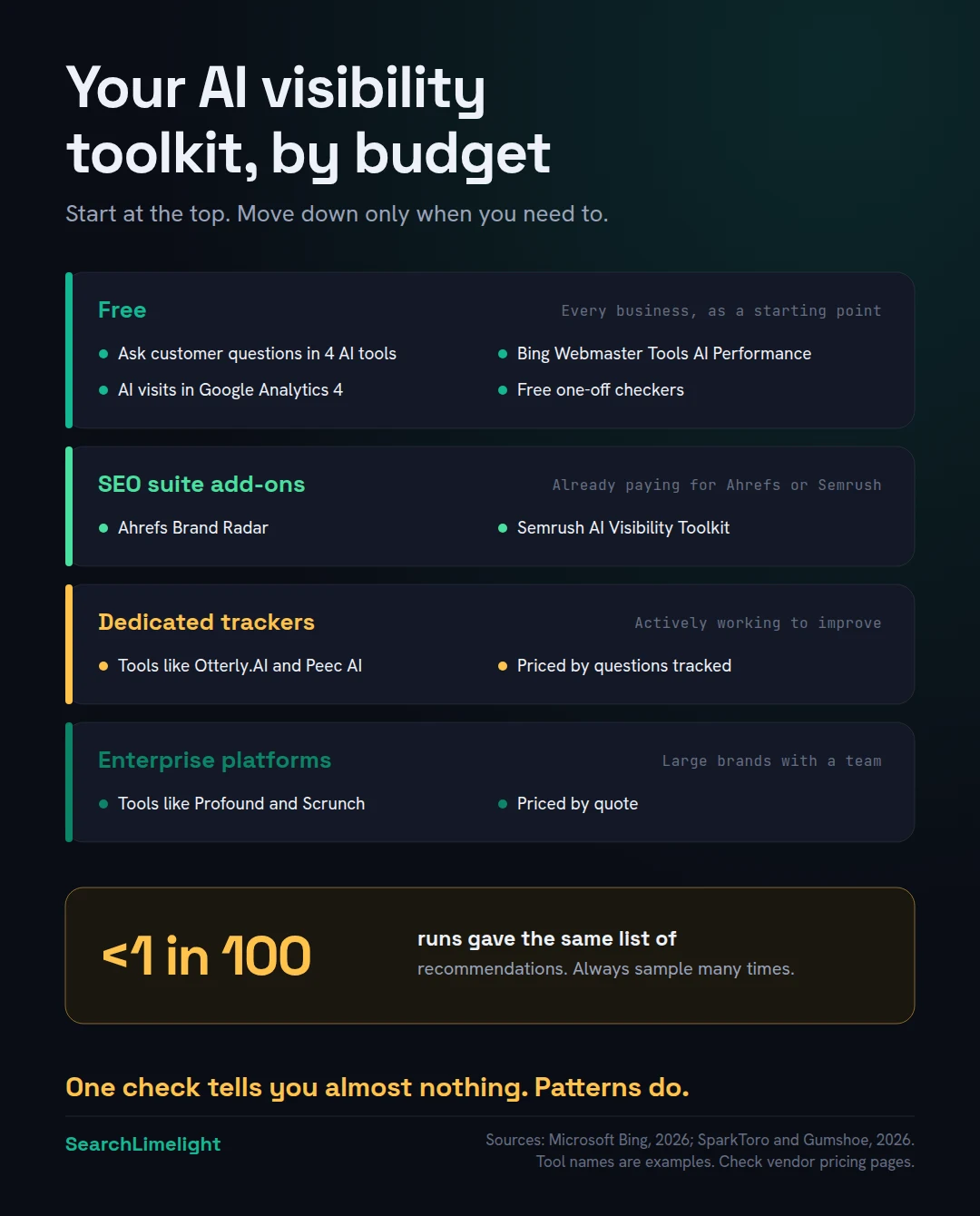
A study by SparkToro and Gumshoe ran the same prompts through AI tools nearly 3,000 times. The same list of recommendations came back less than once in 100 runs. But the tools did keep drawing from a fairly consistent group of brands. So the useful measure isn’t “am I in this answer?” It’s “how often am I in the answers, across many runs?”
The tools also disagree with each other. Different AI engines cite very different sources, and different tracking tools use different prompts and methods. Two tools can give you different pictures of the same business. That’s not necessarily a flaw. It’s a reminder to treat any single number as a guide, not a fact.
3. How can you check your AI visibility for free?
Ask real customer questions in several AI tools and record the results. Then add three free sources of data: Bing Webmaster Tools’ AI Performance report for Copilot, visits from AI tools in Google Analytics 4, and free one-off checkers. Together, they give you a solid baseline.
Method 1: Ask the questions yourself. This is still the most useful free method, and it’s the heart of our 10-minute self-check.
- Write 10 questions a customer would really ask, in their words. For example, “best family dentist in Rondebosch” or “who can fix a leaking roof in Randburg this week?”
- Ask each one in ChatGPT, Google (look at the AI Overview and AI Mode), Perplexity and Copilot.
- Use a private or logged-out window, so your own history doesn’t affect the answer.
- Ask each question at least three times, on different days.
- Record whether you’re named, where in the answer, what’s said, and which sources are cited.
Method 2: Bing Webmaster Tools’ AI Performance report. This is the first-party data most business owners miss. In February 2026, Microsoft launched an AI Performance report in Bing Webmaster Tools. It’s free, and it shows how often your pages are cited in AI answers across Microsoft Copilot, Bing’s AI summaries and some partner services, which pages get cited, and the searches Copilot ran to find them. In June 2026, Microsoft added more detail, including citation share and topics. It doesn’t cover ChatGPT, Perplexity or Google, but it’s real data from an AI provider, and it costs nothing to set up.
Method 3: Google Analytics 4. When someone clicks through from an AI tool, the visit usually shows up with the tool as the source. Look for chatgpt.com, perplexity.ai, gemini.google.com and copilot.microsoft.com in your traffic sources. The numbers will usually be small. The trend matters more than the total.
Method 4: Google Search Console. Clicks and impressions from Google’s AI Overviews and AI Mode are counted within your normal Performance report, but not shown separately. It won’t isolate AI traffic, but a rise in impressions with flat clicks can be a sign AI answers are appearing on your searches.
Method 5: Free one-off checkers. Several SEO companies, including Ahrefs, offer free AI visibility checkers. They’re useful for a quick snapshot, but a single check has the same weakness as a single manual search. Use them to start, not to track.
4. What do paid AI visibility tools actually do?
They ask a set list of questions across several AI engines on a schedule, many times, and report how often you’re named, where, what’s said, which sources are cited, and how you compare with competitors. The main difference between them is scale, engine coverage and depth of reporting.
Every paid tool is built on the same idea as the manual method above, just automated and at scale. You give it the questions your customers ask. It runs them regularly across AI engines and turns the answers into reports.
The tools fall into roughly four groups:
| Type | Examples | Who it suits | Typical price band |
|---|---|---|---|
| Free methods | Manual checks, Bing Webmaster Tools, GA4, free checkers | Every business, as a starting point | Free |
| SEO suite add-ons | Ahrefs Brand Radar, Semrush AI Visibility Toolkit | Businesses already paying for Ahrefs or Semrush | Often around $100 a month or more, on top of the suite |
| Dedicated trackers | Otterly.AI, Peec AI | Small businesses and agencies actively working on AI visibility | From under $50 a month to a few hundred, by number of questions |
| Enterprise platforms | Profound, Scrunch | Large brands with dedicated teams | Hundreds to thousands a month, often by quote |
A note on those prices: they change often, vary by plan and currency, and published figures don’t always agree. Check the vendor’s own pricing page before you decide. What matters more is what each plan meters, usually the number of questions tracked, the number of AI engines, and how often they’re checked.
5. Which AI visibility tool should a small business use?
Start with the free methods. If you already pay for Ahrefs or Semrush, try their AI add-on first. If not, and you’re actively working to improve your AI visibility, a dedicated entry-level tracker is usually enough. Most small businesses don’t need an enterprise platform.
A simple way to decide:
- You’ve never checked: do the free manual check first. It takes an hour and tells you whether there’s a problem.
- You’re not working on it yet: repeat the manual check monthly and set up Bing Webmaster Tools and GA4. No paid tool needed.
- You already use Ahrefs or Semrush: try their AI visibility feature before adding another tool.
- You’re actively improving your AI visibility: an entry-level dedicated tracker makes sense, so you can see whether the work is paying off.
- You’re a large brand with a team: an enterprise platform may be worth it for the depth and support.
For local businesses, one extra question matters. AI answers to local questions depend on where the customer is. Before you pay for any tool, ask whether it lets you set the location for each question, such as a city or suburb. If it only checks from one place, it may not reflect what your customers actually see.
Whatever you choose, trial it first. Run the same questions in two tools if you can, and compare the results with your own manual checks.
6. What should you track, and how often?
Track 10 to 20 real customer questions across ChatGPT, Google’s AI features, Perplexity and Copilot. Record how often you’re named, whether the details are right, which sources are cited, and which competitors appear. Review monthly, and judge progress over three months.
What to record for each question:
- Named or not, across several runs
- Position: first, in the middle, or at the end of the list
- Accuracy: correct name, location, services, hours and contact details
- Tone: positive, neutral or negative
- Sources cited: which websites the AI relied on
- Competitors named instead of you, or alongside you
How often: monthly is enough for most businesses. Weekly checks mostly show random variation. Because answers change so much, look at trends over three months, not single results.
How to choose your questions: use the words customers actually use when they call you, and include your area. Mix in comparison questions (“best”, “most reliable”, “cheapest”), service questions (“who can fix…”) and questions about your business by name (“what do you know about…”).
7. What should you do with the results?
Use them to find the gap. If AI never names you, focus on reputation and mentions. If it names you with wrong details, fix your listings. If it cites sources you’re missing from, get listed there. If competitors are named instead of you, study what those sources say about them.
| What you find | What to do | Where to start |
|---|---|---|
| You’re never named | Build reviews, mentions and listings across trusted sites | The 5 signals that decide whether AI recommends you |
| You’re named with wrong details | Fix your business details everywhere they appear | Local SEO citations |
| AI cites sites you’re not on | Get listed on those sites, with complete details | AI search in your market |
| Your pages are never quoted | Rewrite key pages so AI can quote them | How to write content AI actually quotes |
| You’re named, but low in the list | Strengthen reviews and specific, checkable details | Google Business Profile mistakes |
Measuring AI visibility doesn’t improve it on its own. The value is in knowing where to focus.
What to do this week
- Write 10 real customer questions, including your area.
- Run them in four AI tools, in a private window, and record the results.
- Set up Bing Webmaster Tools and check the AI Performance report.
- Check Google Analytics 4 for visits from chatgpt.com, perplexity.ai, gemini.google.com and copilot.microsoft.com.
- Try one free AI visibility checker for a quick second opinion.
- Put a monthly reminder in your calendar to repeat the manual check.
- Only then decide whether a paid tool is worth it.
Frequently asked questions
Is there a free AI visibility checker?
Yes. Several SEO companies, including Ahrefs, offer free AI visibility checkers for a quick snapshot. Bing Webmaster Tools’ AI Performance report is free and shows real citation data for Microsoft Copilot. And you can always check manually by asking AI tools your customers’ questions.
How accurate are AI visibility tools?
They’re useful for spotting patterns, but no tool gives a single true number. AI answers vary from run to run, and different tools use different questions and methods. Treat the results as a trend to watch, compare tools if you can, and check them against your own manual searches.
Can I see ChatGPT traffic in Google Analytics?
Yes. Visits from ChatGPT usually show up in Google Analytics 4 with chatgpt.com as the source. Perplexity, Gemini and Copilot appear in a similar way. This only counts people who clicked through, so it undercounts how often you’re mentioned without a click.
Does Google Search Console show AI Overview data?
Clicks and impressions from AI Overviews and AI Mode are included in your normal Performance report, but Google doesn’t currently separate them out. As of mid-2026, Bing Webmaster Tools is the only major search provider showing AI citation data separately, for Copilot and Bing’s AI features.
How often should I check my AI visibility?
Monthly is enough for most businesses. AI answers change so much from day to day that weekly checks mostly show random variation. Judge whether things are improving over three months, using the same questions each time.
Do small local businesses need a paid AI visibility tool?
Usually not at first. Start with free manual checks, Bing Webmaster Tools and Google Analytics 4. A paid tool becomes worth it when you’re actively working on your AI visibility and want to track progress across many questions. If you do pay, check it can set the location for each question.
Why do different tools show different results?
Because they ask different questions, check different AI engines, sample a different number of times, and read the answers differently. AI answers also vary from run to run. That’s why the method matters more than the tool: the same questions, many times, tracked over months.
Want an independent check across every engine?
Our free AI Visibility audit asks real customer questions for your business, in your area, across every major AI engine, many times over. You’ll see how often you’re named, what’s said, and which sources AI relies on.
Book a free discovery call and choose the audit that fits: AI Visibility & GEO, SEO, or Local Business SEO. No pitch until you’ve seen the gap.
Related reading
- Is your business showing up in ChatGPT? A 10-minute self-check
- The 5 signals that decide whether AI recommends you
- What is GEO? A plain-English guide for business owners
About the author
Bantu Nonyukela is the founder of SearchLimelight. He has spent ten years in SEO, after starting out as a front-end developer, and is a Toptal-verified SEO expert. From Cape Town, he helps small and medium businesses in South Africa, the US, the UK and Australia get found in search and named by AI. Connect on LinkedIn
Sources
- BrightLocal, Local Consumer Review Survey 2026: brightlocal.com
- SparkToro and Gumshoe, AI recommendation consistency, 2026: sparktoro.com
- Search Engine Land, “Bing Webmaster Tools officially adds AI Performance report,” February 2026: searchengineland.com
- Microsoft Bing, “New AI Visibility Insights in Bing Webmaster Tools,” June 2026: blogs.bing.com
- Bing Webmaster Tools Help, AI Performance: bing.com
- Google Search Central, on AI features and Search Console reporting: blog.google