Key takeaways
- Local SEO comes down to five areas: your Google Business Profile, your other listings, your website, your reviews and, increasingly, how AI tools describe you.
- Google says local ranking depends on relevance, distance and prominence. Most of this checklist works on relevance and prominence, the two you can influence.
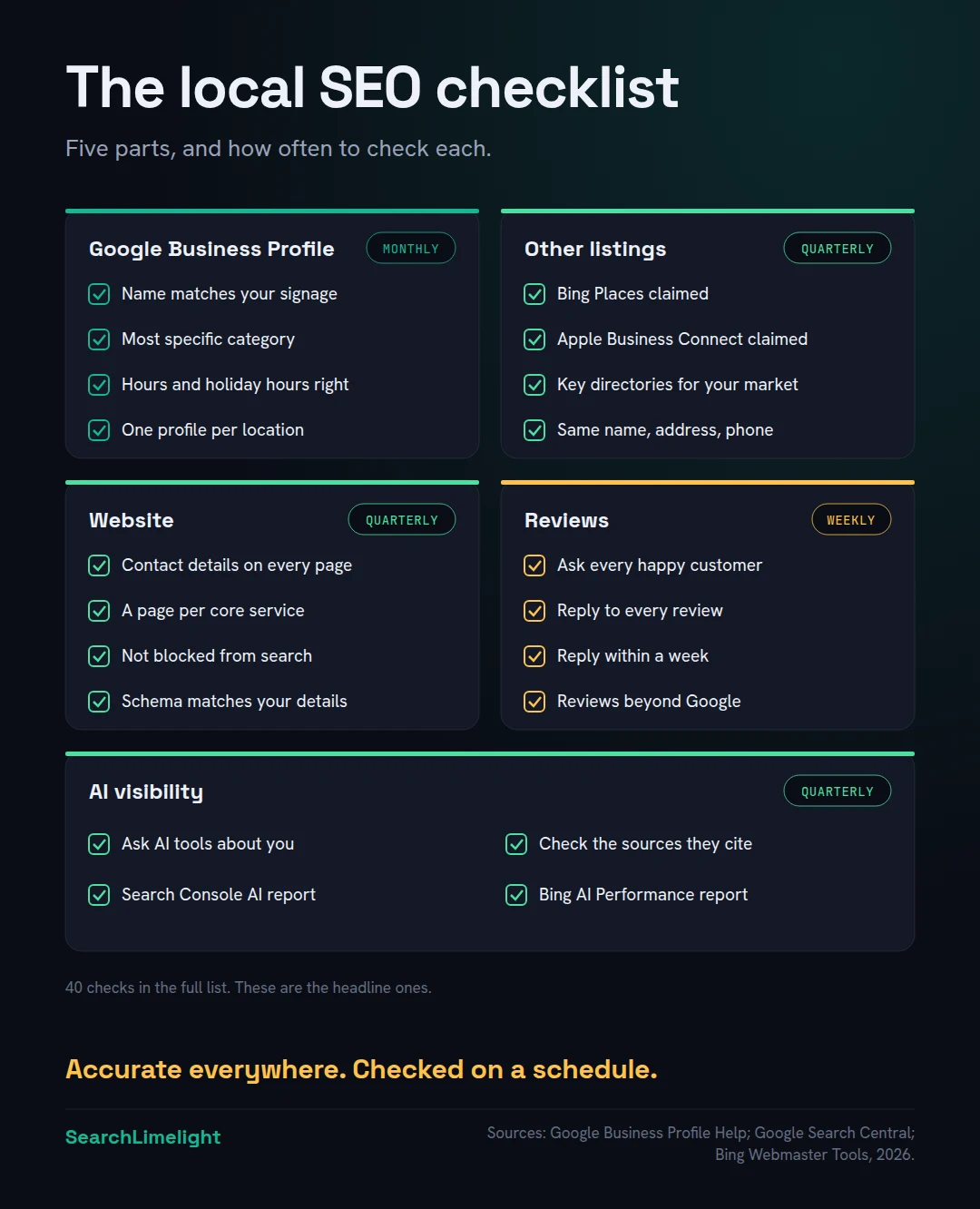
- Not everything needs checking at once. Reviews need weekly attention, your profile monthly, and most other checks quarterly.
- Work through it once properly, fix what fails, then keep to the schedule. That beats any one-off burst of effort.
“Is there a simple list of what I should be doing for local SEO?”
Business owners ask me this all the time, usually after reading several long guides that each say something different. The core work is simpler than it looks. It’s mostly about being accurate, complete and trusted in the places customers look.
This checklist gives you 40 checks in five groups, with how often to do each. Every item is something you can check yourself. Where a topic needs more detail, I’ve linked to a deeper guide. Print it, work through it once, and then keep to the schedule.
1. How should you use this local SEO checklist?
Work through it once from top to bottom and note every check that fails. Fix the failures in order, starting with your Google Business Profile. After that, follow the schedule for each group: weekly for reviews, monthly for your profile, and quarterly for the rest.
It helps to know what you’re working on. Google’s help page on improving your local ranking says local results are based mainly on three things: relevance, distance and prominence. Relevance is how well your profile matches the search. Distance is how far you are from the searcher. Prominence is how well known your business is, which Google says draws on information from across the web, including reviews and ratings.
You can’t change distance. Everything on this list works on relevance and prominence, and on making sure the information about you is accurate everywhere.
Before you start, gather your “master details”: your exact business name as it appears on your signage, address, main phone number, website, opening hours and core services. Every check below compares against these.
Write them down in one place, exactly as they should appear everywhere, down to the suite number and whether you write “Street” or “St”. Decide on one format and stick to it. When a check asks whether something matches, this is what it should match. If you’re not sure which version is right, go with what’s on your signage and your business registration.
2. What should you check on your Google Business Profile?
Check that your name matches your signage, your categories are specific, your address or service area is accurate, your hours are current, you have real photos, and there’s only one profile per location. Google’s guidelines are strict, and breaking them can lead to suspension.
Your Google Business Profile is usually the single most important local SEO asset. Check it monthly.
- Your business name matches your signage and website exactly. Google’s guidelines say extra information in the name, like services or locations, isn’t permitted and could lead to suspension.
- Your primary category is the most specific one that fits. Google suggests completing the sentence “this business IS a”. Use as few categories as you need.
- Your address is precise and eligible, with permanent signage. No PO boxes or virtual offices.
- Your address is hidden if customers don’t visit you, with service areas set instead.
- Your phone number is local and under your control, not a call centre or forwarding number.
- Your website link goes to the right page: your homepage, or each branch’s own page if you have several.
- Your regular hours are correct, and special hours are set for public holidays.
- Your description explains what you do in plain words, with no links or promotional prices, as the guidelines require.
- You have real, recent photos of your premises, team, vehicles and work.
- There’s only one profile per location. Search Google Maps for your name and phone number to find duplicates.
- Owners and managers are people who should have access. Remove former staff and old agencies.
- No one has edited your details without you knowing. Log in and review any updates from Google or the public.
For the most common profile problems and how to fix them, see Google Business Profile mistakes that quietly cost you calls. If your profile has been suspended, start with how to fix a suspended Google Business Profile.
3. What should you check on your other listings?
Check that you have claimed, accurate listings on Bing Places, Apple Business Connect and the main directories in your market, and that your name, address and phone number match your master details everywhere. Consistency across the web supports how search engines and AI tools understand your business.
Customers don’t only use Google. In BrightLocal’s 2026 survey of US consumers, the share using Apple Maps rose from 14% to 27%, while Google’s share as a review source fell from 83% to 71%. Check these quarterly.
- Your Bing Places listing is claimed and verified. It’s free and feeds Bing Maps and Microsoft’s Copilot. See our Bing Places for Business guide.
- Your Apple Business Connect listing is claimed, so your details appear correctly in Apple Maps.
- Your Facebook page shows the same name, address, phone and hours.
- You’re listed on the main directories for your market and industry. Which ones matter differs by country. We compare them in AI search by market.
- Your name, address and phone number match your master details on every listing, including suite numbers and abbreviations.
- Old addresses and phone numbers are corrected or removed after any move or number change.
- There are no duplicate listings on any single platform.
We explain how to find and fix mismatched listings in our guide to local SEO citations.
4. What should you check on your website?
Check that your contact details appear on every page, each core service has its own page, search engines can crawl your site, it works well on phones, and your schema matches your visible details. Your website is where both search engines and AI tools confirm what your profile says.
Your website supports your relevance and gives search engines and AI tools detail to work with. Check it quarterly, and after any redesign.
- Your name, address and phone number are on every page, usually in the footer, matching your master details.
- Each core service has its own page with a clear heading and a first paragraph that answers what, where and for whom.
- Your homepage title says what you do and where, like “Electrician in Durbanville | Harbour Electrical”.
- If you serve distinct areas, you have real local pages for your main ones, not near-identical town pages. See local landing pages.
- There’s no block of suburb names stuffed into your footer or copy. Google’s spam policies name blocks of text listing the cities a page wants to rank for as keyword stuffing.
- Your site works well on a phone, with a tap-to-call number near the top.
- Your pages aren’t blocked from search engines. Check your site is verified in Google Search Console and Bing Webmaster Tools, with a sitemap submitted to each.
- Your LocalBusiness schema uses the most specific type and matches your visible details. See schema markup for AI search.
- Your website shows real proof: photos of your work, your team, accreditations and customer reviews.
For a full page-by-page review, use our on-page SEO checklist.
5. What should you check on your reviews?
Check that you’re asking every happy customer for a review, replying to every review, and building reviews on more than one platform. Google says reviews and ratings feed prominence, and customers expect you to reply.
Reviews are the part of local SEO that needs the most regular attention. Check them weekly.
- You ask every happy customer for a review, with a direct link, soon after the job.
- You reply to every review, positive and negative. In BrightLocal’s 2026 survey, 89% of consumers said they expect businesses to reply.
- You reply within a week. The same survey found 81% expect a reply within that time.
- Your replies are personal, not copy and paste. Half of consumers in the survey said generic replies put them off.
- You never offer incentives for reviews or ask for positive reviews only. This breaks Google’s policies.
- You’re building reviews beyond Google, on the platforms customers in your market and industry use.
- You report reviews that break platform rules, rather than arguing with them publicly.
See our guides to getting more Google reviews and responding to Google reviews.
6. What should you check for AI visibility?
Ask the main AI tools what they’d recommend in your area, check whether you’re named and what sources they cite, and review the AI reports in Google Search Console and Bing Webmaster Tools. AI answers draw on the same foundations as local SEO, so this group tells you if they’re working.
This is the newest part of local SEO, and the one most checklists leave out. Check it quarterly.
- Ask ChatGPT, Gemini, Copilot and Perplexity a question a customer would ask, like “Who’s a good electrician in Durbanville?” Note whether you’re named.
- Check what they say about you when asked by name. Look for wrong details, like an old address or services you don’t offer.
- Note the sources they cite. If a directory or article keeps appearing, make sure you’re listed or mentioned there accurately.
- Check Google Search Console’s Generative AI performance report. Google’s guide to generative AI search points site owners to it for seeing how content performs in its AI features.
- Check Bing Webmaster Tools’ AI Performance report, which shows how often your pages are cited in Copilot and Bing’s AI summaries, according to Bing’s announcement.
If an AI tool gets something wrong, don’t try to argue with it. Find where the wrong detail comes from, usually an old directory listing, an outdated page on your own site or a stale profile, and fix it at the source. AI tools pick up corrections as those sources are updated and re-read, which can take weeks.
AI results vary from one question to the next, so ask several questions and repeat them each quarter rather than relying on one check. Our guide on how to check your AI visibility explains a simple method, and what is GEO? explains why these checks matter.
7. How often should you run through the checklist?
Reviews weekly, your Google Business Profile monthly, and your listings, website and AI visibility quarterly. Run the whole list again after any big change, like a move, new phone number, rebrand or website redesign.
Here’s the schedule in one place:
- Weekly: reviews (checks 29 to 35).
- Monthly: Google Business Profile (checks 1 to 12).
- Quarterly: other listings, website and AI visibility (checks 13 to 28 and 36 to 40).
- After any big change: everything, starting with the profile and listings.
Set a recurring reminder for each. Ten minutes a week on reviews and half an hour a month on your profile will do more than a big clean-up once a year.
What to fix first. If several checks fail, fix them in this order: anything that could get your profile suspended, then wrong contact details anywhere, then missing listings, then your website, then everything else. Wrong information costs you customers today. The rest improves your visibility over time.
How long it takes to see results. Some fixes, like correcting your hours, help customers straight away. Ranking changes take longer. Google’s SEO Starter Guide says changes can take anywhere from hours to several months to be reflected in search, so give any fix time before judging it.
Can you do it yourself? Yes. Everything on this list is something an owner can check. Where it helps to have someone else involved is in deciding what to fix first, and in the website and AI checks, which take longer to learn.
What to do this week
- Write down your master details: name, address, phone, website, hours and core services.
- Run checks 1 to 12 on your Google Business Profile.
- Search Google Maps for your phone number to find duplicate profiles.
- Claim Bing Places and Apple Business Connect if you haven’t.
- Reply to any unanswered reviews.
- Ask one AI tool who it recommends for your service in your area.
- Set recurring reminders for weekly, monthly and quarterly checks.
Frequently asked questions
What is a local SEO checklist?
A list of the checks that help a local business show up in Google Maps, local search results and AI answers. It covers your Google Business Profile, other listings, website, reviews and AI visibility, with how often to review each.
Can I do local SEO myself?
Yes. Every check on this list can be done by a business owner. The work is mostly about accuracy and consistency. Help is useful for prioritising, for technical website issues, and for the AI visibility checks.
What is the most important local SEO factor?
Google says local results are based mainly on relevance, distance and prominence. For most small businesses, a complete, accurate Google Business Profile and a steady flow of genuine reviews make the biggest difference among the things you can control.
How is a local SEO audit different from a checklist?
An audit is a one-off, detailed review, usually with competitor comparisons and a prioritised plan. A checklist is what you use to run the basics yourself and keep them in good shape between audits.
Does local SEO help with AI search?
Yes. AI tools draw on the same foundations: your business profiles, website, reviews and what other sites say about you. Google’s guide to generative AI search points local businesses to Business Profiles to help them appear in AI responses.
How long does local SEO take to work?
Some fixes help customers straight away, like correcting your hours or phone number. Ranking improvements usually take weeks to months, depending on your competition and how much needed fixing.
Is local SEO different in South Africa, the UK or Australia?
The foundations are the same everywhere. What differs is which directories and review platforms customers use. Check the main ones in your country and industry, and make sure your details match on each.
Want us to run the checklist for you?
Most businesses fail more of these checks than they expect, often without knowing which ones matter. Our free audit runs through your profile, listings, website, reviews and AI visibility, and tells you what to fix first.
Book a free discovery call and choose the audit that fits: AI Visibility & GEO, SEO, or Local Business SEO. No pitch until you’ve seen the gap.
Related reading
- Google Business Profile mistakes that quietly cost you calls
- Bing Places for Business: how to claim, verify and fill in your listing
- What is GEO? A plain-English guide for business owners
About the author
Bantu Nonyukela is the founder of SearchLimelight. He has spent ten years in SEO, after starting out as a front-end developer, and is a Toptal-verified SEO expert. From Cape Town, he helps small and medium businesses in the United States, Australia, the United Kingdom and South Africa get found in search and named by AI. Connect on LinkedIn
Sources
- Google Business Profile Help, Improve your local ranking on Google: support.google.com
- Google Business Profile Help, Guidelines for representing your business on Google: support.google.com
- Google Search Central, Spam policies for Google web search: developers.google.com
- Google Search Central, “Optimizing your website for generative AI features on Google Search,” updated July 2026: developers.google.com
- Google Search Central, SEO Starter Guide: developers.google.com
- Microsoft Bing, “Introducing AI Performance in Bing Webmaster Tools,” February 2026: blogs.bing.com
- BrightLocal, Local Consumer Review Survey 2026: brightlocal.com