Key takeaways
- On-page SEO is everything you change on the page itself: the title, description, headings, words, images and links. It’s the part of SEO you control completely.
- Start with the pages that bring in money, like your service and location pages, and give each one a single clear job.
- Google says compelling, useful content will likely influence your search presence more than anything else. Titles, headings and links help Google understand it.
- Google also lists things you can safely ignore, including meta keywords, word count targets and the order of your headings.
“Our web designer says the site is ‘SEO optimised’, but we’re still nowhere on Google. What should the pages actually have on them?”
We hear this a lot. Most websites have an SEO plugin and a title on every page. But filled-in fields aren’t the same as pages that clearly answer what customers search for.
This checklist covers what to change on each important page, built on Google’s own documentation, plus what Google says you can stop worrying about. Site-wide checks like indexing and speed are in our SEO audit checklist.
The 10 checks at a glance: a clear title, a useful description, a readable web address, one main heading, the answer at the top, headings that match customer questions, first-hand detail, descriptive alt text, internal links, and structured data where it fits.
1. What is on-page SEO?
On-page SEO is the work of improving individual pages so search engines understand them and people want to click them. It covers the title, description, web address, headings, content, images and links on each page. It’s different from technical SEO, which fixes the whole site, and off-page SEO, which builds your reputation elsewhere.
It helps to think of SEO in three layers.
Technical SEO makes sure search engines can find, read and store your whole website. That’s things like your sitemap, your robots.txt file and your page speed across the site.
On-page SEO makes each individual page as clear and useful as possible. That’s this checklist.
Off-page SEO builds your reputation beyond your website: links from other sites, reviews, directory listings and mentions.
On-page SEO is the layer you control completely. For most of it, you need only a login to your website and a clear idea of what each page is for.
It also matters beyond Google. Google says its AI Overviews and AI Mode are built on its core search ranking systems, and that normal SEO best practices still apply to them. A page that’s clear to Google is also easier for AI tools to understand and quote.
2. Which pages should you optimise first?
Start with the pages that bring in customers: your main service pages, location pages and homepage. Give each one a single clear job, such as “emergency plumbing in Durbanville”. Then use Google Search Console to find pages that already appear in results but don’t get many clicks.
You don’t need to optimise every page. Focus on the pages where a visitor can become a customer.
A simple order that works for most businesses:
- Main service pages. One page per main service.
- Location pages, if you serve several areas.
- Your homepage.
- Your most visited blog posts or guides.
For each page, write one sentence describing its job. For example: “This page is for homeowners in Durbanville who need a plumber urgently.” If you can’t write that sentence, the page is probably trying to do too much.
Then check for overlap. If two of your pages are both trying to rank for “plumber Durbanville”, they compete with each other and neither does as well as one strong page would. Merge them, or give each a clearly different job.
If you have Google Search Console set up, the Performance report is the best place to look. Look for pages with plenty of impressions but few clicks. Google is already showing them, but people aren’t choosing them. Those pages often need a better title and description, which is item 4 below.
3. How do you choose the right keyword for a page?
Pick the words your customers would actually type to find that page, then search for them yourself. The kind of pages Google shows tells you what searchers want. Build each page around one main topic and its natural variations, not a list of keywords repeated everywhere.
Start with your customers’ words, not yours. Google’s SEO Starter Guide gives a nice example: some people search for “charcuterie” while others search for “cheese board”. An accountant might call a service “bookkeeping”, while their customers search for “someone to do my books”.
Search for it yourself. Type the phrase into Google and look at what comes back. If the results are all service pages from local businesses, a service page is right. If they’re all guides and articles, people want information first, and a sales page will struggle.
Pick one main topic per page. Include close variations naturally, because that’s how people really write. Google says its systems understand how a page relates to many searches, even when it doesn’t use the exact words.
Don’t repeat it everywhere. Google’s spam policies specifically name keyword stuffing, which means repeating the same words over and over. Use your main phrase where it fits naturally: in the title, the main heading and the opening paragraph.
4. How do you write a title and description that get clicked?
Write a unique title for every page that says clearly what the page offers, with the most important words first and your business name at the end. Write a short description that summarises the page and gives a reason to click. Google may rewrite either one if it doesn’t match the page.
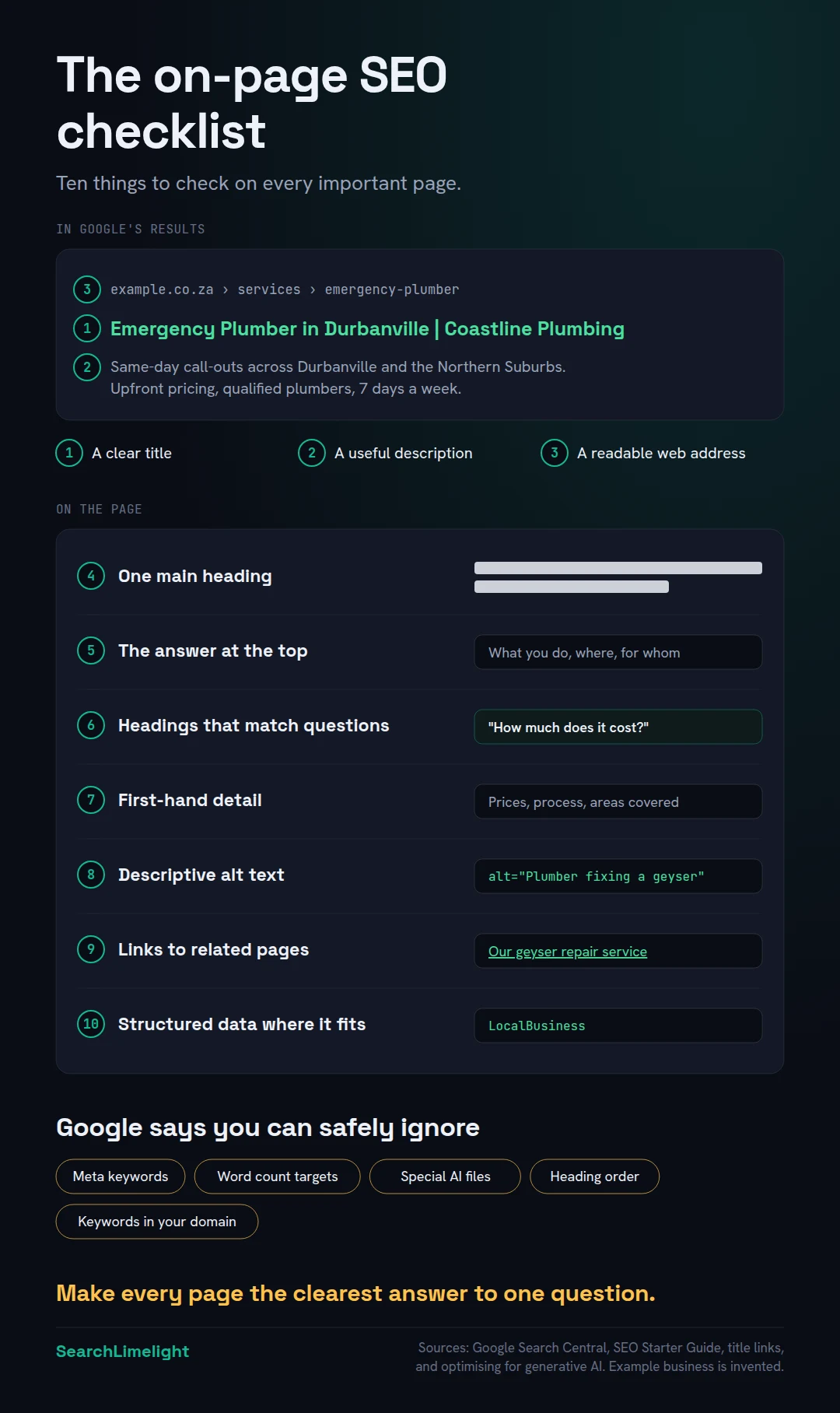
The title and description are your shop window in Google’s results.
The title. Google’s documentation on title links says every page should have a title, and that it should be descriptive and concise. It warns against vague titles like “Home”, repeating the same title across pages, and stuffing in keywords. There’s no fixed length limit, but Google cuts titles off in results to fit the screen, so put the important words first.
A pattern that works for local service pages is “Service in Area | Business Name”. For example: “Emergency Plumber in Durbanville | Coastline Plumbing”. (Coastline Plumbing is an invented example.)
The description. This is the short summary under the title, set in the meta description field of your SEO plugin. Google says a good one is short, unique to the page and includes the most relevant points. Google often builds the snippet from your page content instead, so a strong opening paragraph matters just as much.
Why Google changes your title. Google says it may generate a different title link if yours is missing, out of date, inaccurate or repeated across many pages. If Google keeps rewriting a title, treat it as a hint that the title doesn’t match the page. Changes can take a few days to a few weeks to show, because Google has to recrawl the page.
5. How should you structure the words on the page?
Use one clear main heading, answer the visitor’s main question in the first few lines, then break the rest into sections with headings that match what customers ask. Add first-hand detail only you can give. Keep it accurate and up to date.
One main heading. Your page’s main heading, called the H1, should say what the page is about. Google uses it, among other things, to work out the page’s title in search results.
Answer first. Put the most important information at the top. For a service page, that’s what you do, where, for whom, and how to get in touch. Visitors decide in seconds whether they’re in the right place.
Headings that match real questions. Use subheadings, called H2s and H3s, for the questions customers ask: “How much does it cost?”, “How quickly can you come out?”, “Do you work weekends?” Google’s Starter Guide recommends breaking long content into sections with headings so people can find their way around.
First-hand detail. Google’s guide to optimising for its AI features draws a clear line between “commodity” content, which repeats common knowledge anyone could write, and “non-commodity” content with genuine expert or first-hand insight. For a business, that means specifics: your real prices or price ranges, your actual process, the areas you cover, the questions your team gets asked every week.
Keep it current. Google’s Starter Guide says to check older content and update it, or even delete it if it’s no longer relevant. Wrong opening hours or a discontinued service on a key page costs you customers.
We cover writing in more depth in How to write content AI actually quotes.
6. How do you optimise images, links and web addresses?
Give every meaningful image descriptive alt text and place it near related text. Use short web addresses made of real words. Link each page to your other relevant pages with link text that describes where the link goes, and link out to trusted sources where they help.
Images and alt text. Alt text is a short description of an image, added in your website’s media settings. Google says it helps search engines understand what the image shows and how it relates to the page. It also helps visitors using screen readers. Describe the image plainly: “Technician repairing a geyser in a Durbanville home” beats “IMG_4032” or a list of keywords.
Web addresses. Google’s Starter Guide recommends words that are useful to people, like “/services/geyser-repair/”, over random strings of numbers. If a page already ranks, don’t change its address without setting up a redirect.
Internal links. Google finds most new pages through links, so link your important pages from related ones. A blog post about burst geysers should link to your geyser repair page. Use link text that says where the link goes. Google says good link text tells users and search engines what the linked page is about. “Our geyser repair service” is better than “click here”.
Links to other sites. Linking to a trusted source, like a regulator or an official guide, can support what you’re saying. Google says to make sure you trust what you link to.
Page experience. Make sure each page works well on a phone, loads quickly and isn’t covered by pop-ups. Google’s PageSpeed Insights will test any page for free. Site-wide speed fixes belong in the SEO audit checklist.
7. What does Google say you can safely ignore?
Google’s own guides say you don’t need meta keywords, a target word count, a set number of headings in a set order, keywords in your domain name, or special AI files. Structured data is useful for rich results but isn’t required for AI features. Spend the time on clearer content instead.
A lot of SEO advice online is out of date. Google’s SEO Starter Guide has a section called “Things we believe you shouldn’t focus on”. Here are the points most relevant to a business owner.
Meta keywords. Google Search doesn’t use the keywords meta tag. If your SEO plugin has a keywords box, you can leave it empty.
Word count. Google says the length of content alone doesn’t matter for ranking. There’s no magic minimum or maximum. Write as much as the page needs to be genuinely useful, and stop.
Heading order and number. Google says headings in order are good for screen readers, but from a search perspective it doesn’t matter if they’re out of order, and there’s no ideal number.
Keywords in your domain name. Google says keywords in a domain name or web address have hardly any ranking effect. Choose a name that’s good for your business.
Special AI files and “chunking”. Google’s AI guide says you don’t need llms.txt files, special markup or content cut into tiny pieces to appear in Google’s AI features.
A note on structured data. Structured data, often called schema markup, is code that describes your page in a way machines can read, such as your business type, address and opening hours. Google says it isn’t required for its AI features and there’s no special schema you need for them. It can still make pages eligible for rich results in Google, like review stars, so it’s worth adding where it fits. Most SEO plugins can add the basics for you.
What to do this week
- List your five most important pages and write one sentence describing each page’s job.
- Search Google for each page’s main phrase and note what kind of pages rank.
- Rewrite any title that says “Home” or repeats across pages, with the service and area first.
- Rewrite the opening paragraph of each page so it says what you do, where, and for whom.
- Add one section of first-hand detail to each page, such as prices, process or areas covered.
- Add descriptive alt text to the main image on each page.
- Add two internal links to each page from related pages on your site.
Frequently asked questions
What is an on-page SEO checklist?
It’s a list of things to check and improve on an individual web page so search engines understand it and people want to click it. It usually covers the title, meta description, web address, headings, content, images, internal links and structured data.
What’s the difference between on-page and technical SEO?
On-page SEO improves individual pages: their words, titles, headings, images and links. Technical SEO makes sure search engines can find, crawl and store your whole website, covering things like sitemaps, robots.txt and site-wide speed. Our SEO audit checklist covers the technical side.
How long does on-page SEO take to work?
Google says some changes take effect within hours and others can take several months, and suggests waiting a few weeks before judging results. Title changes need Google to recrawl the page, which can take a few days to a few weeks.
How long should a title tag be?
Google doesn’t set a limit, but it cuts titles off in results to fit the screen. Keep titles concise, put the most important words first, and avoid repeating keywords. “Service in Area | Business Name” is a simple pattern that works for local pages.
Do meta descriptions affect rankings?
Google doesn’t describe them as a ranking factor. They matter because they can appear as the snippet under your title in search results, which affects whether people click. Google often uses text from your page instead, so a clear opening paragraph matters too.
Do I need an SEO plugin like RankMath or Yoast?
It isn’t required, but it helps. Plugins make it easy to set titles, descriptions and basic structured data on WordPress without touching code. They don’t do the thinking for you, though. A green light in the plugin doesn’t mean the page is useful.
Does on-page SEO help with AI search too?
Yes. Google says its AI Overviews and AI Mode are rooted in its core search ranking systems, and that SEO best practices still apply. Clear, specific, first-hand content is also easier for tools like ChatGPT to understand and quote.
Want to know which pages are holding you back?
Most business websites have the SEO fields filled in and still underperform, because the pages don’t clearly answer what customers are searching for. Our free audit reviews your most important pages against what’s ranking in your market and shows you exactly what to fix first.
Book a free discovery call and choose the audit that fits: AI Visibility & GEO, SEO, or Local Business SEO. No pitch until you’ve seen the gap.
Related reading
About the author
Bantu Nonyukela is the founder of SearchLimelight. He has spent ten years in SEO, after starting out as a front-end developer, and is a Toptal-verified SEO expert. He helps small and medium businesses in the United States, Australia, the United Kingdom and South Africa get found in search and named by AI. Connect on LinkedIn
Sources
- Google Search Central, SEO Starter Guide: developers.google.com
- Google Search Central, “Influencing your title links in search results”: developers.google.com
- Google Search Central, “Optimizing your website for generative AI features on Google Search”: developers.google.com
- Google Search Central, spam policies (keyword stuffing): developers.google.com
- Google Search Central, snippets and meta descriptions: developers.google.com
- Google Search Central, image SEO best practices: developers.google.com
- Google PageSpeed Insights: pagespeed.web.dev