Key takeaways
- A local landing page is a page about your business in one specific place: a branch, a town or a suburb you serve. Done well, it helps you rank there and gives customers a reason to choose you.
- Done badly, it’s a doorway page. Google’s spam policies name pages targeted at regions or cities that funnel users to one page as an example of doorway abuse.
- Use the swap test: if you can change the town name and the page still makes sense, it isn’t a local page yet.
- Build fewer, better pages, starting where you have real customers, real jobs and real demand.
“A competitor has a page for every suburb in the city. Should I do the same?”
The answer is “maybe, but not like that”. Pages for each area you serve can work very well. But fifty near-identical town pages is exactly what Google’s spam policies describe.
This guide explains what local landing pages are, when you need them, how to tell a useful page from a doorway page, and what to put on each one. The examples use an invented electrician, Harbour Electrical.
1. What is a local landing page?
A local landing page is a page on your website about your business in one specific place. There are two kinds: location pages for a physical branch customers visit, and service area pages for places you travel to. Each one should show why you’re a good choice in that area, not just repeat your homepage.
Location pages are for businesses with more than one address, like a dental group with three practices or a shop with two branches. Each branch gets its own page with its own address, phone number, hours, directions, photos and team.
Service area pages are for businesses that go to the customer, like electricians, cleaners, pest control and mobile mechanics. There’s no shop front, but there are areas you work in regularly. A page for an area you genuinely serve, with evidence of your work there, helps customers and search engines connect you with that place.
When someone searches “electrician Durbanville”, Google wants a page clearly about electrical work in Durbanville. A general “we serve the Northern Suburbs” page is a weaker match.
2. Do you need local landing pages?
You need them if you have more than one branch, or if you regularly serve distinct areas where people search for your service by area name. You don’t need them if you serve one small area, or if you’d have nothing specific to say about each place. A thin page for every suburb does more harm than good.
You probably need them if:
- you have two or more branches, each with its own address and phone number;
- customers search for your service with the area name, like “plumber Bellville” or “dentist Sandton”;
- you do real work in those areas, with jobs, photos and reviews to show for it.
You probably don’t need them if:
- you serve one town or a small, well-defined area, and your homepage already covers it;
- you’d be writing about places you rarely work in, just to rank there;
- the only thing that would change from page to page is the town name.
A quick way to check demand: type your service and a suburb name into Google and look at what ranks. If page one is full of local pages from competitors, customers are searching that way. For many small suburbs, almost nobody searches that way.
3. What’s the difference between a local page and a doorway page?
A real local page is useful to someone in that area on its own. A doorway page exists to catch a search and pass people on. Google’s spam policies name pages targeted at specific regions or cities that funnel users to one page as doorway abuse. The swap test tells you which one you’ve built.
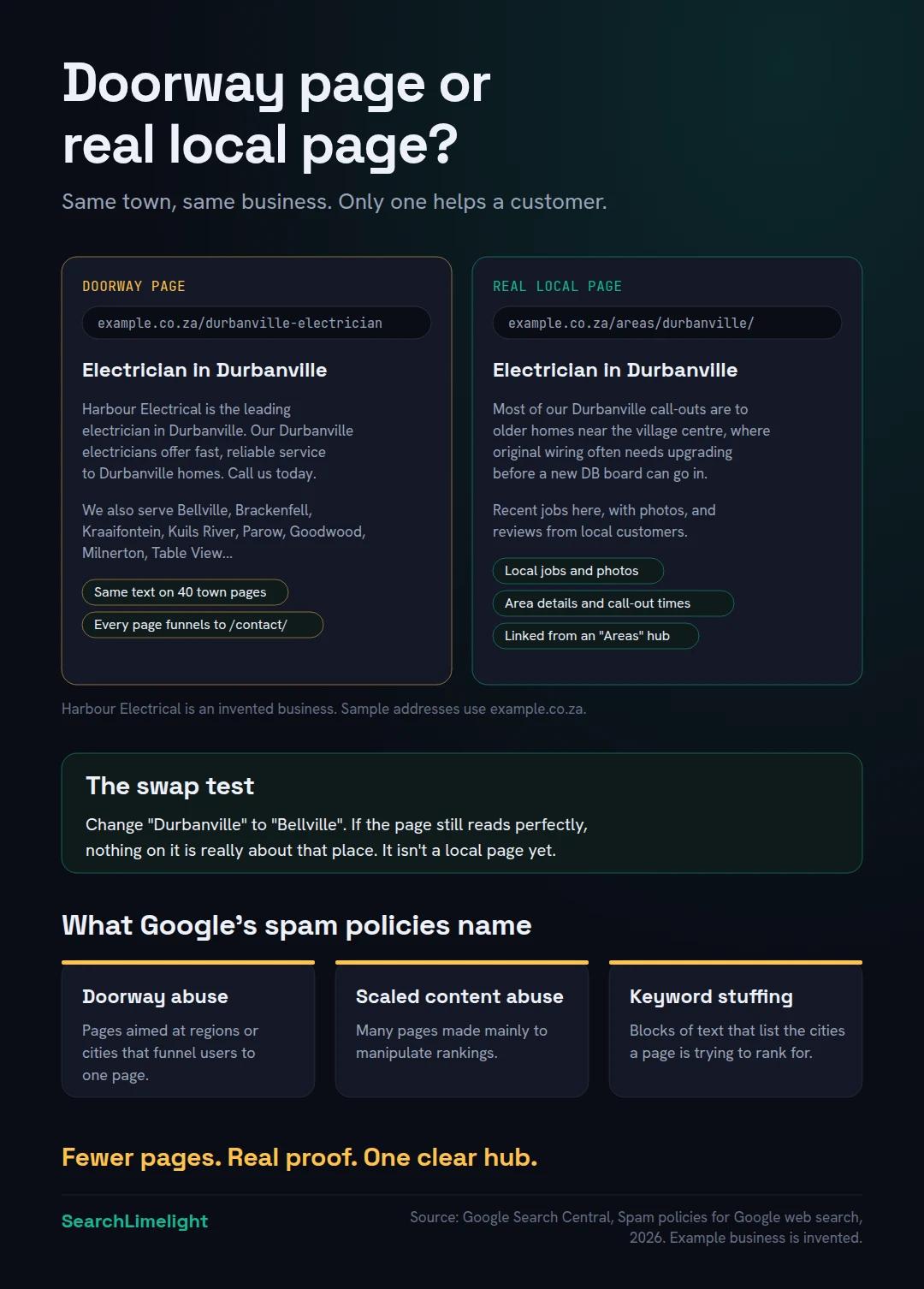
Google’s spam policies define doorway abuse as sites or pages created to rank for specific, similar search queries, which lead people to intermediate pages that aren’t as useful as the final destination. Two of Google’s examples describe the classic town page scheme almost exactly:
- multiple domain names or pages targeted at specific regions or cities that funnel users to one page;
- substantially similar pages that are closer to search results than a clearly defined, browseable hierarchy.
Two more policies catch the same pages from different angles. Scaled content abuse covers generating many pages mainly to manipulate rankings, including using AI tools to churn out pages without adding value. Keyword stuffing includes, in Google’s words, blocks of text that list the cities and regions a page is trying to rank for. That’s the long “we serve Bellville, Brackenfell, Durbanville, Kraaifontein…” paragraph at the bottom of many sites.
Google’s guide to generative AI search adds a 2026 warning. It says creating separate content for every possible variation of how people might search, primarily to manipulate rankings or AI responses, violates the scaled content abuse policy. It also notes that a high quantity of pages doesn’t make a website higher quality.
The swap test. Take one of your local pages and imagine replacing the town name with another. If the page still reads perfectly, nothing on it is really about that place. It’s a template with a name dropped in. A real local page would read strangely with a different town name, because it mentions local jobs, local customers and local details.
Here’s the difference for our invented electrician:
- Doorway version: “Harbour Electrical is the leading electrician in Durbanville. Our Durbanville electricians offer fast, reliable service to Durbanville homes. Call us today.” Swap in “Bellville” and nothing breaks.
- Local version: “Most of our Durbanville call-outs are to older homes near the village centre, where original wiring often needs upgrading before a new DB board can go in. Here are three recent jobs in the area.” Swap the town, and it stops being true.
4. What should a local landing page include?
Your business details for that place, proof that you work there, and information that’s genuinely specific to it. Think local jobs, photos, reviews from customers in the area, practical details like parking or call-out areas, and a clear reason to choose you there. Add structured data and link your Google Business Profile to it.
A clear heading and opening. Say what you do and where, in plain words: “Electrician in Durbanville”. Then a first paragraph that answers the searcher’s question: what you do there, how quickly you can come, and what makes you a good choice.
Business details for that place. For a branch: the full address, phone number, opening hours, a map and directions. They must match that branch’s Google Business Profile exactly. For a service area: the areas around it you cover, and your call-out times.
Local proof. This is what separates a real page from a template. Show recent jobs in the area with photos and a line about each. Quote reviews from customers who live there, with their permission. Mention local landmarks, estates or buildings you’ve worked on, where it’s appropriate.
Area-specific information. What’s different about working in this area? Older houses, a particular building type, parking rules, access to complexes, water pressure issues, municipal requirements. A template can’t copy this.
Services offered there. If you offer everything everywhere, say so briefly and link to your main service pages. If some services are only available at one branch, make that clear.
Answers to local questions. A few short questions and answers that people in that area actually ask. “Do you charge extra to come to Durbanville?” is useful. “Why choose a Durbanville electrician?” isn’t.
A way to contact you. A phone number that works, a form, and for branches, a link to directions.
Structured data. For branch pages, add LocalBusiness markup with that branch’s own details, using the most specific type available, as Google’s local business guidance recommends. We explain what schema does and doesn’t do in schema markup for AI search.
Link your profiles to it. If each branch has its own Google Business Profile and Bing Places listing, link each one to that branch’s page rather than your homepage.
5. How many local landing pages should you build?
Start with the areas where you already have customers, completed jobs and search demand, and build them well. For most small businesses, that’s a handful of pages, not dozens. Add more only when you have something real to say about each new place.
There’s no magic number, and Google says more pages don’t make a site better. A practical approach:
Step 1: List your real areas. Go through your jobs or bookings from the last year and note where customers were. Your top areas will usually stand out quickly.
Step 2: Check demand. For each area, check whether people search for your service with that area name.
Step 3: Check your proof. For each area, do you have at least a few jobs, photos or reviews you can use? If not, that area isn’t ready for its own page.
Step 4: Build the best three first. Write them properly, publish them, and see how they perform over a few months. Google’s SEO Starter Guide says changes can take anywhere from hours to months to show, so give them time.
Step 5: Group the rest. Smaller areas nearby can be covered on the page for the main area, as a short, natural list of the places you also cover, not a keyword block.
It’s also fine to decide you don’t need area pages at all. If you serve one town, a strong homepage and good service pages will usually do more for you than a set of thin suburb pages. How “near me” search really works covers what actually decides who gets shown.
6. How should you structure URLs, titles and links?
Put local pages in one clear section, like /areas/durbanville/, linked from a single hub page that lists them all. Give each page a unique, descriptive title. Link to each page from relevant service pages and from its Google Business Profile. A clear structure is part of what separates a real local section from doorway pages.
Remember Google’s doorway example: substantially similar pages that are closer to search results than a clearly defined, browseable hierarchy. The fix for that is structure.
One hub page. Create an “Areas we serve” or “Our branches” page that lists every local page with a short line about each.
Clean web addresses. Keep them short and consistent, for example:
- example.co.za/areas/durbanville/
- example.co.za/areas/bellville/
Avoid long, keyword-stuffed addresses like example.co.za/best-cheap-emergency-electrician-durbanville-cape-town/.
Unique titles. Google’s title link guidance warns against boilerplate titles and keyword stuffing. “Electrician in Durbanville | Harbour Electrical” is clear. Don’t repeat the same title with only the town name changed on dozens of pages and expect each to stand out.
Useful internal links. Link from your service pages to the areas where that service is popular, and from each local page back to your service pages. A visitor should be able to move between them naturally.
Keep it in your sitemap, and make sure no local page is blocked from crawling.
7. Do local landing pages help with AI search?
They can, if they contain specific, checkable facts about your work in that area. AI tools run several searches behind the scenes and pick the clearest, best supported passages. A page full of local detail gives them something to use. A template page gives them nothing new.
When someone asks an AI tool for “a good electrician in Durbanville”, the AI often runs several related searches at once. Google calls this query fan-out. It might look up electricians in Durbanville, reviews of local electricians and questions about older homes in the area.
A local page with real detail can match several of those searches.
But Google’s guide is clear about the limits. It warns against creating pages for every fan-out variation to manipulate AI responses, and says unique, non-commodity content will likely influence visibility in its AI search more than anything else. For a local page, non-commodity means the jobs, photos and knowledge only you have.
Your local pages also work alongside what others say about you. Reviews, listings and mentions in local directories all feed the same answers. We explain that side in what is GEO?
What to do this week
- Run the swap test on every existing area page and mark the ones that fail.
- List your top areas from the last year of jobs or bookings.
- Check search demand for “[your service] [area]” for each one.
- Delete or merge thin area pages with nothing unique on them, and redirect them to the best matching page.
- Remove any block of suburb names from your footer or page copy.
- Gather local proof for your top three areas: job photos, reviews and notes.
- Rebuild one area page properly using section 4 as your checklist.
Frequently asked questions
What is the difference between a location page and a service area page?
A location page is for a branch customers visit, with its own address, hours and directions. A service area page is for a place you travel to, like a suburb an electrician covers. Both should show real evidence that you work there.
Are local landing pages bad for SEO?
No, useful ones are good for SEO. The problem is doorway pages: near-identical pages for many towns that only change the name. Google’s spam policies name these as doorway abuse, and they can cause pages or a whole site to rank lower.
How long should a local landing page be?
There’s no ideal length. Google says there’s no ideal page length and to write for your audience. A good local page is as long as it takes to cover your details, local proof and area-specific information. That might be 400 words or 1,000.
Can I use AI to write local landing pages?
You can use it to help, but not to mass-produce pages. Google’s spam policies name using generative AI tools to create many pages without adding value as scaled content abuse. Use AI to tidy your own notes about real local jobs, not to invent local detail.
Should each local page have its own phone number?
For branches, yes: use the number for that branch, matching its Google Business Profile. For service area pages, your main number is fine. What matters is that every number is real and matches your listings.
How many locations can I target without a physical office?
As many as you genuinely serve, but build pages only for areas where you have real work and demand. Covering more places doesn’t need more pages. A short, natural list of nearby areas on your main local pages works.
Do I need a separate Google Business Profile for each area?
Only for real branches with their own staffed address. Service businesses without separate offices use one profile and set service areas. Google’s profile guidelines say a service-area business gets one profile for its central location, and a virtual office isn’t eligible.
Want to know where your local pages stand?
Most sites we check either have no local pages or a stack of near-identical ones. Our free audit shows which of your pages help, which hold you back, and what customers in each area actually see.
Book a free discovery call and choose the audit that fits: AI Visibility & GEO, SEO, or Local Business SEO. No pitch until you’ve seen the gap.
Related reading
- Google Business Profile mistakes that quietly cost you calls
- Schema markup for AI search: what it does and doesn’t do
- What is GEO? A plain-English guide for business owners
About the author
Bantu Nonyukela is the founder of SearchLimelight. He has spent ten years in SEO, after starting out as a front-end developer, and is a Toptal-verified SEO expert. From Cape Town, he helps small and medium businesses in the United States, Australia, the United Kingdom and South Africa get found in search and named by AI. Connect on LinkedIn
Sources
- Google Search Central, Spam policies for Google web search (doorway abuse, scaled content abuse, keyword stuffing): developers.google.com
- Google Search Central, “Optimizing your website for generative AI features on Google Search,” updated July 2026: developers.google.com
- Google Search Central, Local business (LocalBusiness) structured data: developers.google.com
- Google Search Central, Title links: developers.google.com
- Google Search Central, SEO Starter Guide: developers.google.com
- Google Business Profile Help, “Guidelines for representing your business on Google”: support.google.com