Key takeaways
- Apple Business Connect was Apple’s free tool for managing how your business looks on Apple Maps. On 14 April 2026, Apple replaced it with a single free platform called Apple Business, at business.apple.com.
- If you’d already claimed your listing, your details moved across automatically. If you hadn’t, your business may still be on Apple Maps with information you can’t control.
- Getting on Apple Maps means adding your location, then verifying your organisation with two proofs, such as a business ID and an official document. Apple says verification can take up to five business days.
- Your listing, which Apple calls a place card, shows up across Apple Maps, Siri, Safari and Spotlight, so iPhone owners can find you without opening Google.
“I tried to find Apple Business Connect and landed on some page about managing devices. Where did it go?”
That’s the question I’ve been hearing since April. Apple quietly folded its listings tool into a bigger platform, and most of the guides you’ll find still describe the old one. Some of their steps no longer match what you’ll see on screen.
The good news is that the job itself hasn’t changed much. This guide explains what happened to Apple Business Connect, whether an Apple Maps listing is worth your time, and how to set one up in the new Apple Business, step by step.
1. What was Apple Business Connect, and what happened to it?
Apple Business Connect was Apple’s free tool for managing how your business appeared on Apple Maps and other Apple apps. In April 2026, Apple merged it with two of its other business tools into one free platform, Apple Business. The listing features are the same, and existing data moved across automatically.
On 24 March 2026, Apple announced Apple Business, a new platform that replaced Apple Business Connect, Apple Business Manager and Apple Business Essentials. It went live on 14 April 2026, free, in more than 200 countries and regions.
Apple Business also handles device management, work email and calendars. As a local business owner, you can ignore most of that. The part you need is under Brands > Locations.
If you’d already claimed your listing, you don’t have to start again. Apple says existing Business Connect data, including claimed locations, place card information, photos and account details, migrated automatically. You can sign in with the same personal Apple Account you used before.
If you never claimed it, Apple may still show your business on Maps, built from other sources. Until you claim it, you can’t fix a wrong phone number or outdated hours.
2. Is an Apple Maps listing worth it for a small business?
Yes, for almost any business with customers who use iPhones. Apple Maps is the built-in map on every iPhone, and your place card also appears in Siri, Safari and Spotlight. The listing is free, and customers are spreading their searches across more apps than they used to.
It’s already on your customers’ phones. Apple Maps comes installed on every iPhone, and Apple says your place card information displays across Apple Maps, Safari, Spotlight and more. An iPhone user can find Apple’s version of your business without ever opening Google.
Customers are spreading out. In BrightLocal’s 2026 survey of US consumers, the share using Apple Maps rose from 14% to 27% in a year, while Google’s share as a review source fell from 83% to 71%. Over the same period, 45% had used ChatGPT or another AI tool to find local business recommendations, up from 6%. One listing is no longer enough.
It costs nothing. Apple Business is free. There’s no charge to add, claim or verify a location, so be wary of anyone charging you simply to “get you on Apple Maps”.
3. How do you add your business to Apple Maps?
Sign in at business.apple.com, search for your business first, then add or claim the location. Pin it on the right building, choose your category, and add your phone number, website and hours. Then verify your organisation and complete the place card. Most owners finish the setup in one sitting.
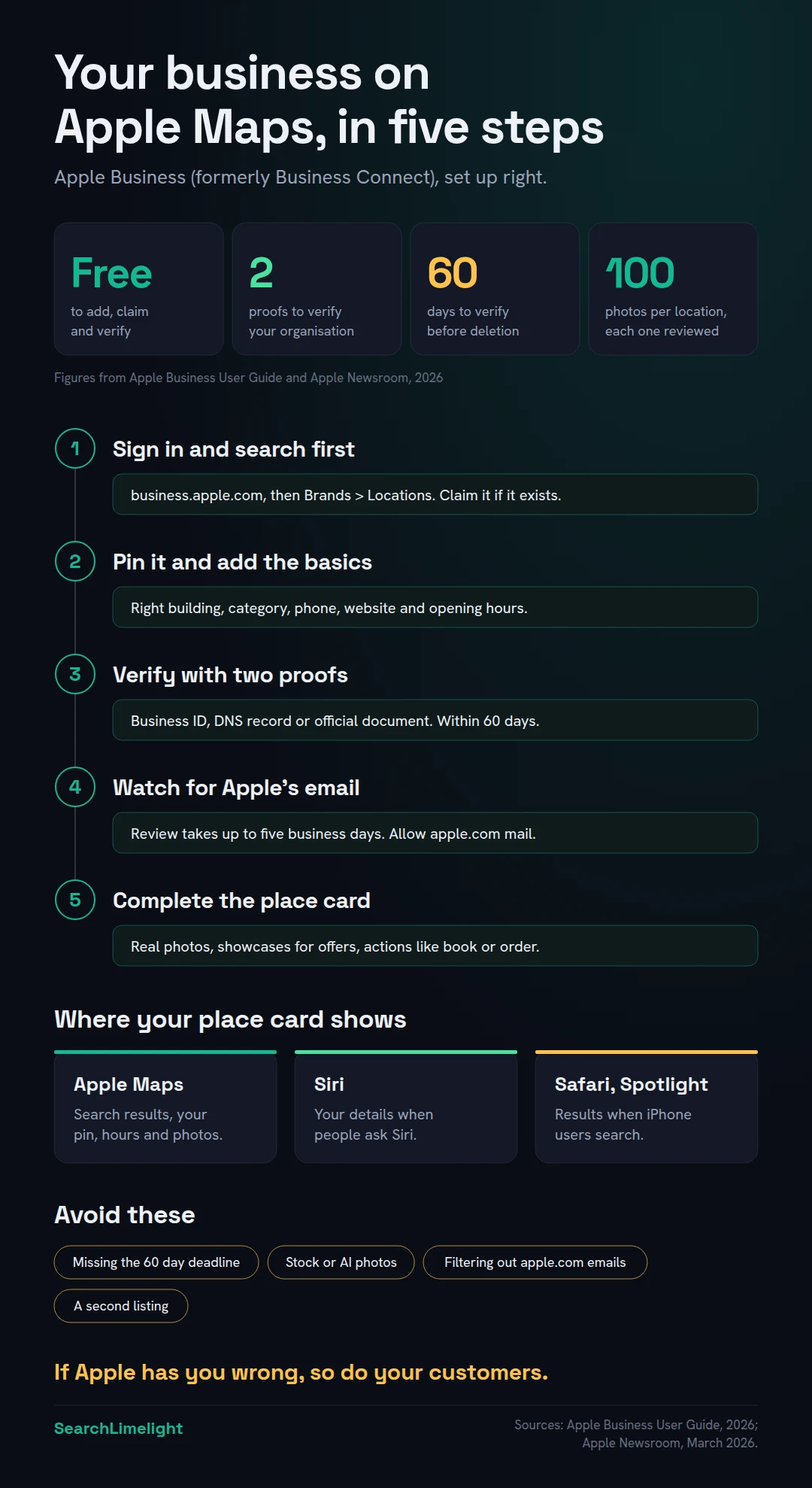
These steps follow Apple’s user guide for adding a single location.
Step 1: Sign up or sign in at business.apple.com. New users select “Sign up now” and enter the organisation’s name, website and address, then the legal name of the person signing up. Use an email address that belongs to the business, so the listing doesn’t leave when a staff member does.
Step 2: Search for your business before adding anything. Go to Brands > Locations and select Add. Type your business name. If Apple already has it, select it. If not, choose to add a new location with that name. If someone else already manages the location, Apple shows a note saying so, and you can request a transfer later (see section 4).
Step 3: Pin it on the right building. Enter your address, then drag the map if the marker sits on the wrong building. Satellite view helps you find your entrance. A pin on the building next door sends customers to the wrong door.
Step 4: Fill in the basics. Apple asks for:
- the display name that appears in Maps
- a primary category, which you can add to later
- your status: Open, or Opening Soon with a date no more than six months away
- a phone number, including the country code
- an optional website, which can also be a Facebook, Instagram or TikTok page
- your opening hours
Step 5: Choose or create your brand. Every location belongs to a brand. Details you set at brand level, like your name, logo and cover photo, flow down to each location.
Step 6: Verify. For your first location, Apple asks you to verify your organisation. Here’s how.
4. How does Apple verify your business, and how long does it take?
Apple verifies your organisation with two proofs, chosen from a business ID, a DNS record on your website or an official document like a utility bill. You have 60 days after signing up, and Apple says review takes up to five business days. Some existing locations can also verify by phone.
This step trips people up. According to Apple’s sign-up guide, you need two of these:
- A business ID: a D-U-N-S Number or, in the US, an Employer Identification Number (EIN).
- Domain validation: a TXT record added to your website’s DNS settings. Whoever manages your domain can add it.
- An official document: a business licence, sales tax permit, food, health or alcohol permit, lease or property agreement, utility bill or other official paper.
For most small businesses outside the US, the easiest pair is domain validation plus a document, such as a utility bill or lease in the business’s name.
Timing. Apple says verification can take up to five business days, and longer during busy periods. Adding your website when you sign up can speed things up.
Don’t let the 60 days run out. If your organisation isn’t approved within the window, Apple deletes it, along with its data and accounts. Verify the day you sign up.
Phone verification for existing listings. If your business already appears on Apple Maps, Apple may offer a phone call with a four-digit code. The call goes to the number Apple already has on record. If you don’t recognise that number, contact Apple Business support.
If someone else controls your listing. Select Request Transfer, explain why, and attach proof such as a business licence or utility bill. Apple says the review can take up to five business days.
Check your spam filter. Apple’s guide repeatedly warns you to allow mail from apple.com domains. Verification results arrive by email.
5. What should you fill in to make your place card work?
Use your real business name, the most specific category, accurate hours and a working phone number and website. Then add genuine photos of your premises, team and work. Apple reviews every photo, allows up to 100 per location, and rejects stock images, added text and AI-generated pictures.
Business name. Use the name on your signage and paperwork, nothing more, and the same name everywhere you’re listed.
Category. Choose the category that describes what your business is, not everything it does. “Electrician” beats “Home services”. Apple updates its categories regularly, so check back for a closer match.
Hours. Add regular hours, and update them before public holidays.
Website link. Link the page that matches this location. With several branches, link each to its own page. Our guide to local landing pages explains how to build them.
Photos. Apple’s photo and text standards are strict. Apple reviews every photo, which can take up to three business days, and allows 100 per location. Photos must clearly show your location, be well lit and belong to you. They can’t include:
- stock photos, clip art or illustrations
- AI-generated images
- added text, graphics, borders or QR codes
- watermarks, date stamps or collages
- heavy filters
Start with your shopfront or vehicle, your premises, your team at work and finished jobs, with permission from anyone pictured.
Businesses that visit customers. Apple’s setup is built around pinning a location on a map. If your customers never come to you, such as a mobile mechanic or a cleaning company working from home, check with Apple Business support how to list your business before adding your home address to a public map.
Keep it matching everywhere. If your details differ between Apple, Google, Bing and directories, each platform has to guess which is right. Our guide to local SEO citations shows how to fix mismatches.
6. What do showcases, insights and Maps ads do?
Showcases let you post offers, new products or seasonal news on your place card. Actions add buttons like “order” or “reserve”. Insights show how people find and use your listing. Apple also sells ads on Maps in the US and Canada, but you must claim your location first.
Showcases. A showcase is a short promotion on your place card, such as a deal, new product or seasonal item. Think of it as Apple’s version of a Google Business Profile post.
Actions. Actions are buttons on your place card that take people straight to a booking page, an online order form or your app. If customers book or order online, add the matching action.
Insights. Apple Business shows how customers discover and interact with your location on Maps, including searches, views and taps on your actions. Check it once a month. If views rise but taps don’t, your photos, hours or actions probably need work.
Ads on Maps. Apple announced that businesses in the US and Canada could create ads in Maps from summer 2026, shown at the top of search results and in a new Suggested Places section. Apple says you’ll need to claim your location on Maps before you can advertise. You don’t need ads to appear on Apple Maps, and most small businesses should get the free listing right first.
7. What are the most common Apple Maps listing mistakes?
The big ones are letting the 60-day verification window lapse, creating a second listing instead of claiming the first, relying on one person’s login, using stock or AI photos, and setting the listing up once then never checking it. Each one can leave customers with wrong details, or with nothing at all.
Letting verification lapse. Apple deletes unverified organisations after 60 days. Diarise the deadline.
Adding a duplicate. If Apple already has your business, claim it or request a transfer. A second listing splits your information and confuses customers.
Signing up with one person’s account. If the only admin leaves, so does your access. Use a business email address, and give a second trusted person access.
Using stock or AI photos. Apple rejects them.
Ignoring Apple’s edit notices. When users report problems like wrong hours, Apple reviews the reports and may edit your place card, then emails your admins. Check any change straight away.
Letting it drift. Owners update Google and forget Apple. Put Apple on the same checklist as Google and Bing. Most of the 12 Google Business Profile mistakes that quietly cost you calls apply here too, and our Bing Places for Business guide covers Microsoft’s side.
Never looking at the result. Once your listing is live, open Apple Maps on an iPhone, search for your business and your main service, and ask Siri about it by name. That’s what your customers see.
What to do this week
- Search for your business in Apple Maps on an iPhone and note what Apple already shows.
- Sign in or sign up at business.apple.com with a business email address.
- Claim your location, or request a transfer if someone else manages it.
- Verify with two proofs the same day, and put the 60-day deadline in your diary.
- Allow apple.com in your email filter so you don’t miss the verification result.
- Fix your name, category, hours and website link in one sitting.
- Upload at least ten real photos of your premises, team and work.
Frequently asked questions
Does Apple Business Connect still exist?
No, not under that name. On 14 April 2026, Apple replaced Apple Business Connect with Apple Business, which also absorbed Apple Business Manager and Apple Business Essentials. The same listing features are now under Brands and Locations at business.apple.com, and existing Business Connect data moved across automatically.
Is Apple Business free?
Yes. Apple describes Apple Business as a free service. Adding, claiming, verifying and updating a location costs nothing. Paid extras, like extra iCloud storage, AppleCare+ for Business and ads on Maps, are optional and have nothing to do with getting listed.
How long does it take to get on Apple Maps?
Apple says organisation verification can take up to five business days, and longer when volumes are high. Photos are reviewed separately and can take up to three business days. Verify as soon as you sign up, because unverified organisations are deleted after 60 days.
Do I need a D-U-N-S Number to verify?
No. A D-U-N-S Number or US Employer Identification Number is one option, but you need any two of Apple’s methods. Many small businesses use domain validation, which means adding a record to their website’s DNS settings, together with an official document like a utility bill or lease.
Can I use my old Business Connect login?
Yes. Apple says you can sign in to Apple Business with the personal Apple Account you used for Business Connect. If you keep using that personal account, you can manage brands and locations but not the other Apple Business features, which most small businesses don’t need.
Can I manage several locations in one account?
Yes. Apple says each location is managed separately, whether you have one or a thousand. Details you set for your brand, like your logo and name, carry across to every location, while each one keeps its own hours, photos and phone number.
Does Apple Business work outside the US?
Apple Business launched in more than 200 countries and regions. Apple notes that certain features may only be available in some countries, so check its feature availability page for yours. Ads on Maps, for example, started in the US and Canada only.
Want to know where your business shows up?
Most owners have never checked Apple Maps, let alone what Siri, Copilot or ChatGPT say about them. Our free audit checks your listings, website and AI visibility, and shows you what’s missing or wrong.
Book a free discovery call and choose the audit that fits: AI Visibility & GEO, SEO, or Local Business SEO. No pitch until you’ve seen the gap.
Related reading
- Bing Places for Business: how to claim, verify and fill in your listing
- 12 Google Business Profile mistakes that quietly cost you calls
- Local SEO checklist: 40 checks for small businesses
About the author
Bantu Nonyukela is the founder of SearchLimelight. He has spent ten years in SEO, after starting out as a front-end developer, and is a Toptal-verified SEO expert. He helps small and medium businesses in the United States, Australia, the United Kingdom and South Africa get found in search and named by AI. Connect on LinkedIn
Sources
- Apple Newsroom, “Introducing Apple Business,” March 2026: apple.com
- Apple Business User Guide, Add a single location: support.apple.com
- Apple Business User Guide, Sign up for Apple Business: support.apple.com
- Apple Business User Guide, About locations: support.apple.com
- Apple Business User Guide, Photo and text standards and guidelines: support.apple.com
- Apple Business User Guide, Maintain location information accuracy: support.apple.com
- BrightLocal, Local Consumer Review Survey 2026: brightlocal.com