Key takeaways
- An SEO audit checks whether Google can find, read and trust your website, and whether your pages match what customers search for.
- You can do a useful audit yourself in an afternoon, using free tools: Google Search Console, PageSpeed Insights and a few searches.
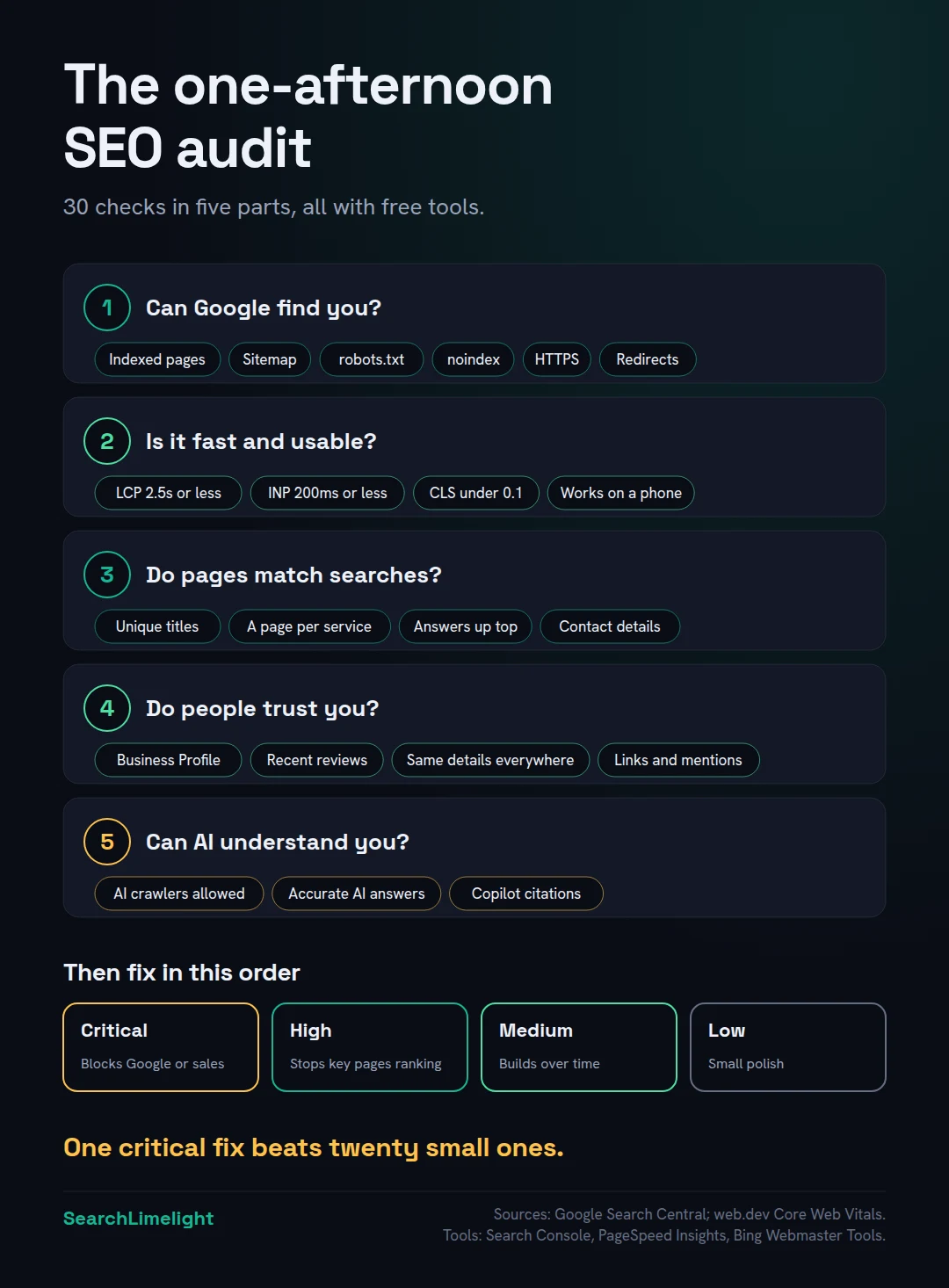
- Check in order: can Google find you, is the site fast and usable, do pages match searches, do people trust you, and can AI understand you.
- Fix what blocks Google first. Then fix what loses customers. Leave the nice-to-haves for last.
“We’ve never had an SEO audit. Where do we even start, and do we need to pay someone?”
You don’t need to pay someone to find the most common problems. Many of the issues I see on small business websites can be spotted in an afternoon with free tools: a page Google can’t index, a missing service page, a title that says “Home”, a phone number that’s different on the website and the Business Profile.
This checklist walks you through 30 checks in five parts. For each, it tells you what to look at, where to find it, and what good looks like. At the end, you’ll know how to prioritise what you find, so you fix the things that matter first.
It’s written for owners and managers of small businesses, not SEO specialists. Where a check needs a bit of technical knowledge, I’ve explained it in plain terms.
1. What is an SEO audit, and when do you need one?
An SEO audit is a structured check of your website’s health in search. It looks at whether Google can find and read your pages, whether they load well, whether they match what customers search for, and whether your business looks trustworthy. Do one at least once a year, after a redesign, and whenever traffic drops.
Think of it like a service for your car. Nothing may be obviously broken, but small problems build up, and some of them quietly cost you customers.
Good times to audit:
- Once a year, as routine maintenance.
- After a website redesign or move to a new domain. This is when the worst problems happen.
- When search traffic or enquiries drop and you don’t know why.
- Before hiring an SEO provider, so you know what you’re paying to fix.
What you’ll need: Google Search Console set up for your site (it’s free), Google’s PageSpeed Insights, your website login, a spreadsheet to note what you find, and two to four hours.
2. Part one: can Google find and read your website?
Check that Google has indexed your pages, that nothing blocks it, that your sitemap is submitted, that your site uses HTTPS, and that old pages redirect properly. If Google can’t read a page, nothing else about it matters.
| # | Check | Where to look | What good looks like |
|---|---|---|---|
| 1 | Is your site indexed? | Search Google for site: followed by your domain | Your important pages appear |
| 2 | Are key pages indexed? | Search Console, Pages report | Your service pages are listed as indexed |
| 3 | Why aren’t other pages indexed? | Search Console, “Why pages aren’t indexed” | Only pages that shouldn’t be in search, like thank-you pages |
| 4 | Is your sitemap submitted? | Search Console, Sitemaps | Submitted, with no errors |
| 5 | Is anything blocking Google? | yourdomain.com/robots.txt and your website’s search visibility setting | No “Disallow: /” for all crawlers. Search visibility switched on |
| 6 | Any accidental noindex tags? | Search Console, URL Inspection on key pages | “URL is on Google” |
| 7 | Does your site use HTTPS? | Your browser’s address bar | A padlock, and http:// redirects to https:// |
| 8 | Do old pages redirect? | Search Console, Pages report, “Not found (404)” | Old addresses redirect to the right new pages |
| 9 | Any manual actions or security issues? | Search Console, Security and manual actions | “No issues detected” |
If you find a serious problem here, like a noindex setting on your whole site, stop and fix it before carrying on. Why isn’t my website showing up on Google? explains each of these problems in detail.
3. Part two: is your website fast and easy to use?
Check your Core Web Vitals, Google’s measures of loading speed, responsiveness and visual stability. Good means the main content loads within 2.5 seconds, the page responds to taps within 200 milliseconds, and the layout doesn’t jump around. Check it works well on a phone.
Google measures real user experience with three Core Web Vitals. You don’t need to understand the technical details. You need to know what good looks like:
| # | Check | Where to look | What good looks like |
|---|---|---|---|
| 10 | Largest Contentful Paint (how fast the main content loads) | PageSpeed Insights or Search Console, Core Web Vitals | 2.5 seconds or less |
| 11 | Interaction to Next Paint (how quickly the page responds) | PageSpeed Insights | 200 milliseconds or less |
| 12 | Cumulative Layout Shift (whether things jump around) | PageSpeed Insights | Less than 0.1 |
| 13 | Does it work well on a phone? | Open your site on your own phone | Easy to read and tap, no sideways scrolling |
| 14 | Any intrusive pop-ups? | Visit your homepage on a phone | Nothing covers the content as soon as the page opens |
Mobile matters most, because Google mainly uses the mobile version of a site for indexing and ranking. If your site looks fine on a desktop but awkward on a phone, Google sees the awkward version.
Common causes of slow sites on small business websites include very large images, too many plugins and cheap hosting. PageSpeed Insights lists specific suggestions for each page.
4. Part three: do your pages match what customers search for?
Check that every page has a unique, descriptive title, that each main service has its own page, that pages answer the questions customers ask, and that your contact details are easy to find. This is where most small business websites lose the most ground.
| # | Check | Where to look | What good looks like |
|---|---|---|---|
| 15 | Unique, descriptive page titles | Search site: followed by your domain, and read the titles | Each says what the page is and where, like “Geyser Repairs in Durbanville” |
| 16 | One page per main service | Your website menu | Each core service has its own page, not one “Services” list |
| 17 | Clear main heading on each page | Look at the top of each page | Says plainly what the page is about |
| 18 | Pages answer customer questions | Read each service page as a customer | What, where, how fast, roughly what it costs, near the top |
| 19 | No thin or duplicate pages | Search Console, “Crawled, currently not indexed” | Every page has something useful and different to say |
| 20 | Internal links to key pages | Your homepage and menus | Important pages are linked from several other pages |
| 21 | Contact details easy to find | Every page’s header or footer | Phone number, area and a clear way to get in touch |
| 22 | Images have descriptions | Your website editor, image settings | Short, accurate alt text on meaningful images |
Page titles are worth special attention. Google uses them as the main clickable line in search results, and its guidance on title links asks for descriptive, concise titles unique to each page. “Home” and “Services” tell searchers nothing.
For a quick test of check 18, ask: if a customer read only the first two sentences of this page, would they know what you do, where, and whether you can help them? If not, rewrite the opening. How to write content AI actually quotes shows how.
5. Part four: does your business look trustworthy?
Check your Google Business Profile, your reviews, whether your business details match everywhere, which other sites mention or link to you, and whether your website shows who’s behind the business. Trust decides whether Google ranks you and whether customers choose you.
| # | Check | Where to look | What good looks like |
|---|---|---|---|
| 23 | Business Profile complete | Your Google Business Profile | Right primary category, services, hours, real photos |
| 24 | Reviews recent and steady | Your Business Profile | New reviews most months, all replied to |
| 25 | Details match everywhere | Search your business name and phone number | Same name, address and phone on every listing |
| 26 | Other sites link to you | Search Console, Links report | Real local and industry sites, not spam |
| 27 | Clear “about” information | Your About page | Who runs the business, experience, qualifications |
Google’s guidance on creating helpful, people-first content includes questions you can ask yourself, like whether a visitor would leave feeling they’ve learned enough to reach their goal, and whether the content shows first-hand expertise. Read your key pages with those questions in mind.
For local businesses, checks 23 to 25 often matter more than anything else in this list. Google Business Profile mistakes that quietly cost you calls and Local SEO citations cover them in depth.
6. Part five: can AI tools find and understand your business?
Check that your site doesn’t block the crawlers AI tools use, that AI answers describe your business correctly, and that your key pages are easy to quote. This part is new, and most audit checklists don’t include it yet.
| # | Check | Where to look | What good looks like |
|---|---|---|---|
| 28 | AI crawlers allowed | yourdomain.com/robots.txt | No blocks on search crawlers like OAI-SearchBot, unless you chose that |
| 29 | AI describes you correctly | Ask ChatGPT and Google about your business | Right services, area, hours and contact details |
| 30 | Copilot citations tracked | Bing Webmaster Tools, AI Performance report | Set up, with a baseline noted |
The 10-minute self-check walks through check 29 properly, and How to check your AI visibility covers check 30.
7. How do you prioritise what you find?
Fix anything that stops Google indexing your key pages first. Then fix anything that loses customers who find you, like wrong contact details or a broken form. Then improve what helps you rank. Leave cosmetic issues for last. Don’t try to fix everything at once.
Most audits turn up more issues than anyone can fix in a week. Sort what you find into four groups:
| Priority | What falls here | Examples |
|---|---|---|
| Critical: fix today | Anything that hides you from Google or stops customers contacting you | Site-wide noindex, broken contact form, wrong phone number |
| High: fix this month | Anything that stops key pages ranking | Missing service pages, “Home” as a title, very slow mobile pages |
| Medium: fix this quarter | Improvements that build over time | Better answers on pages, internal links, review routine |
| Low: when you can | Small improvements | Alt text on minor images, small speed gains |
Work top down. One critical fix often does more than twenty low-priority ones.
What to do this week
- Set up Google Search Console if you haven’t, and submit your sitemap.
- Block out two to four hours and work through the 30 checks.
- Note every issue in a spreadsheet, with the check number and where you found it.
- Sort each issue into critical, high, medium or low.
- Fix every critical issue before you do anything else.
- Put a reminder in your calendar to repeat the audit in a year, or after any redesign.
Frequently asked questions
How often should I do an SEO audit?
At least once a year for most small businesses. Also audit after a website redesign or domain change, and whenever search traffic or enquiries drop without an obvious reason. Keep an eye on Search Console monthly between audits, so you spot problems early.
Can ChatGPT do an SEO audit?
It can help, but it can’t do a full audit on its own. AI tools can review your page text, suggest better titles and point out unclear writing. They can’t see your Search Console data, measure real loading speed or reliably check how Google has indexed your site. Use AI as a helper alongside the free tools in this checklist.
How long does an SEO audit take?
Working through this checklist takes most people two to four hours for a small business website. A professional audit of a larger site can take days. The time is worth it: one critical issue, like a site-wide noindex setting, can outweigh everything else.
How much does a professional SEO audit cost?
It varies widely by provider, market and the size of the site. In Ahrefs’ poll of SEO providers, the most common fee for a one-off SEO project was $2,501 to $5,000, though simple audits often cost less. Ask what the audit produces. A prioritised list of fixes is worth paying for. An automated report is not.
What’s the difference between a technical SEO audit and a full SEO audit?
A technical audit checks whether search engines can crawl, index and load your site properly. It covers parts one and two of this checklist. A full audit also looks at your content, your reputation and, increasingly, your visibility in AI tools, which are parts three to five.
Do I need paid SEO tools to do an audit?
No. Google Search Console, PageSpeed Insights, Bing Webmaster Tools and a few searches cover everything in this checklist. Paid tools help on larger sites, for tracking competitors, and for finding problems across hundreds of pages at once.
What’s the most important thing to check?
Whether Google can index your key pages. Search site: followed by your domain, and use Search Console’s URL Inspection tool on your homepage and main service pages. If Google can’t index a page, no other improvement to it will help.
Want a professional pair of eyes on your site?
If you’d rather not do it yourself, or you’ve done the checklist and want a second opinion, our free audit covers all five parts, including AI visibility, and gives you a prioritised list of what to fix first.
Book a free discovery call and choose the audit that fits: AI Visibility & GEO, SEO, or Local Business SEO. No pitch until you’ve seen the gap.
Related reading
- Why isn’t my website showing up on Google? Causes and fixes
- How long does SEO take to work? A realistic timeline
- Local SEO for small business: the plain-English guide
About the author
Bantu Nonyukela is the founder of SearchLimelight. He has spent ten years in SEO, after starting out as a front-end developer, and is a Toptal-verified SEO expert. From Cape Town, he helps small and medium businesses in South Africa, the US, the UK and Australia get found in search and named by AI. Connect on LinkedIn
Sources
- web.dev, “Web Vitals” (Core Web Vitals thresholds): web.dev
- Google Search Central, “Mobile-first indexing best practices”: developers.google.com
- Google Search Central, “Influencing your title links in search results”: developers.google.com
- Google Search Central, “Creating helpful, reliable, people-first content”: developers.google.com
- Ahrefs, “SEO Pricing: How Much Does SEO Cost? 439 People Polled”: ahrefs.com