Key takeaways
- Google says local results are mainly based on relevance, distance and popularity. You can’t pay for a better Google Maps ranking.
- Where you rank changes street by street. Searching from your own office tells you very little, so check from where your customers are.
- Most businesses missing from the map pack have one of a few fixable problems: a profile that isn’t live, the wrong primary category, wrong hours, a misplaced pin, a thin review flow, or a website that doesn’t match the profile.
- Fix them in that order. Some competitors rank by breaking Google’s rules. Report them rather than copying them.
“We’re two kilometres from the customer, and Google shows three electricians from the next suburb before us. What are they doing that we’re not?”
I get some version of this question every week. The owner has a Google Business Profile, a decent website and happy customers, but the map shows three other businesses and theirs is nowhere.
This guide is a diagnosis, not a theory lesson. It shows you how to check where you really rank, then the checks to run, in order, to find out why you’re not in the map pack. It also covers what won’t help, so you don’t waste a month on it.
1. How does Google decide who shows up on Google Maps?
Google says local results are mainly based on relevance, distance and popularity. Relevance is how well your profile matches the search. Distance is how far you are from the searcher. Popularity, which Google also calls prominence, is how well known you are, including links and reviews. You can’t pay for a better position.
That’s from Google’s help page on local ranking, which also says there’s no way to request or pay for a better local ranking. A guaranteed map pack spot is something Google says doesn’t exist.
The “map pack” is the box of usually three businesses, with a small map, near the top of Google for searches like “electrician Durbanville”. The same system orders results in the Google Maps app.
For the fuller explanation of how the three work together, read our guide to how near me search works. The rest of this article is about finding which of the three is letting you down.
2. How do you check your real Google Maps ranking?
Check from where your customers are, not from your desk. Google ranks businesses partly by distance from the searcher, so your position changes from street to street. Use a grid rank checker, which tests many points around you, or ask customers in different areas what they see.
Search “electrician near me” from inside your own shop and Google knows you’re standing on top of your business, so you’ll often look great. A customer three kilometres away may see a completely different list.
Take Harbour Electrical, an invented electrician in Durbanville that we use as an example on this site. Searching from the owner’s office, they’re second in the map pack. A grid check shows they’re in the top three within about a kilometre, drop to position eight or nine towards Bellville, and don’t appear at all in Kraaifontein, where a lot of new housing is. That’s not a “we’ve disappeared” problem. It’s a “strong only on our doorstep” problem, with a different fix.
Three ways to check:
- Grid rank checkers. Tools like Whitespark’s Local Ranking Grids place a grid of points over your area and record your position at each one, giving you a colour map of where you’re strong and where you fade. Run one for each main service, not just your business name.
- Your Google Business Profile Performance report. It shows the searches people used to find your profile. It won’t give you positions, but it shows which searches you already appear for. Google explains the report in its performance and insights help page.
- Ask real people in different suburbs to search for your main service and send you a screenshot. Whatever you use, write down your starting point so you can tell whether the fixes below work.
3. Why is your business not showing on Google Maps at all?
If you don’t appear even when you’re nearby and search for your exact service, the profile itself usually has a problem. It may not be verified, may be suspended, may be a duplicate, may be marked closed, or may have its pin on the wrong spot. Fix this before anything else.
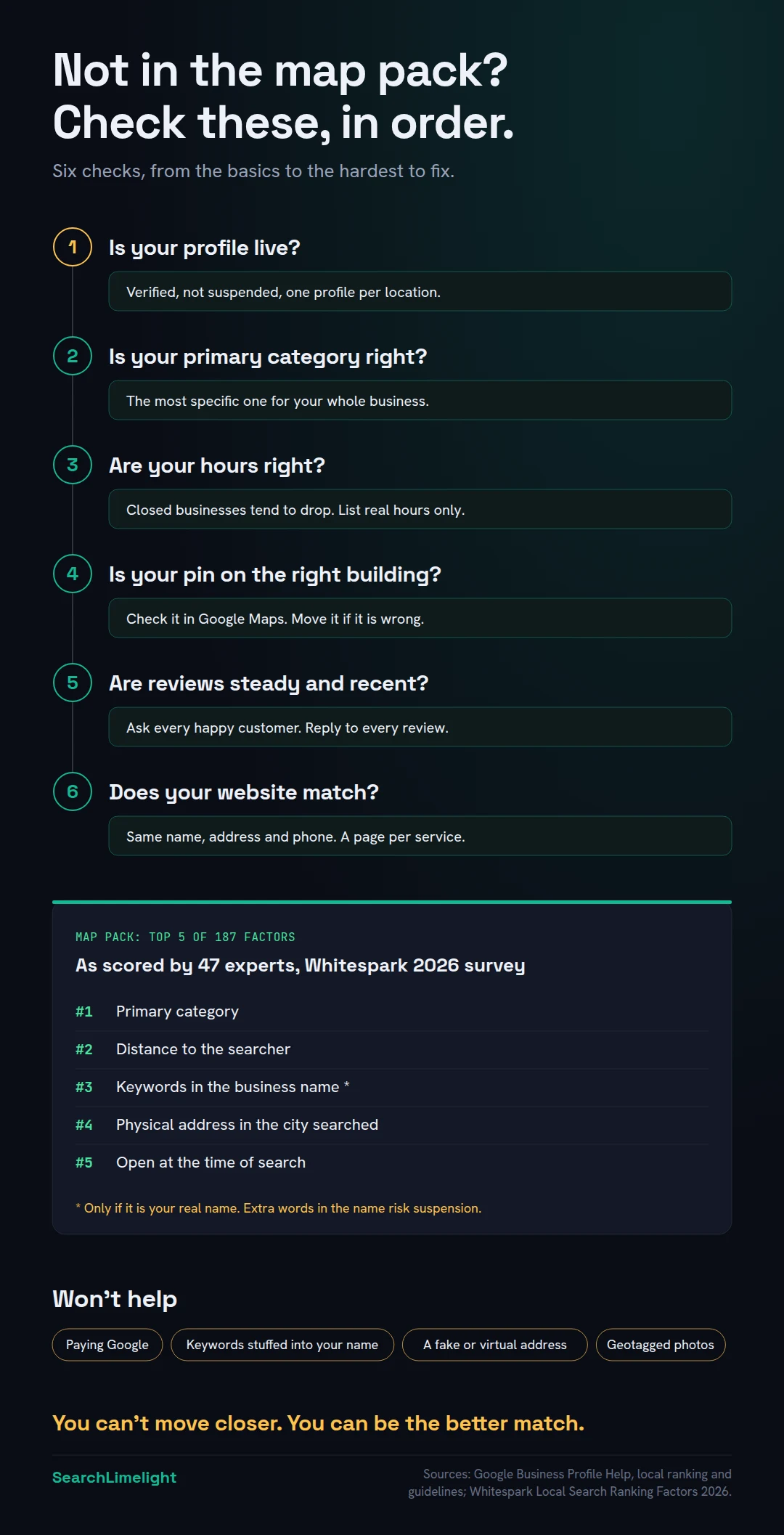
Before you worry about competitors, make sure Google can show you at all.
Is your profile verified? Google says verified businesses are more likely to show up in search results. Our guide to Google Business Profile verification covers every method and what to do when it fails.
Is it suspended? The public can’t see a suspended profile. If Google has emailed you or your dashboard shows a warning, read Google Business Profile suspended? How to fix it and appeal.
Do you have more than one profile? Google’s guidelines allow one profile per location. Duplicates split your reviews. Search your name and phone number on Google Maps to find old or extra profiles.
Are your hours right? In Whitespark’s 2026 survey of local search experts, “business is open at time of search” came fifth out of 187 factors for the map pack. Whitespark’s founder, Darren Shaw, writes that he has watched businesses start to slip about an hour before closing and get replaced by open competitors once they close. Keep your hours, including holiday hours, accurate. But don’t list hours you don’t keep: he notes it frustrates customers and goes against Google’s guidelines.
Is your pin on the right building? “Proper placement of the map pin” made the top 10 in the same survey. A pin on the wrong street makes distance work against you.
Do you visit customers? Then Google’s guidelines say to hide your address and set service areas, within about two hours’ drive. Showing a home address that customers never visit invites trouble.
4. Is your primary category holding you back?
Very often, yes. Your primary category tells Google what your business is, and local search experts rank it as the single most important map pack factor. Choose the most specific category that describes your whole business, add a few accurate extra categories, and fill in your services.
In Whitespark’s 2026 survey, the primary category came first of 187 factors for map pack rankings. That’s expert opinion, not Google data, but it matches what we see. The problem is usually one of three things:
- Too broad. “Contractor” when you’re really an electrician. Google’s guidelines ask you to pick the fewest, most specific categories that describe your core business, completing the sentence “this business IS a”.
- The wrong main one. A dental practice that picked “Cosmetic dentist” as primary will struggle for plain “dentist” searches. Your primary category should match what most of your customers search for.
- Used as keywords. Adding every category that sounds related, like “Solar energy company” for an electrician who installs one solar system a year.
Then add accurate additional categories, which came eighth in the same survey, but only for work that’s genuinely part of the business.
Finally, fill in your services. Add Google’s suggested services for your category, plus your own. In the survey, having Google’s predefined services on your profile ranked 22nd, and Darren Shaw says his own testing confirmed that services affect rankings.
Quick check: search for your main service and click the top three map pack businesses. Their primary category shows under their name. If all three use one you don’t, that’s a strong clue.
5. How much does distance matter, and what can you do about it?
A lot. Distance from the searcher ranks second in local search experts’ ratings, and you can’t move your business. What you can do is make sure your pin and address are right, win the searches near you first, and build enough relevance and reputation to reach further out.
Google names distance as one of its three factors. In Whitespark’s survey, “proximity of address to the point of search” came second of 187, and “physical address in city of search” came fourth.
If a customer in Bellville searches for an electrician, a good electrician in Bellville has a head start over a good one in Durbanville. No amount of work fully cancels that out. What you can do:
- Get your location data right. Check your address, pin and service areas, as in section 3.
- Own your immediate area first. Be in the top three close to you before chasing distant suburbs.
- Strengthen relevance and popularity. A precise category, full services and a steady flow of strong reviews can beat closer competitors who haven’t done that work.
- Build pages for the areas you serve. A useful page about your work in each main area helps you show in normal search results there. Local landing pages: how to build location pages that rank explains how to do it without breaking Google’s rules.
What you shouldn’t do is fake a closer address. Google’s guidelines rule out PO boxes and virtual offices, and a co-working space only counts if you have signage, staff and customers there. Fake addresses are a fast route to a suspension.
6. Why do competitors with worse service outrank you?
Usually because they have more, better or more recent Google reviews, or because they’re breaking Google’s rules, for example by stuffing keywords into their business name. Build a steady flow of genuine reviews, and report rule-breaking competitors through Google’s official forms instead of copying them.
Reviews first. Google says more reviews and positive ratings can help your local ranking. In Whitespark’s survey, high Google ratings ranked sixth, the number of Google reviews with text ranked ninth, recent reviews ranked 11th, and a steady flow of reviews over time ranked 14th.
Customers care too. In BrightLocal’s 2026 survey of US consumers, 47% said they won’t use a business with fewer than 20 reviews, 74% only care about reviews from the last three months, and 68% will only use a business with four or more stars.
So compare yourself honestly with the top three. If they get five reviews a month and you get one a quarter, you’ve found your gap. Ask every happy customer, use a direct review link, and reply to every review. How to get more Google reviews has the full playbook.
Then check for rule-breaking. Look at the names in the map pack. If a competitor’s sign says “Smith Electrical” but their Google name says “Smith Electrical Emergency Electrician Durbanville 24 Hours”, they’re breaking Google’s guidelines, which say adding extra information to your name could lead to suspension.
It works for now because keywords in the name are a strong signal (Whitespark’s experts ranked it third). Copying it means betting your whole profile on not getting caught.
Instead, report it. In Google Maps, open their profile and use Suggest an edit to correct the name. For misleading business names, phone numbers or websites that look fraudulent, Google’s help centre points you to the Business Redressal Complaint form. Include a photo of their real signage if you can. Removing spam listings came 19th in the survey. Sometimes the fastest way up is removing someone who shouldn’t be above you.
7. What else affects your Google Maps ranking, and what doesn’t?
Your website matters. The page your profile links to should show the same name, address and phone number, and each main service should have its own page. Several popular tricks don’t help: geotagged photos, keyword-stuffed descriptions, frequent posting for rankings, and paid Google ads.
What helps: a website that backs up your profile. Several of the top 25 factors in Whitespark’s survey sit on your website:
- The name, address and phone on your website match your profile (15th).
- The page your profile links to has your main service and area in its title (17th) and headings (20th).
- Your content mentions the places you serve in a natural way (18th).
- Each main service has its own page (24th).
- Other local and industry websites link to you (25th to 27th).
Link your profile to the page that best matches it, and make sure that page says clearly what you do, where, and how to reach you. Our on-page SEO checklist covers the details.
What doesn’t help much, according to the same survey:
- Geotagged photos came last of 187. Upload real photos for customers, not rankings.
- Keywords in your business description ranked 171st. Write the description for people.
- Frequent Google posts ranked 148th for rankings. Posts can still help customers choose you, which is a different job.
- Paying for Google Ads ranked 185th.
Behaviour matters too, but you can’t fake it. Clicks from the map pack ranked 13th. You earn them with the fixes above.
What to do this week
- Run a grid rank check for your top two services and save the results.
- Search your business name and phone number on Google Maps to find duplicates, and check your pin sits on the right building.
- Compare your primary category with the top three businesses in your map pack.
- Add Google’s suggested services for your category, then your own.
- Check your hours, including upcoming public holidays.
- Ask five happy customers for a review and reply to every review you get.
- Report any competitor whose Google name doesn’t match their real signage.
Frequently asked questions
How do I get my business on Google Maps?
Create or claim a Google Business Profile, fill it in completely, and verify it. If customers visit you, show your address. If you go to them, hide it and set your service areas.
How long does it take to rank higher on Google Maps?
Fixing a wrong category, a misplaced pin or wrong hours can show results within days to weeks. Building the reviews and reputation to beat established competitors usually takes several months. Run the same grid check monthly so you can see real progress.
Why does my Google Maps ranking change from place to place?
Because distance from the searcher is one of Google’s main factors. Your ranking differs for someone next door, across town and in the next suburb, so one search from your desk tells you little.
Can I pay Google to rank higher on Maps?
No. Google says there’s no way to request or pay for a better local ranking. Ads can appear above or inside map results, but they’re labelled as ads and don’t change your normal ranking.
Should I put keywords in my Google Business Profile name?
Only if they’re part of your real business name, as on your signage and documents. Google’s guidelines say extra information in your name could lead to suspension. The boost isn’t worth losing your profile.
Do Google posts help my Maps ranking?
Not much for rankings. Local search experts rated post frequency low as a ranking factor. Posts can still help customers comparing you with competitors.
Why is my competitor ranking higher with fewer reviews?
They may be closer to the searcher, have a better matching category, or have more recent reviews. Or they may be breaking the rules, for example with keywords in their name. Check each of those before assuming reviews are the whole story.
Not sure why you’re missing from the map?
Most businesses missing from the map pack have one or two specific problems, not ten. Our free audit checks your Google profile, rankings across your area, website and AI visibility, and shows you which fix comes first.
Book a free discovery call and choose the audit that fits: AI Visibility & GEO, SEO, or Local Business SEO. No pitch until you’ve seen the gap.
Related reading
- 12 Google Business Profile mistakes that quietly cost you calls
- Local landing pages: how to build location pages that rank
- Google Business Profile verification: how to get verified, and what to do when it fails
About the author
Bantu Nonyukela is the founder of SearchLimelight. He has spent ten years in SEO, after starting out as a front-end developer, and is a Toptal-verified SEO expert. From Cape Town, he helps small and medium businesses in the United States, Australia, the United Kingdom and South Africa get found in search and named by AI. Connect on LinkedIn
Sources
- Google Business Profile Help, Tips to improve your local ranking on Google: support.google.com
- Google Business Profile Help, Guidelines for representing your business on Google: support.google.com
- Google Business Profile Help, Verify your business on Google: support.google.com
- Google Business Profile Help, Fix suspended or disabled profiles: support.google.com
- Google Business Profile Help, Understand your Business Profile performance and insights: support.google.com
- Google Maps Help, Report a business on Google Maps: support.google.com
- Whitespark, 2026 Local Search Ranking Factors (47 experts, 187 factors, published 6 November 2025): whitespark.ca
- BrightLocal, Local Consumer Review Survey 2026: brightlocal.com