Key takeaways
- Google suspends or disables Business Profiles that don’t follow its guidelines. While suspended, the public can’t see the profile and you can’t manage it.
- The most common causes are fixable: extra words in the business name, an address that isn’t eligible, a second profile for the same business, or a problem with an owner’s or manager’s Google Account.
- Fix the problem first, then appeal through Google’s appeals tool with evidence whose business name and address match the profile.
- Don’t create a new profile or send several appeals while you wait. Google says decisions can take up to 5 business days.
“Our Google listing has disappeared and there’s a message saying it’s suspended. What do we do?”
For many local businesses, the Google Business Profile brings in more calls than the website. When it vanishes, the phone goes quiet.
Most suspensions have a clear cause, and Google has a formal process for reinstatement. But the natural reactions, like making a new profile or appealing again and again, can make things worse. This guide explains what a suspension means, why it happens, and what to do, in order.
1. What does it mean when a Google Business Profile is suspended?
It means Google has restricted your profile because it believes the profile breaks its guidelines. While a profile is removed, the public can’t see it and owners and managers can’t act on it. You can appeal if you believe it should be reinstated.
Google’s help page on fixing suspended or disabled profiles says Google may suspend or disable profiles that don’t follow its guidelines. It explains that when a profile is removed, the public can’t go to it, and the owner and managers can’t act on it. If Google reinstates the profile, it reinstates both the profile and its owner and managers.
You may see a few different terms. Here’s the practical difference:
A suspended or disabled profile. Google has restricted the Business Profile itself, usually for a guideline problem. You fix it and appeal through the Business Profile appeals tool.
A restricted Google Account. Sometimes the problem is the account, not the profile. Google says an account may be restricted for violating its policies, and when that happens, the Business Profiles the account manages are suspended and it can’t create or claim other profiles. You have to get the account restriction lifted first, through your Google Account’s restrictions page, before appealing the profile.
If only a manager’s account is removed, Google says the locations themselves aren’t affected.
2. Why do Google Business Profiles get suspended?
Because something in the profile or account appears to break Google’s guidelines. Common causes include extra words in the business name, a virtual office or PO box address, more than one profile for the same business, categories used as keywords, and phone numbers or links that don’t lead to the business itself.
Google’s guidelines for representing your business say that to avoid suspension you must avoid prohibited content, reflect your business accurately and follow the product guidelines. These rules catch owners out most often.
Extra words in the business name. Google says your name should reflect your real-world name as used on your storefront, website and stationery. It states plainly that including unnecessary information in the name isn’t permitted and could result in suspension. That includes marketing taglines, locations, services, phone numbers and opening hours. “Smith Plumbing” is fine. “Smith Plumbing 24 Hour Emergency Plumber Durban” is not, unless that’s genuinely your registered, signposted name.
An address that isn’t eligible. Google says P.O. boxes and mailboxes at remote locations aren’t acceptable. A virtual office, meaning a rented address you don’t operate from, isn’t eligible. A co-working space only qualifies if your office there has clear signage, receives customers during business hours and is staffed by your team.
Showing a home address as a service business. If you go to customers and don’t serve them at your address, Google says you should hide it. A plumber working from home, for example, should clear the address and set a service area.
More than one profile for the same business. Google’s guidelines say there should only be one profile per business location. That includes old duplicates created by a previous agency or owner.
Categories used as keywords. Google asks for the fewest categories that describe your core business, and says not to use categories solely as keywords.
Phone numbers and links that redirect. Google says not to use phone numbers or web addresses that redirect people to pages or numbers other than the actual business’s, and that the phone number must be under the business’s direct control.
Account problems. If the owner’s Google Account is restricted, every profile it owns is suspended too.
Google doesn’t publish a list of triggers, so treat every edit, especially a big one, as something a reviewer might check.
3. What should you do first when your profile is suspended?
Stop and check before you act. Don’t create a new profile and don’t send an appeal straight away. Find the reason Google gives, check whether it’s the profile or the account that’s restricted, and read the guideline it links to. Only then start fixing.
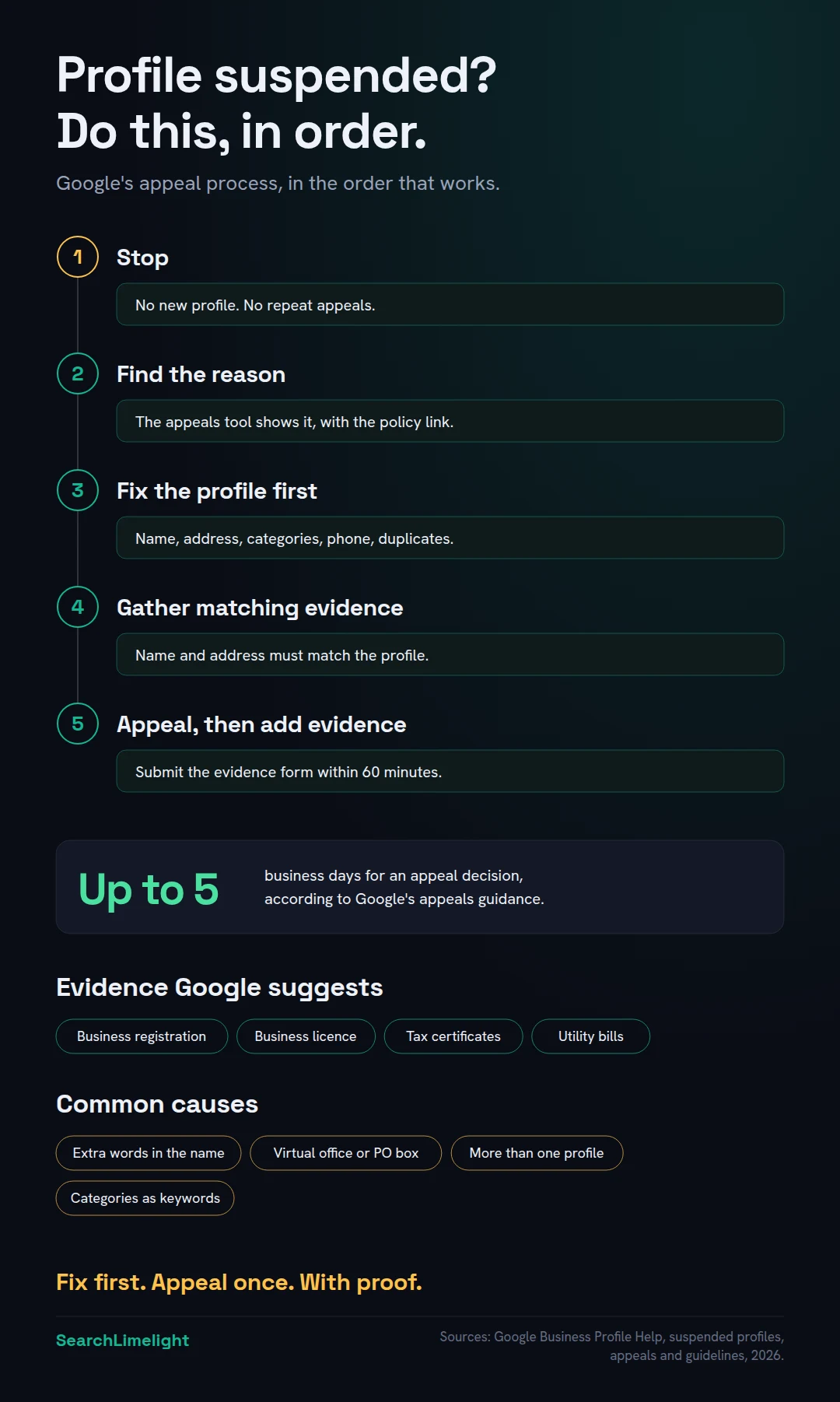
Don’t create a new profile. Google’s help says, in bold, not to create a new Business Profile for the same business while your appeal is under review. A second profile adds a duplicate to the problem.
Don’t appeal before you’ve fixed anything. Google’s appeals guidance says not to submit multiple appeals for the same issue before receiving a decision. If your first appeal goes in before you’ve fixed the cause, you’ve spent your best chance on a profile that still breaks the rules.
Find the reason. Open the Google Business Profile appeals tool while signed in to the Google Account that owns the profile. Google says the tool shows the restricted profile, the reason for the action and a link to the policy it relates to. Check your email for a message from Google too.
Check the account. If the problem is an account restriction, you’ll need to appeal that first on your Google Account’s restrictions page. Google says that once the account restriction is lifted, you can then appeal the profile.
Check who has access. Look at the list of owners and managers on the profile. Remove anyone who shouldn’t be there, like a former employee or an agency you no longer use.
4. How do you fix the problem before appealing?
Go through the profile against Google’s guidelines, field by field, and fix anything that doesn’t match your real-world business. Make the name match your signage, check the address is eligible, remove duplicate or keyword categories, and make sure your phone number and website belong to this business.
Use this checklist, working from the guideline Google named:
- Name: exactly as it appears on your signage, website and stationery. Remove taglines, locations, services and anything else extra.
- Address: your real, staffed location with permanent signage. If customers don’t visit you, hide the address and set a service area instead.
- Service area: Google says it shouldn’t extend beyond about two hours’ drive from your base, though some businesses can justify larger areas.
- Categories: the fewest that describe your core business, as specific as possible. Google suggests completing the sentence “this business IS a”, not “this business HAS a”.
- Phone: a number the business controls, ideally a local one, not a call centre or a number that forwards elsewhere.
- Website: a page that represents this business location.
- Description: no links, no promotions or prices, nothing irrelevant, as the guidelines require.
- Duplicates: search Google Maps for your business name and phone number. If you find another profile for the same location, note it for your appeal.
Fix the real world if needed. If you’ve been using a virtual office, the fix is a service-area profile with your address hidden, not an argument that the office is real.
Also make sure your website and other listings, like Bing Places and directories, show the same name, address and phone number. Our guide to local SEO citations covers fixing mismatches.
5. How do you submit an appeal?
Use the Google Business Profile appeals tool, signed in to the account that owns the profile. Select the profile, submit the appeal, then add evidence. Once you open the evidence form, you have 60 minutes to submit it. Documents should show the same business name and address as the profile.
Step 1: Prepare your evidence before you start. Google says evidence that can strengthen an appeal includes official business registration, a business licence, tax certificates and utility bills for the business, such as electricity, phone, water or internet. Check that the business name and address on every document match the profile. Photos of your permanent signage, shopfront or branded vehicle can also help show you’re a real business at that location.
Step 2: Open the appeals tool. Sign in to the Google Account related to the profile, select Confirm, then choose the profile you want to appeal.
Step 3: Review the decision. The tool shows the reason and links to the policy. Make sure you’ve fixed what it names.
Step 4: Submit the appeal. Select Submit Appeal. You may be prompted to add evidence. Google says it highly recommends doing so.
Step 5: Add your evidence within 60 minutes. Select Add evidence, review your business details, upload your documents and add a short explanation. Google warns that if you don’t submit the evidence form within 60 minutes of opening it, it won’t be attached to your appeal. This is why step 1 comes first.
What to write. Keep it short and factual: what you changed and why the business is eligible. For example: “We removed the service keywords from our name so it matches our signage, and hid our home address as we visit customers. Attached are our company registration and a recent utility bill.”
6. How long does an appeal take, and what if it’s denied?
Google says appeal reviews and decisions can take up to 5 business days, and you can check the status in the appeals tool. If your appeal is denied, you may be able to request an additional review with new evidence. Businesses in the UK and EEA have extra options.
Google’s appeals guidance says reviews and decisions can take up to 5 business days. You’ll get an email with the decision, and the appeals tool shows the status as Submitted, Approved, Not Approved, Can’t be appealed or Eligible for appeal.
While you wait: don’t make more edits, don’t create a new profile and don’t submit another appeal for the same issue.
If it’s approved: your profile comes back with its owners and managers. Check every field, photo and review once it’s live.
If it’s denied: Google says that only if your reinstatement request is denied, it may be able to do an additional review. You can submit one through Google’s form and include evidence you didn’t add the first time. Before you do, look again at the policy Google named. A denial usually means something still doesn’t match the guidelines, or the evidence didn’t prove it.
If you’re in the UK or EEA: Google notes that businesses there have different appeal options and, for EEA member states, possible additional redress routes.
If you’re stuck, the Google Business Profile Community forum is a good place to ask. Be wary of anyone who guarantees reinstatement or asks for your password.
7. How do you stop it happening again?
Keep your profile an honest reflection of your real business, make changes one at a time, limit who has access, and check the profile regularly. Most suspensions come from rules that are easy to follow once you know them.
Edit carefully. When you move, rebrand or change your phone number, update the profile to match the real world, and make sure your website and signage match too.
Keep access tight. Give managers only the access they need, and remove people and agencies when they stop working with you. An owner account that gets restricted takes its profiles with it.
Never add keywords to your name. It’s the most tempting shortcut in local SEO and the one Google names most clearly as a suspension risk.
Log in monthly. Check that no one has edited your details without you knowing. We cover this and 11 other common issues in Google Business Profile mistakes that quietly cost you calls.
Build beyond one profile. Complete profiles on Bing and Apple, a strong website and reviews on more than one platform spread the risk. Customers use more than Google too: in BrightLocal’s 2026 survey, 45% of US consumers had used an AI tool to find local business recommendations.
What to do this week
If you’re suspended now:
- Stop: no new profile, no repeat appeals.
- Open the appeals tool and write down the reason and linked policy.
- Check your Google Account for a restriction and deal with that first.
- Fix the profile against the checklist in section 4.
- Gather evidence with matching name and address, then appeal.
If you’re not suspended:
- Compare your business name to your signage and remove anything extra.
- Review owners and managers and remove anyone who shouldn’t have access.
Frequently asked questions
Why was my Google Business Profile suspended with no warning?
Google doesn’t usually warn before suspending a profile. The appeals tool and Google’s email show the reason and the policy involved. The most common causes are extra words in the business name, an ineligible address, duplicate profiles or a restricted owner account.
How long does a Google Business Profile suspension last?
It lasts until Google reinstates the profile after a successful appeal. Google says appeal reviews can take up to 5 business days. If your first appeal is denied, an additional review adds more time.
Can I just create a new Google Business Profile?
No. Google says not to create a new profile for the same business while your appeal is under review. Its guidelines allow only one profile per business location, so a new profile can add a duplicate problem to the suspension.
What documents do I need to reinstate my profile?
Google lists official business registration, a business licence, tax certificates and utility bills for the business as helpful evidence. The business name and address on each document should match the profile. Photos of permanent signage can also help.
What’s the difference between a suspended and disabled profile?
Google uses both terms for profiles it has restricted for not following its guidelines, and the fix is the same: correct the problem and appeal through the appeals tool. If your Google Account itself is restricted, you must appeal that first.
Do I lose my reviews if my profile is suspended?
While the profile is removed, the public can’t see it, including its reviews. Check your reviews once the profile is reinstated.
Should I pay someone to get my profile reinstated?
You can appeal yourself using Google’s free appeals tool, and most owners should start there. If you use help, avoid anyone who guarantees reinstatement or asks for your password instead of manager access.
Want a second pair of eyes on your profile?
A suspension is often a sign of wider problems with how your business appears online. Our free audit checks your Google Business Profile against Google’s guidelines, along with your listings, website and AI visibility.
Book a free discovery call and choose the audit that fits: AI Visibility & GEO, SEO, or Local Business SEO. No pitch until you’ve seen the gap.
Related reading
- Google Business Profile mistakes that quietly cost you calls
- Bing Places for Business: how to claim, verify and fill in your listing
- Local landing pages: how to build location pages that rank
About the author
Bantu Nonyukela is the founder of SearchLimelight. He has spent ten years in SEO, after starting out as a front-end developer, and is a Toptal-verified SEO expert. From Cape Town, he helps small and medium businesses in the United States, Australia, the United Kingdom and South Africa get found in search and named by AI. Connect on LinkedIn
Sources
- Google Business Profile Help, Fix suspended or disabled profiles: support.google.com
- Google Business Profile Help, Appeal Business Profile content & profile restrictions: support.google.com
- Google Business Profile Help, Guidelines for representing your business on Google: support.google.com
- BrightLocal, Local Consumer Review Survey 2026: brightlocal.com