Key takeaways
- Your Google review link and QR code are free, inside your Google Business Profile under “Ask for reviews”. You don’t need a generator or paid tool.
- The biggest factor in getting reviews is asking every customer, at the right moment, with one tap to the review form.
- A steady flow matters more than a big number. In 2026, 74% of consumers gave more weight to reviews from the last three months.
- Never offer rewards, prize draws or discounts for reviews, and never only ask happy customers. Both break Google’s rules.
“Our customers love us. They tell us all the time. So why do we only have 14 Google reviews?”
Because happy customers rarely think to leave a review on their own. Unhappy ones often do. Unless you ask, your reviews will lag well behind the service you actually give.
The good news is that getting more reviews isn’t complicated. It’s a small system: a link that takes customers straight to the review form, the right moment to ask, the right words, and a habit that keeps it going. None of it costs money.
This guide covers where to find your free review link and QR code, when to ask, what to say, what Google doesn’t allow, and how to build a review routine that runs without you thinking about it.
1. Why do Google reviews matter so much?
Reviews affect both whether customers choose you and where Google ranks you. Nearly all customers read reviews before choosing a local business, and they want them recent. Reviews also feature four times among the top 15 map pack ranking factors.
For customers. In BrightLocal’s 2026 survey, 97% of US consumers read reviews when choosing a local business, and 74% gave more weight to reviews from the last three months. A profile with great reviews from two years ago and nothing since looks like a business that may have changed, or closed.
For rankings. In the 2026 Whitespark Local Search Ranking Factors survey, four review factors made the top 15 for the map pack: a high Google rating (6th), the number of reviews with text (9th), recent reviews (11th) and a steady flow of reviews over time (14th).
For AI. AI tools draw on reviews when they recommend businesses. A steady stream of specific, genuine reviews gives them something solid to repeat. We cover this in The 5 signals that decide whether AI recommends you.
2. How do you find your Google review link?
Sign in to the Google account that manages your Business Profile, search for your business on Google, and select “Ask for reviews”. Copy the link it shows. That link takes customers straight to your review form. It’s free, and you don’t need a link generator.
Many businesses pay for tools or use third-party generators without realising Google gives you the link directly. Here’s how to get it:
- Sign in to the Google account that manages your Business Profile.
- Search for your business name on Google. Your profile management panel appears.
- Select “Ask for reviews”. On some screens, you’ll find it under your reviews as “Get more reviews”.
- Copy the link. It usually looks like a short g.page address ending in /review.
- Test it. Open the link in a private or incognito browser window. You should land directly on the review form with the stars showing.
Save the link somewhere you can find it easily, like a note on your phone or your email signature. You’ll use it every day.
A quick word on link generators. Free generator tools do the same thing, and many are fine. But you don’t need one, and it’s safer to use the link Google gives you, so you know it points to the right profile.
3. How do you get a Google review QR code?
It’s in the same place. In early 2025, Google added a QR code to the “Ask for reviews” panel in your Business Profile. Download it and put it wherever customers see you in person: your counter, receipts, invoices, business cards or a sign at the door.
Google introduced review QR codes in March 2025. When a customer scans it, their phone opens your review form directly.
Good places to use your QR code:
| Business | Where the QR code works well |
|---|---|
| Shop, café or salon | At the till, on the counter, on receipts |
| Clinic or practice | At reception, on appointment cards, on the checkout screen |
| Tradesperson | On invoices, on a card left after the job, on your van |
| Restaurant | On the bill folder or a small table card |
| Any business | On your email signature and printed quotes |
Add one short line next to it, like “How did we do? Scan to leave a Google review.” Keep it simple and neutral.
4. When should you ask for a review?
Ask at the moment the customer is happiest, usually right after a job is finished well or a service is delivered. Send the link the same day, while the experience is fresh. The longer you wait, the less likely they are to leave one.
Timing makes a bigger difference than wording. Here’s when to ask in different types of business:
| Business | The best moment |
|---|---|
| Plumber, electrician, builder | When the job is done and the customer has seen it working |
| Dentist, physio, optometrist | At checkout, then a message within a few hours |
| Accountant, lawyer | When a matter closes well, or after a successful filing |
| Restaurant or café | When the customer compliments the food or service |
| Online shop | A few days after delivery, once they’ve used the product |
A simple rule: if the customer has just said “thank you, that’s great”, that’s your moment. Ask in person, then send the link so it takes one tap.
5. What should you say when you ask?
Keep it short, personal and neutral. Thank them, ask if they’d share their experience, and include the direct link. Don’t ask for five stars, don’t suggest what to write, and don’t offer anything in return.
Here are some examples you can adapt. Change the wording so it sounds like you.
In person:
“Thanks so much. If you’ve got a minute, it would really help us if you shared your experience on Google. I’ll send you the link.”
Text or WhatsApp:
“Hi Lindiwe, thanks for choosing us today. If you have a moment, we’d really appreciate a Google review: [your link]. Thanks, Sam from Kloofview Plumbing”
Email:
Subject: Thanks from [your business]
“Hi Mark, thanks for trusting us with your kitchen renovation. If you’re happy with the work, we’d be grateful if you’d share your experience on Google. It takes a minute and helps other people find us: [your link]. Thanks again, Priya”
Notice what these don’t do. They don’t ask for five stars. They don’t tell the customer what to mention. And they don’t promise anything in return. That’s what keeps them within Google’s rules.
(Kloofview Plumbing is an invented example.)
6. What does Google not allow when asking for reviews?
Google prohibits offering incentives for reviews, including discounts, freebies and prize draws, and selectively asking only happy customers. It also prohibits asking for specific content, pressuring customers on the spot, and setting staff targets. Breaking these rules can get reviews removed and your profile restricted.
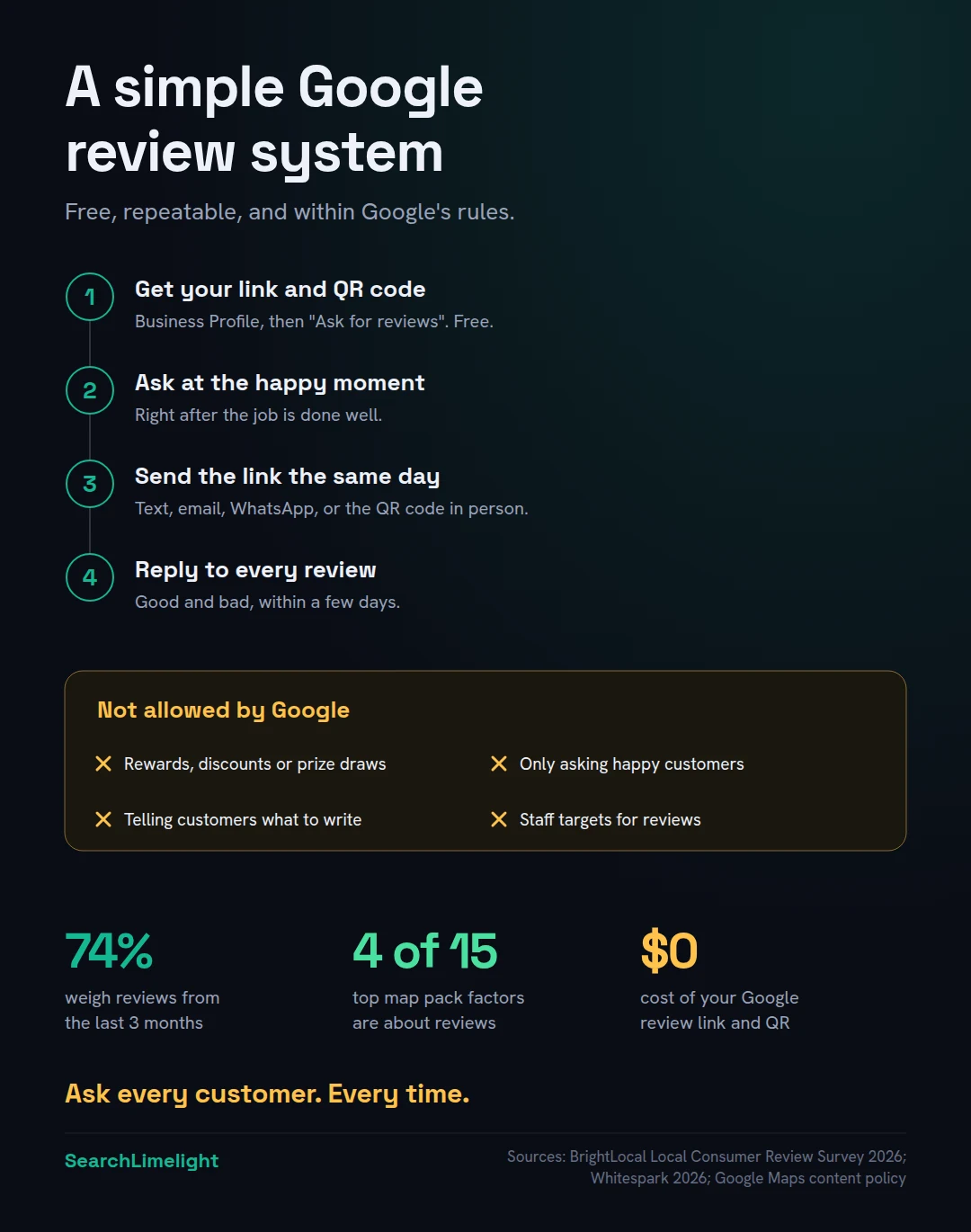
Google’s policy on user-generated content sets out what’s not allowed. For businesses asking for reviews, the key points are:
- No incentives. No discounts, free products, gifts, payments or entries into a prize draw in exchange for a review. Some review tools promote prize games or spin-to-win offers linked to reviews. Treat these with caution, because an incentive is an incentive.
- No review gating. Don’t send the link only to customers you expect to be happy, or use a tool that asks customers how satisfied they are first and only directs the happy ones to Google.
- No scripts. Don’t tell customers what to write, like asking them to mention certain words or services.
- No pressure on the spot. Don’t ask customers to write a review in front of you on your device.
- No staff targets. Don’t set targets for staff based on the number of reviews.
Google is watching closely. Search industry reports in 2026 describe Google asking Maps users directly whether a business offered rewards for reviews. And the law applies too: fake and incentivised reviews are restricted in the US, under the FTC’s 2024 rule, and in the UK, under the DMCC Act since April 2025.
Google Business Profile mistakes that quietly cost you calls covers these rules in more detail.
7. How do you build a review system that runs itself?
Make asking part of how you finish every job or visit. Use one link, one message template and one moment. If you use booking or invoicing software, automate the message. Then check your reviews weekly, reply to every one, and look at your monthly total.
The businesses with the most reviews aren’t the ones that run campaigns. They’re the ones that ask every customer, every time, without thinking about it.
Set it up once:
- Save your review link and QR code.
- Write one message template for text, WhatsApp or email.
- Choose your moment from section 4.
- Automate it if you can. Many booking, practice management and invoicing tools can send a follow-up message after an appointment or payment. Add your review link to that message.
- Brief your team. Everyone who deals with customers should know when and how to ask.
Then keep it going:
- Weekly: reply to every new review, good and bad.
- Monthly: check how many new reviews you received, and compare with last month.
- Quarterly: look at what customers mention most, good and bad, and use it to improve.
Aim for a steady flow rather than a burst. A few genuine reviews every month look far more natural, to customers and to Google, than fifty in one week followed by silence.
8. Should you ask for reviews on other sites too?
Yes, once Google is running smoothly. Customers read reviews on more than one site, and AI tools often draw on industry and review platforms. Pick the one or two that matter most in your industry and country, and alternate them with Google.
In BrightLocal’s 2026 survey, Google was still the main place people read reviews, but its share fell from 83% to 71% in a year as people spread across more platforms. And AI tools pull from those other platforms. BrightLocal found Yelp was used as a source in a third of AI searches in the US.
Which sites matter depends on where you are and what you do: Hellopeter in South Africa, Yelp in the US, Trustpilot and Checkatrade in the UK, and ProductReview.com.au and hipages in Australia are common examples. AI search in your market covers each country.
A simple approach: ask most customers for a Google review, and some for a review on your main industry site.
What to do this week
- Get your review link and QR code from your Business Profile under “Ask for reviews”.
- Test the link in a private browser window.
- Write your message template using the examples above.
- Ask your five most recent happy customers for a review today.
- Put the QR code where customers see you, at the counter or on invoices.
- Add the link to your email signature and your booking or invoice follow-up.
- Reply to every review you haven’t answered yet.
Frequently asked questions
How do I find my Google review link?
Sign in to the Google account that manages your Business Profile, search for your business on Google, and select “Ask for reviews”. Copy the link shown there. It takes customers straight to your review form. Test it in a private browser window to make sure it opens the review form.
Do I need a Google review link generator?
No. Google gives you your review link and QR code for free inside your Business Profile. Generator tools do the same job, but using Google’s own link means you can be sure it points to the right profile.
Can I offer a discount or prize for a Google review?
No. Google’s policies prohibit offering anything in exchange for a review, including discounts, gifts, free services and entries into prize draws. Reviews obtained this way can be removed, and your profile can be restricted. In the US and UK, incentivised reviews can also break the law.
How many Google reviews should I get each month?
There’s no magic number. What matters is a steady flow compared with the businesses you compete with. If competitors get five a month and you get one, that’s your gap. Asking every customer is the most reliable way to keep reviews coming regularly.
Why can’t my customers leave a review?
The most common reasons are that the link points to the wrong place, the customer isn’t signed in to a Google account, or your Business Profile isn’t verified. Test your link in a private window. If the review form doesn’t open, get a fresh link from “Ask for reviews”.
Why did a customer’s review disappear?
Google’s automated systems sometimes filter reviews they think might be fake or break policy, even genuine ones. This can happen with reviews posted from the same location as the business, or in bursts. You can check the status of reviews you’ve reported through Google’s Reviews Management Tool.
Can I ask for reviews by text message or WhatsApp?
Yes. Sending your review link by text, WhatsApp or email is one of the most effective ways to get reviews, because customers can leave one in a single tap. Keep the message short and neutral, and don’t offer anything in return.
Want a review system set up for you?
Our free Local Business SEO audit compares your reviews with your competitors, shows where you’re falling behind, and gives you a simple plan to build a steady flow of genuine reviews.
Book a free discovery call and choose the audit that fits: AI Visibility & GEO, SEO, or Local Business SEO. No pitch until you’ve seen the gap.
Related reading
- How to remove a Google review (and what to do when you can’t)
- Google Business Profile mistakes that quietly cost you calls
- Local SEO for small business: the plain-English guide
About the author
Bantu Nonyukela is the founder of SearchLimelight. He has spent ten years in SEO, after starting out as a front-end developer, and is a Toptal-verified SEO expert. From Cape Town, he helps small and medium businesses in South Africa, the US, the UK and Australia get found in search and named by AI. Connect on LinkedIn
Sources
- BrightLocal, Local Consumer Review Survey 2026: brightlocal.com
- Whitespark, 2026 Local Search Ranking Factors: whitespark.ca
- Search Engine Land, “Google offers QR codes to get reviews from customers,” March 2025: searchengineland.com
- Google Maps User Generated Content Policy, “Prohibited and restricted content”: support.google.com
- Google Business Profile Help, on asking customers for reviews: support.google.com
- BrightLocal, “AI Search Makes Local Listings More Important Than Ever,” 2025: brightlocal.com
- US Federal Trade Commission, final rule on fake reviews and testimonials, August 2024: ftc.gov