Key takeaways
- You can’t delete a Google review on your own profile. You can report reviews that break Google’s policies, and Google removes the ones that do.
- A review that’s negative, harsh or unfair usually doesn’t break the rules. Those stay, so your reply becomes your best tool.
- If a report is rejected, you get one appeal. Extortion attempts and defamation each have their own separate process.
- Google takes this seriously. In 2025, it blocked or removed over 292 million policy-violating reviews.
“Someone left us a one-star review. They were never even a customer. How do I get it taken down?”
It’s one of the most stressful things that can happen to a small business online. You’ve built your reputation over years, and one review, sometimes from someone you’ve never met, sits at the top of your profile for everyone to see.
The honest answer is that you can’t simply delete it. But that doesn’t mean you’re stuck. Google removes reviews that break its rules, and some reviews clearly do. For the rest, there’s a lot you can do to limit the damage, and even turn it to your advantage.
This guide explains which reviews Google will remove, exactly how to report them, what to do if Google says no, how to handle fake review attacks and extortion, and how to respond when a review stays up.
1. Can you remove a Google review from your business profile?
Not directly. Business owners can’t delete reviews. You can report a review that breaks Google’s policies, and Google will remove it if it agrees. A review that’s simply negative, or one you disagree with, generally stays. Only the person who wrote a review can edit or delete it.
It’s worth being clear on this, because a lot of frustration comes from expecting a delete button that doesn’t exist. Google treats reviews as the customer’s content, not yours. That’s what makes them trustworthy to other customers.
What you can do:
- Report reviews that break Google’s policies.
- Appeal once if Google rejects your report.
- Report extortion attempts through a dedicated form.
- Use Google’s legal process for reviews you believe are unlawful, like defamation.
- Reply publicly to any review.
- Ask the reviewer to update their review, if you’ve genuinely resolved their problem. You can’t offer anything in return.
You also can’t switch reviews off. Every Business Profile is open to reviews.
2. Which Google reviews break the rules?
Google removes reviews that are spam or fake, off-topic, written with a conflict of interest, abusive or hateful, sexually explicit, or that reveal someone’s personal information, among other violations. It doesn’t remove reviews just because they’re negative, unfair or inaccurate in your view.
Google’s policy on user-generated content lists what isn’t allowed. The categories most relevant to businesses include:
| Likely to break the rules | Unlikely to break the rules |
|---|---|
| Fake engagement: reviews from people who never used your business, or posted in bulk | A real customer who had a bad experience |
| Conflict of interest: reviews by competitors, current or former employees, or owners | A harsh opinion about your prices or service |
| Off-topic: rants about politics, or a review of a different business | A review you feel is exaggerated or unfair |
| Harassment or hate speech: personal attacks, threats, slurs | Criticism of a named staff member’s service, stated politely |
| Personal information: someone’s phone number, address or private details | A review that’s inaccurate about a minor detail |
| Spam: repeated content, links or advertising | A review that’s short, like “Terrible. One star.” |
The key question isn’t “is this review fair?” It’s “does this review break a specific rule?” If you can point to one, you have a case. If you can’t, a report is unlikely to succeed.
3. How do you report a Google review?
Report it through Google’s Reviews Management Tool, or directly from your Business Profile. Choose the reason that matches the policy it breaks, then submit. You can check the status in the same tool. If Google finds no violation, you can submit one appeal.
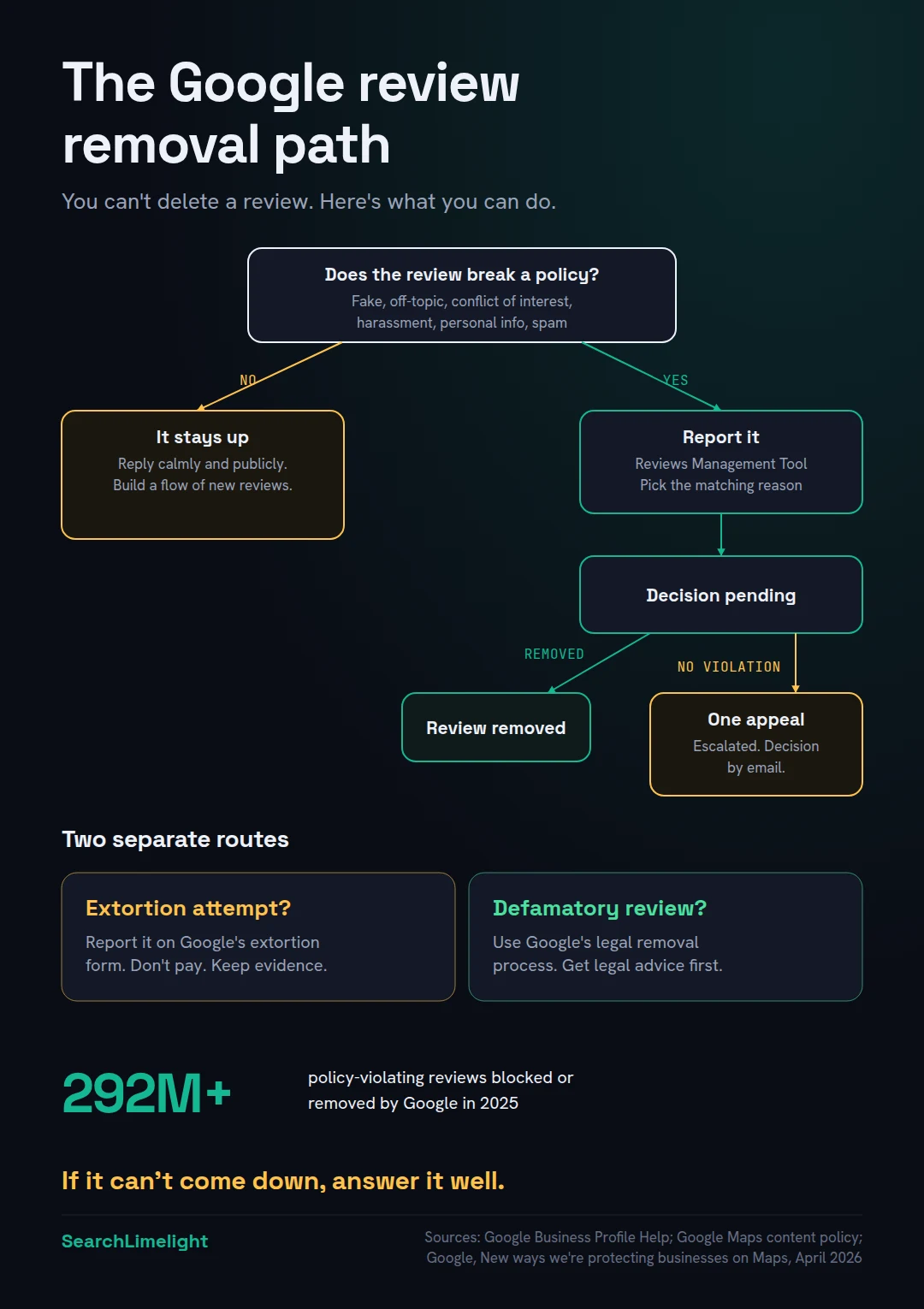
According to Google’s help page on reporting reviews, here’s the process:
- Open the Reviews Management Tool from Google’s help page and sign in with the account that manages your Business Profile.
- Select your business, then choose to report a new review for removal.
- Find the review and select Report.
- Choose the reason that best matches the policy it breaks. Picking the right category matters, because the review is judged against it.
- Submit.
You can also report a review directly from your Business Profile on Google Search or Maps, using the options next to the review.
Checking the status. Revisit the Reviews Management Tool. Google’s help page lists the statuses:
- Decision pending: the review has been flagged but not yet evaluated.
- Report reviewed, no policy violation: Google looked and didn’t find a violation. You can submit a one-time appeal.
- Escalated, check your email for updates: your appeal is being assessed, and you’ll get an email with the final decision.
If the appeal succeeds, the review is removed. If not, it stays.
Make your appeal count. You only get one per review. Explain clearly which policy the review breaks and why. If you have evidence, like records showing the reviewer was never a customer, or that the account belongs to a competitor or former employee, include it.
4. What if you’re hit by a fake review attack or extortion?
If you get a sudden wave of one-star reviews followed by someone demanding money to stop or remove them, that’s an extortion scam. Don’t pay or engage. Gather evidence and report it through Google’s dedicated extortion form, which is separate from the normal review report.
This scam has become common enough that Google now has a specific process for it. The pattern: a sudden spike in one-star and two-star reviews, then a message, often through a messaging app, demanding money, goods or services to remove them.
Google’s advice is direct:
- Don’t pay or engage. Paying encourages further attempts and doesn’t guarantee the reviews will be removed.
- Don’t try to resolve it yourself by offering money or services.
- Gather evidence immediately: screenshots of the reviews, the messages, phone numbers and payment details they ask for.
- Report it through Google’s merchant extortion report form, with as much detail as you can.
Google has also said it’s getting faster at this. In an April 2026 update, it announced upgraded systems to block review extortion scams before the reviews go live. When it sees a sudden spike in spam reviews, it removes them, pauses new reviews on the profile, alerts the owner and shows customers a notice explaining why. The same update said Google blocked or removed over 292 million policy-violating reviews in 2025.
5. What about reviews you believe are defamatory?
If you believe a review makes false statements of fact that damage your business, it may be a legal matter rather than a policy one. Google has a separate legal removal process for this. Laws differ by country, so get legal advice before going down this route.
A review saying “the food was awful” is an opinion. A review falsely claiming “they were shut down by the health inspector last month” is a statement of fact. If it’s untrue and damaging, it may be defamatory.
Google handles legal requests separately from its policy reports, through its legal removal process. You’ll need to explain what’s unlawful and why, and Google will assess it against the law in your country.
I’m not a lawyer, and defamation law differs between South Africa, the US, the UK and Australia. If you’re considering this route, speak to a lawyer first. Legal action over a review can also draw more attention to it, so weigh that up.
6. What should you do if a review stays up?
Reply to it, calmly and publicly. Your reply is written for the next customer who reads it, not the reviewer. Acknowledge the issue, don’t argue, offer to sort it out offline, and keep it short. Then focus on earning more genuine reviews, so one bad review carries less weight.
Most negative reviews won’t be removed, and that’s OK. A business with a few negative reviews and good replies often looks more trustworthy than one with a perfect score.
How to reply to a negative review:
- Thank them for the feedback, even if it stings.
- Acknowledge the issue without admitting to things that didn’t happen.
- Don’t argue in public. You won’t win, and the next customer is watching.
- Offer to sort it out offline, with a name and a direct way to reach you.
- Keep it short. Three or four sentences.
An example:
“Thanks for the feedback, Sipho. I’m sorry the repair took longer than we said it would. That’s not the standard we aim for. I’d like to understand what happened and put it right, so please call me directly on [number]. Thandi, owner”
If you don’t think they were a customer, say so politely: “We can’t find a record of your visit under this name. Please contact us on [number] so we can look into it.” Then report it.
Reply to positive reviews too. It’s easy to only respond to complaints, but replies to good reviews matter as well. They show customers the business is active and that someone reads what they write. Keep them short and specific: thank the person by name and mention the job or detail they praised. Avoid pasting the same reply on every review, because customers notice. A good habit is to reply to every new review, positive or negative, within a few days of it arriving.
Build your review flow. The best protection against a bad review is a steady stream of genuine good ones. Local SEO for small business covers how to build a review habit. Never offer rewards for reviews, and never only ask happy customers. Google Business Profile mistakes that quietly cost you calls explains why both break Google’s rules.
7. Should you pay a review removal service?
Be very careful. Legitimate services can help you prepare strong reports and appeals, but they use the same Google tools you can use yourself. Nobody can remove a review that doesn’t break Google’s policies. Avoid anyone who guarantees removal, and never pay someone who contacts you offering to remove reviews.
Review removal services are a growing industry, and some rank highly on Google. Some are legitimate and know the policies well. Others make promises they can’t keep.
Before paying anyone, ask:
- How will you get it removed? The only legitimate route is Google’s own reporting, appeal and legal processes. If they hint at a back door, walk away.
- What if it doesn’t break the rules? An honest service will tell you some reviews can’t be removed.
- Do you guarantee removal? Nobody can, because Google makes the decision.
And one firm rule: if someone contacts you out of the blue offering to remove negative reviews for a fee, especially after a sudden wave of bad reviews, treat it as a possible extortion attempt and report it.
What to do this week
- Read every review you haven’t replied to, and reply to them all.
- Check each negative review against the table in section 2. Does it break a specific rule?
- Report the ones that do through the Reviews Management Tool, choosing the right reason.
- Note the dates, and check the status in a week.
- Bookmark Google’s extortion report form, so you know where it is if you ever need it.
- Set up a simple review request for every customer, starting this week.
- Make sure you’re getting Google’s emails about your profile by checking the email address on your account.
Frequently asked questions
Can I delete a Google review on my business?
No. Business owners can’t delete reviews on their own profile. You can report reviews that break Google’s policies through the Reviews Management Tool, and Google removes them if it agrees. Only the person who wrote a review can edit or delete it.
How do I remove a one-star review from Google?
A one-star review is only removed if it breaks one of Google’s policies, such as being fake, off-topic, abusive or written by a competitor or employee. Report it through the Reviews Management Tool and choose the matching reason. If it’s a genuine customer’s honest opinion, it will stay, so reply calmly instead.
How long does Google take to review a reported review?
It varies, and Google doesn’t commit to a timeframe. You can check progress at any time in the Reviews Management Tool, where the status shows as decision pending until the review has been evaluated. If you appeal, you’ll get the final decision by email.
Can I turn off Google reviews for my business?
No. Google doesn’t let businesses switch off reviews on their Business Profile. Reviews are part of what makes profiles trustworthy for customers. The best protection is a steady flow of genuine reviews and good replies to the negative ones.
How do I delete a Google review I wrote myself?
If you wrote the review, you can edit or delete it yourself. In Google Maps, go to your contributions, find the review and choose to edit or delete it. Google’s help page on adding, editing and deleting reviews has step-by-step instructions for each device.
Can I ask a customer to change their review?
Yes, if you’ve genuinely resolved their problem. You can ask them to consider updating their review. But you can’t offer anything in return, like a discount or refund in exchange for changing it. Google’s policies prohibit incentives for reviews, including for revising or removing them.
Does replying to a negative review help?
Yes. Your reply is read by every future customer who sees the review. A calm, specific reply that offers to fix the problem shows you care and take responsibility. It often does more for your reputation than removing the review would.
Want help with a review problem?
Whether it’s one damaging review, a sudden wave, or a rating that’s slipped over time, our free Local Business SEO audit looks at your reviews against competitors and gives you a clear plan to protect and rebuild your reputation.
Book a free discovery call and choose the audit that fits: AI Visibility & GEO, SEO, or Local Business SEO. No pitch until you’ve seen the gap.
Related reading
- Google Business Profile mistakes that quietly cost you calls
- Local SEO for small business: the plain-English guide
- How “near me” search really works in 2026
About the author
Bantu Nonyukela is the founder of SearchLimelight. He has spent ten years in SEO, after starting out as a front-end developer, and is a Toptal-verified SEO expert. From Cape Town, he helps small and medium businesses in South Africa, the US, the UK and Australia get found in search and named by AI. Connect on LinkedIn
Sources
- Google Business Profile Help, “Report inappropriate reviews on your Business Profile”: support.google.com
- Google Maps User Generated Content Policy, “Prohibited and restricted content”: support.google.com
- Google Business Profile Help, “Report negative review extortion scams on your Business Profile”: support.google.com
- Google, “New ways we’re protecting businesses on Maps,” April 2026: blog.google
- Google Maps Help, “Add, edit, or delete Google Maps reviews and ratings”: support.google.com
- Google legal removal requests: support.google.com