Key takeaways
- “Not showing up” usually means one of three things: Google hasn’t indexed your site, something is blocking it, or it’s indexed but ranking too low to find.
- A quick test tells you which: search site: followed by your domain. If nothing appears, it’s an indexing problem. If pages appear, it’s a ranking problem.
- The most common cause for new sites is simply time. Google says crawling can take from a few days to a few weeks.
- The most common cause for older sites is an accidental block, like a “noindex” setting left on after a website launch.
“We launched our new website a month ago. I search for us on Google and there’s nothing. Is something broken?”
Maybe. Maybe not. “My website isn’t showing up on Google” can mean several different things, and each has a different fix. A brand new site that Google hasn’t found yet needs patience and a nudge. A site with a leftover setting telling Google to stay away needs a two-minute fix. A site that’s on Google but sitting on page six needs a completely different kind of work.
This guide helps you work out which problem you have, then fix it. You’ll need about 30 minutes and access to your website’s settings. Google Search Console, Google’s free tool for website owners, will help a lot. If you haven’t set it up, now’s the time.
1. Is your website actually missing, or just hard to find?
Search Google for site: followed by your domain, with no spaces, for example site:yourbusiness.co.za. If no results appear, Google hasn’t indexed your site, which is an indexing problem. If pages appear, your site is on Google but not ranking well, which is a ranking problem.
This one test saves a lot of wasted effort, because indexing problems and ranking problems have completely different fixes.
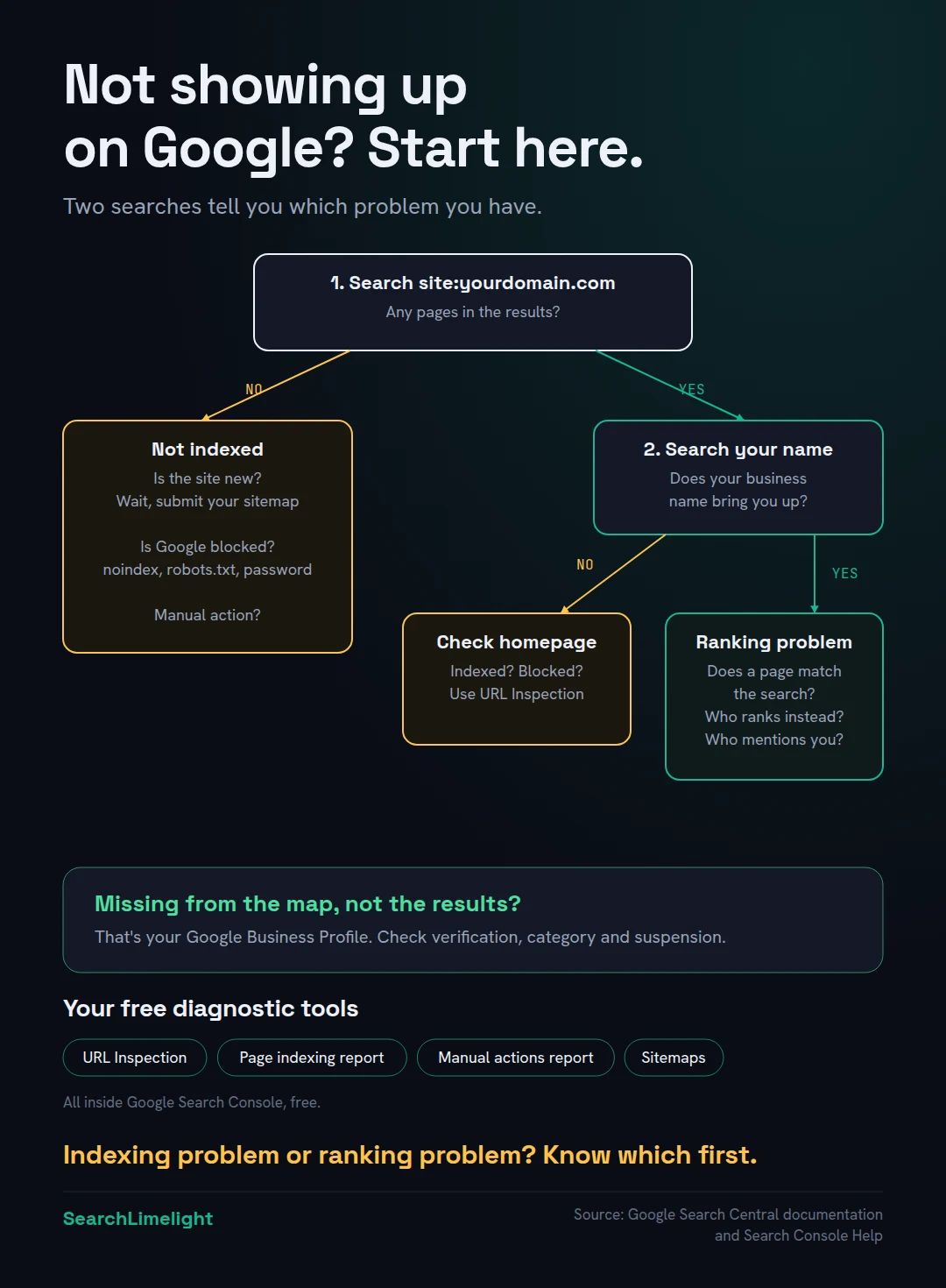
Then try two more searches:
- Search your exact business name. If you don’t appear even for your own name, the problem is almost certainly indexing or a block.
- Search your main service and area, like “physiotherapist Claremont”. If you appear for your name but not for this, it’s a ranking problem.
One more distinction: is it your website that’s missing, or your business on the map? They’re separate systems. If you’re missing from the map with three businesses at the top of local searches, jump to section 7.
2. Is your website new?
If your website is new, or on a new domain, Google may simply not have found it yet. Google says crawling can take anywhere from a few days to a few weeks. You can help by submitting your site in Google Search Console, adding a sitemap, and getting links from other sites.
Google finds new pages mostly by following links and reading sitemaps, which are lists of your pages. A brand new site on a brand new domain has no links pointing to it, so Google may take a while to discover it.
Google’s own documentation says that crawling can take anywhere from a few days to a few weeks. Here’s how to help it along:
- Verify your site in Google Search Console. It’s free.
- Submit your sitemap. Most website builders create one automatically, often at yourdomain.com/sitemap.xml. Add it in Search Console under Sitemaps.
- Request indexing for your homepage. Use the URL Inspection tool at the top of Search Console, paste your homepage address, and select “Request indexing”.
- Get a few links. Add your website to your Google Business Profile, your social pages and your main directory listings. These give Google more paths to find you.
Then give it time. Requesting indexing repeatedly doesn’t speed things up.
3. Is something blocking Google?
The most common block is a “noindex” setting, which tells Google not to include a page. It’s often left on by accident after a website is built. Other blocks include a robots.txt rule, password protection, or a “coming soon” page. Google’s URL Inspection tool shows you which one applies.
This is the cause I find most often on established websites, especially after a redesign. Developers often block Google while building a site, so an unfinished version doesn’t appear in search. Then the site launches and nobody switches the block off.
Check for these common blocks:
- A noindex setting. In WordPress, go to Settings, then Reading, and make sure “Discourage search engines from indexing this site” is not ticked. Other website builders have similar search visibility settings. SEO plugins can also set noindex on individual pages. A noindex tag tells Google not to show the page in search results.
- A robots.txt rule. Visit yourdomain.com/robots.txt. If you see “Disallow: /” under “User-agent: *”, you’re telling all search engines not to crawl your whole site.
- Password protection or a “coming soon” page. If visitors need a password, so does Google.
- Your website builder’s visibility settings. Platforms like Wix and Squarespace have their own settings for hiding a site from search engines. Check they’re switched off.
How to confirm: paste a page address into Search Console’s URL Inspection tool. It tells you whether the page is indexed and, if not, often why, including whether it’s blocked by noindex or robots.txt.
If you find a block, remove it, then request indexing for your key pages.
4. Has Google found your pages but chosen not to include them?
Search Console’s Page indexing report shows every page Google knows about and why some aren’t indexed. “Discovered, currently not indexed” means Google knows the page exists but hasn’t crawled it yet. “Crawled, currently not indexed” means Google looked at it and decided not to include it, often because it’s thin or too similar to other pages.
Google doesn’t promise to index every page. Its own documentation says that even when a page meets all its requirements, indexing and serving isn’t guaranteed.
In Search Console, open the Pages report under Indexing. Scroll to “Why pages aren’t indexed”. The two most common statuses are:
- Discovered, currently not indexed. Google knows the page exists but hasn’t got round to crawling it. This is common on new sites. Linking to the page from your homepage and other pages helps signal that it matters.
- Crawled, currently not indexed. Google visited the page and decided not to include it, at least for now. This usually points to the page itself: too little content, too similar to other pages on your site, or not adding anything useful.
For the second, look honestly at the page. Does it say something useful and specific? Or is it three sentences, or a near-copy of another page with the town name swapped? Improving the content is usually the fix.
Some pages shouldn’t be indexed anyway, like thank-you pages, login pages and duplicate versions of the same page. Don’t worry about those.
5. Is your site on Google, but ranking too low to find?
If your site appears in a site: search but not for your services, Google has indexed you but ranks other pages higher. The usual reasons are that your pages don’t clearly match what people search, stronger competitors, or too little reputation. This is where SEO work comes in, and it takes time.
Most people who say “my website isn’t on Google” actually mean this: it’s there, but on page five, where nobody looks.
Ask yourself these questions:
- Does a page clearly match the search? If people search “emergency electrician Bellville”, do you have a page about emergency electrical work that mentions Bellville? Google can’t rank a page for something it doesn’t cover. A single “Services” page listing ten things is weaker than a page for each.
- Who’s ranking instead of you? Look at the top results. Are they established businesses with lots of reviews and content? That tells you how much work it will take.
- Does anyone else mention you? Links and mentions from other sites help Google trust you. A new site with none will struggle against older, well-known competitors.
How to get your website onto the first page of Google. There’s no trick, but there is an order that works for most small businesses:
- Start with searches you can win. Specific searches, like “emergency electrician Bellville”, are far easier than “electrician Cape Town”.
- Build one strong page for each. Answer what customers want to know near the top: what you do, where, how quickly and roughly what it costs.
- Improve pages already close. Search Console shows pages ranking in positions 5 to 15. They’re closest to page one.
- Earn trust from other sites. Reviews, directory listings, local mentions and links all help.
These are ranking problems, not technical faults, and they take longer to fix. Google’s own estimate for SEO is four months to a year. How long does SEO take to work? explains what’s realistic and what moves first.
6. Could it be a penalty, a hack or a technical fault?
Less often, but it happens. Check Search Console for manual actions and security issues. Also check that your site loads properly, that moving to a new domain didn’t break things, and that old pages redirect to new ones after a redesign.
- Manual actions. If Google’s team finds a site breaking its spam policies, it can take action against it. Search Console’s Manual actions report tells you if this has happened. For most small businesses, it hasn’t.
- Security issues. Hacked sites can be flagged or hidden. Check the Security issues report in Search Console.
- Site errors. If your hosting is unreliable, Google may struggle to reach your pages. Check that your site loads quickly and consistently.
- A redesign or domain change. If your website moved to a new address or had its pages renamed, the old pages need redirects to the new ones. Without them, you lose the trust your old pages had built, and Google may treat your new site as brand new.
If your site suddenly disappeared after doing well, these are the first places to look.
7. Is it your business that’s missing, rather than your website?
If you’re missing from Google Maps or the map with three businesses at the top of local searches, that’s your Google Business Profile, not your website. Check that your profile is verified, has the right category, and isn’t suspended.
Your website and your Business Profile are separate. Your website can rank well while your business is missing from the map, or the other way round.
If your business isn’t showing on the map:
- Check your profile is verified. Unverified profiles may not appear in the map results.
- Check your primary category. It’s the single biggest factor in which searches you appear for.
- Check you’re not suspended. Suspensions often follow rule breaks, like keywords added to your business name or a virtual office address.
- Remember distance. You’ll rarely appear on the map for customers far from your location.
How “near me” search really works in 2026 explains how the map decides, and Google Business Profile mistakes that quietly cost you calls covers the common profile problems.
What to do this week
- Search site: followed by your domain to see whether Google has indexed your site.
- Search your exact business name and your main service with your area.
- Set up Google Search Console if you haven’t, and submit your sitemap.
- Check for blocks: your website’s search visibility setting, your robots.txt file and any password protection.
- Inspect your homepage with the URL Inspection tool.
- Open the Page indexing report and note why any important pages aren’t indexed.
- Check the Manual actions and Security issues reports.
Frequently asked questions
How long does it take for a new website to show up on Google?
Google says crawling can take anywhere from a few days to a few weeks. Submitting your sitemap in Google Search Console and adding your website to your Business Profile and social pages can help Google find it sooner. Showing up for competitive searches takes much longer.
How do I get my website to show up on Google?
Set up Google Search Console, submit your sitemap, and request indexing for your homepage. Make sure nothing is blocking Google, like a noindex setting or robots.txt rule. Then give each service its own clear page and build links and mentions from other sites.
Why is Google not indexing my website?
Common reasons are that your site is new and not yet discovered, a noindex setting or robots.txt rule is blocking it, the site is password protected, or Google crawled your pages but decided they weren’t useful enough to include. The Page indexing report in Search Console shows which applies.
Does paying for Google Ads help my website show up in normal results?
No. Google says it doesn’t accept payment to crawl a site more often or to rank it higher in its organic results. Ads appear separately and are labelled as sponsored. Your organic ranking depends on your website and reputation, not your ad spend.
Why does my website show up for my name but not my services?
Because Google has indexed your site but ranks other pages higher for your services. This usually means your pages don’t clearly match those searches, competitors are stronger, or you have few links and mentions from other sites. Giving each service its own detailed page is a good first step.
Why did my website disappear from Google?
Check for a recent change first. A redesign or new website launch often leaves a noindex setting switched on, or breaks old page addresses without redirects. Also check Search Console for manual actions and security issues, and confirm your site is loading properly.
Why is my business not showing up on Google Maps?
That’s your Google Business Profile, not your website. Check that the profile is verified, has the right primary category and isn’t suspended. Distance matters too: you’ll rarely appear for customers far from your location. Your website can rank well while your profile doesn’t, and the other way round.
Want someone to find the problem for you?
Most “invisible website” problems take minutes to fix once you know where to look. Our free SEO audit checks your indexing, your settings, your rankings and your Business Profile, and tells you exactly what’s wrong.
Book a free discovery call and choose the audit that fits: AI Visibility & GEO, SEO, or Local Business SEO. No pitch until you’ve seen the gap.
Related reading
- How long does SEO take to work? A realistic timeline
- How “near me” search really works in 2026
- Is SEO dead? What the data actually shows in 2026
About the author
Bantu Nonyukela is the founder of SearchLimelight. He has spent ten years in SEO, after starting out as a front-end developer, and is a Toptal-verified SEO expert. From Cape Town, he helps small and medium businesses in South Africa, the US, the UK and Australia get found in search and named by AI. Connect on LinkedIn
Sources
- Google Search Central, “Ask Google to recrawl your URLs”: developers.google.com
- Google Search Central, “Block search indexing with noindex”: developers.google.com
- Google Search Central, “AI features and your website,” on indexing not being guaranteed: developers.google.com
- Search Console Help, “Manual actions report”: support.google.com
- Google Search Central, “Do you need an SEO?”, on payment and rankings: developers.google.com