Key takeaways
- Google Business Profile posts are short updates, offers and events that appear on your profile in Google Search and Maps. Google says they help customers decide to visit you.
- There are three types: updates, offers and events. Each has its own required details, and posts older than six months are archived unless you set a date range.
- Posts are mainly a sales tool, not a ranking tool. Local search experts rank post frequency low as a ranking factor, so post for the customer who is already looking at you.
- Google reviews every post. Unverified phone numbers, content about regulated products and sloppy writing are the usual reasons posts get rejected.
“Our marketing agency says we must post on Google three times a week. Is that true, or are we paying for busywork?”
It’s a fair question. Many owners have been told posting is essential for rankings. The truth: posts rarely move your position much, but they can decide whether the person looking at your profile picks up the phone.
This guide covers what posts are, the types, whether they help your ranking, what to post, how to write one that gets clicks, and the rules that get posts rejected. It ends with a monthly routine you can keep up.
1. What are Google Business Profile posts?
Google Business Profile posts are short updates you publish on your profile to share news, offers and events with customers on Google Search and Maps. Each post can include text, photos or a video, and a button. Google says they help customers decide to visit your business.
Think of posts as the noticeboard on your Google profile. Your name, hours, reviews and photos tell customers who you are. Posts tell them what’s happening now: a new service, a seasonal special, an open day, or a job you finished last week.
According to Google’s help page on posts, customers can find them in three places:
- In the Updates or Overview tabs of your profile on mobile, in Search and Maps.
- In the From the owner section of your profile on a computer.
- As featured posts added directly to your profile on mobile.
Featured posts are newer and limited. Google says they’re currently available in English for single-location food and drink businesses in the US, UK, Canada, Australia and New Zealand. They can pull event, deal and special posts from your Facebook and Instagram as well as from your profile, and they appear where reviews would normally sit on mobile.
You’ll also hear “Google posts” or “Google My Business posts”, the old name. They’re the same thing.
2. Which types of Google Business Profile posts can you create?
Google currently offers three post types. Updates share general news and can include a photo, video and button. Offers promote a deal and need a title and dates. Events promote something happening at your business and need a title and start and end dates.
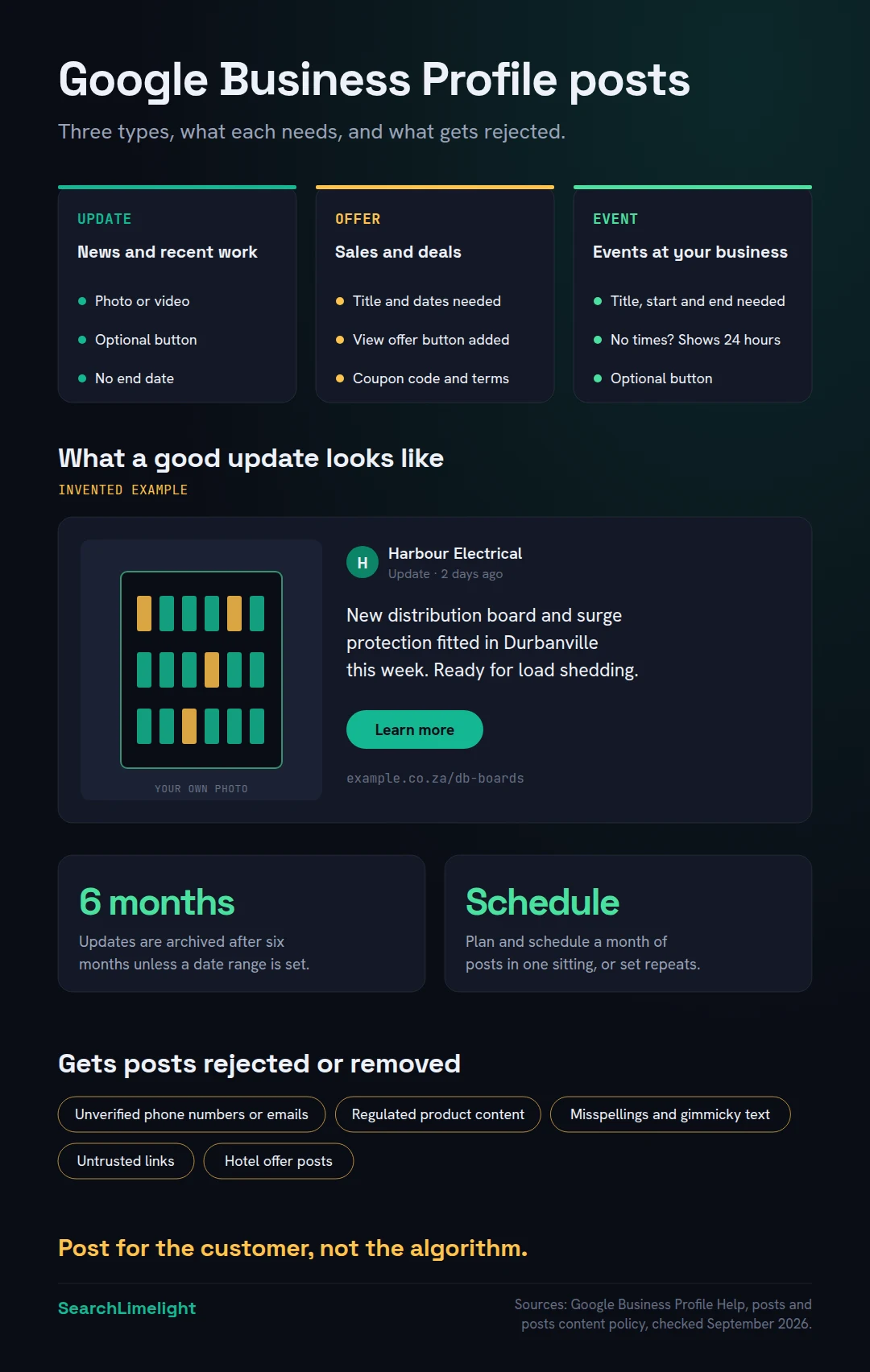
Here’s what each one needs, from Google’s help page.
Updates are the everyday post. You can add a description, a photo or video, and a button with a link. Google says the button should take customers to a page where they can complete the action, like booking, ordering online or learning more.
Offers are for sales and deals. They require a title, dates and times, and Google adds a View offer button automatically. You can also add a description, photo, video, coupon code, link, and terms and conditions.
Events promote something at your business, like a workshop, tasting or open day. They need a title plus start and end dates and times. If you leave out the times, Google shows the event as lasting 24 hours on the event dates.
Two more details worth knowing:
- Posts older than six months are archived, unless you set a date range. Offers and events have dates built in. Updates don’t, so they quietly disappear after six months.
- You can schedule posts and set them to repeat. When you create a post, you can choose a date and time for it to publish, or make it repeat weekly, monthly or on a custom schedule. If you manage several profiles, you can publish one post to more than one location.
If you’ve seen older guides mention “Product” or “COVID-19” posts, those are out of date. Products are managed in their own section of your profile now.
3. Do Google Business Profile posts help your ranking?
Not much, according to local search experts. In Whitespark’s 2026 survey, post frequency ranked 148th of 187 factors for the map pack. Posts work better as a sales tool: they give customers who are already looking at your profile a reason to call you instead of a competitor.
In Whitespark’s 2026 Local Search Ranking Factors survey, 47 local search experts scored 187 factors. For map pack rankings, they placed:
- Frequency of Google posts at 148th.
- Keywords in Google posts at 160th.
- Quantity of Google posts at 168th.
That’s expert opinion, not Google data, but it’s the best independent view available, and it matches what we see. The factors that move rankings are your category, distance, reviews, hours and profile accuracy. Our guide to Google Maps ranking covers those in order.
So why post at all? Because Google’s own explanation is about customers, not rankings. Its help page says that when customers find your latest updates on your profile, it helps them decide to visit your business.
Picture someone comparing three electricians on their phone. All three have good ratings. One has a post from last week showing a finished job in a nearby suburb, with a clear “Book a call-out” button. The other two have nothing newer than 2024. The post doesn’t win the ranking. It wins the call.
There’s one indirect link. The same survey ranked engagement on your profile, like people scrolling, clicking sections and reacting, 33rd for the map pack. Useful posts give people something to engage with. That’s a bonus, not a reason to post daily.
4. What should you post on your Google Business Profile?
Post things a customer comparing you with competitors would find useful: recent work with real photos, seasonal offers, events, new services, answers to common questions and changes to how you operate. If it wouldn’t help someone decide to choose you, skip it.
The best posts answer the question “why you, and why now?” Here are ideas that work for most local businesses, using Harbour Electrical, an invented electrician in Durbanville, as the example.
Recent work (Update). A photo of a finished job with one or two lines about it. “New distribution board and surge protection fitted for a family in Durbanville this week. Load shedding ready.” Real photos of real jobs are the most convincing posts you can make.
A seasonal offer (Offer). Something tied to the time of year. “Free safety check with any geyser installation, 1 to 31 October.” Always include the dates and any terms.
An event (Event). An open day, workshop, launch or community event. A garden centre might run a winter pruning morning. A dentist might host a children’s dental check day.
A new service or product (Update). “We now install EV home chargers.” Link the button to the service page on your website.
An answer to a common question (Update). Take a question customers ask on the phone and answer it in two sentences. “Do you need a certificate of compliance when you sell your house? Yes. Here’s what’s involved.”
A change to how you work (Update). New hours, a new area you cover, a holiday closure, or a new booking system.
Proof and people (Update). An award, a qualification, or a new team member. Keep it short and include a photo.
Avoid motivational quotes, stock photos, and posts that just say “Call us today!”
5. How do you write a Google post that gets clicks?
Lead with the useful part, add one real photo, keep it short, and use one clear button. On offers and events, fill in every date and term. Write for a customer deciding right now, not for a search engine, and never put a phone number in the text.
A few rules that make a big difference:
Put the point first. On most screens, only the start of your post shows before it’s cut off. “Same-day geyser repairs in Durbanville this week” beats “We are delighted to announce that our team is now able to offer…”.
Use your own photo. A clear photo of your work, team or premises does more than any design template. Google’s help page says posts with photos and videos help you connect with customers.
One post, one message. Don’t cram an offer, an event and a new service into one post.
Choose the right button. Match the button to what you want the customer to do: book, order, learn more, or call. For calls, use the Call now button. Google’s policy says it uses your verified profile phone number, which is exactly why you shouldn’t type numbers into the text.
Fill in the details. Google’s own tips say to add a descriptive title, start and end times, and offer details. An offer with no end date or terms looks less trustworthy.
Link to the right page. Send people to the specific service or offer page, not your homepage.
Don’t stuff it. Writing “electrician Durbanville electrician Bellville best electrician” won’t help. Whitespark’s experts listed keyword stuffing in posts as a negative factor, with some suspension risk. They also listed AI-generated text on your profile as a negative factor. Write it yourself, in plain words.
6. What does Google not allow in posts?
Google reviews posts against its content policy. Posts can be rejected or removed for unverified contact details, content about regulated products, misspellings and gimmicky text, untrusted links, offensive or sexual content, and, for hotels, any offers or discounts. Check your post’s status after publishing.
From Google’s posts content policy and its help page, these are the main rules:
- Contact details. Google may remove posts with unverified contact information, including phone numbers, email addresses and social media handles, to prevent fraud. Use the Call now button instead.
- Regulated goods and services. If you’re in a regulated industry, you can post, but not about the products themselves. Google lists adult services, alcohol, tobacco, pharmaceutical products, recreational drugs, health and medical devices, gambling services, fireworks, weapons and financial services.
- Quality. Avoid misspelled words, extra characters, text that adds no value, and auto-generated or distracting content.
- Links. Links to malware, viruses, phishing or pornographic material aren’t allowed.
- Respectful and family-friendly. No offensive language or images, and no sexually suggestive content.
- Hotels. Hotels can post, but can’t create offer posts or mention deals, promotions or discounts.
A regulated business isn’t locked out. A pharmacy can post about extended hours or a flu clinic day. It just can’t promote the regulated product itself.
After you publish, check the status in the Posts section. Google uses three:
- Live: public on Search and Maps.
- Pending: not showing yet, either still processing or because your profile isn’t verified.
- Not approved: not showing. A question mark next to the status tells you which policy the post broke.
If a post isn’t approved, fix the problem and post it again. If none of your posts go live, check your verification first. Our guide to Google Business Profile verification explains what to do.
7. How often should you post, and how do you keep it up?
Google doesn’t set a required frequency. A realistic routine for most small businesses is two to four useful posts a month, planned in one sitting and scheduled ahead. Consistency matters more than volume, and a post that helps a customer beats three that don’t.
You’ll see “post weekly” everywhere, but Google’s help pages don’t require any frequency, and the experts don’t rate frequency highly for rankings. The real risk is the opposite: a profile whose newest post is two years old, which tells customers nobody’s minding the shop.
A routine that works:
- Once a month, spend 30 minutes planning and scheduling the month’s posts.
- Post one recent job with a real photo, every week or two.
- Add one offer or event when you have something genuine to promote.
- Use recurring posts for things that repeat, like a monthly workshop.
- Refresh one evergreen update before it’s archived at six months, such as “what we do and where we work”.
Take the photos as you go. Ask your team to snap every finished job. That one habit solves most “we don’t know what to post” problems.
If you’re also on Apple Maps, Apple Business has a similar feature called showcases, for promotions and updates on your Apple place card. Our guide to getting your business on Apple Maps covers it. Posting the same news on both takes a couple of extra minutes.
Finally, check whether posts are working. Offers have their own metric in your profile’s Performance report, alongside calls, website clicks and bookings. How to read your Google Business Profile performance report explains each number.
What to do this week
- Open your profile’s Posts section and check the date of your newest post.
- Check the status of past posts and fix any that weren’t approved.
- Take photos of three recent jobs, products or your premises.
- Publish one update about recent work, with a photo and a button to the right page.
- Plan one offer or event for next month, with dates and terms.
- Schedule next month’s posts in one 30-minute sitting.
- Remove any phone numbers or emails from post text and use the Call now button.
Frequently asked questions
Are Google Business Profile posts free?
Yes. Posting on your Business Profile costs nothing. You only pay if you choose to run Google Ads, which are separate from posts.
How long do Google Business Profile posts stay up?
Google says posts older than six months are archived unless a date range is set. Offers and events stay live for their dates. Updates without dates drop off after six months, so refresh important ones.
Why was my Google post rejected?
Check the status in your Posts section. A question mark next to “Not approved” shows which policy it broke. Common reasons are a phone number or email in the text, content about regulated products, or low-quality text.
Can I schedule Google Business Profile posts?
Yes. When creating a post, turn on “Schedule this post” and choose a date and time. You can also set a post to repeat weekly, monthly or on a custom schedule.
Should I post the same thing on Facebook and Google?
You can, but adjust it. People on Google are usually closer to buying, so lead with what you offer, where and how to book. Use your own photos and the right button.
Do Google posts help SEO?
Only a little, if at all, for rankings. Local search experts rated post frequency very low as a ranking factor. Posts are more useful for turning profile views into calls, bookings and visits.
Can I post as a service-area business?
Yes. Businesses that visit customers can post in the same way. Photos of recent jobs in the areas you serve work particularly well, as long as you don’t share customers’ private details or addresses.
Want your Google profile to win more calls?
Posts are one part of a profile that turns searches into customers. Our free audit checks your Google profile, your rankings across your area, your website and your AI visibility, and shows you what to fix first.
Book a free discovery call and choose the audit that fits: AI Visibility & GEO, SEO, or Local Business SEO. No pitch until you’ve seen the gap.
Related reading
- 12 Google Business Profile mistakes that quietly cost you calls
- Apple Business Connect is now Apple Business: how to get your business on Apple Maps
- Google Maps ranking: why you’re not in the map pack, and how to fix it
About the author
Bantu Nonyukela is the founder of SearchLimelight. He has spent ten years in SEO, after starting out as a front-end developer, and is a Toptal-verified SEO expert. He helps small and medium businesses in the United States, Australia, the United Kingdom and South Africa get found in search and named by AI. Connect on LinkedIn
Sources
- Google Business Profile Help, Create & manage posts on your Business Profile: support.google.com
- Google Business Profile Help, Business Profile photos, videos & posts content policy: support.google.com
- Google Business Profile Help, Understand your Business Profile performance and insights: support.google.com
- Whitespark, 2026 Local Search Ranking Factors (47 experts, 187 factors, published 6 November 2025): whitespark.ca
- Apple Business, launch announcement, March 2026: apple.com